

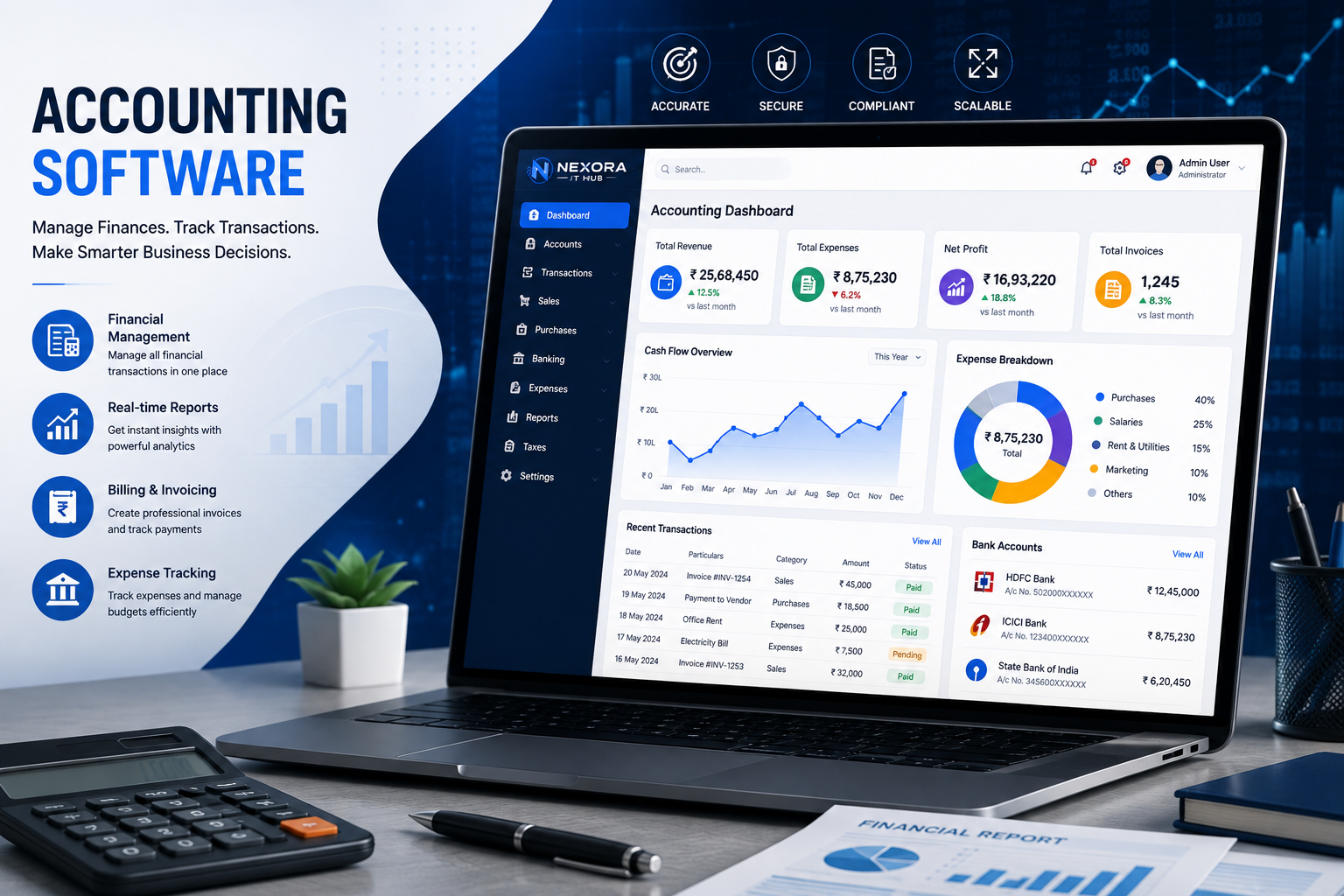
Accounting Software
Smart Accounting Software for Modern Businesses
Managing business finances manually through spreadsheets, registers, and disconnected applications can be time-consuming and difficult. Accounting Software provides a centralized digital platform to manage income, expenses, invoices, payments, customers, suppliers, transactions, and financial reports more efficiently.
Nexora IT Hub Accounting Software is designed to help businesses simplify accounting operations, maintain organized financial records, reduce repetitive data entry, monitor cash flow, and gain better visibility into business finances.
Whether you operate a small business, startup, retail store, wholesale business, service company, agency, distributor, manufacturing company, or multi-branch organization, customized accounting software can help you manage your financial operations from one professional platform.
What is Accounting Software?
Accounting Software is a digital financial management solution that helps businesses record, organize, track, and report financial transactions.
A professional accounting system can manage:
- Income
- Expenses
- Sales
- Purchases
- Invoices
- Payments
- Customers
- Suppliers
- Accounts Receivable
- Accounts Payable
- Cash Flow
- Bank Transactions
- Ledgers
- Financial Reports
- Tax-related records
- Business Expenses
Instead of maintaining separate spreadsheets and paper records, businesses can manage their accounting information through a centralized system.
Benefits of Accounting Software
1. Centralized Financial Management
Accounting software allows businesses to manage important financial information from one platform.
Users can maintain:
- Customer accounts
- Supplier accounts
- Sales transactions
- Purchase transactions
- Expenses
- Payments
- Receivables
- Payables
- Financial reports
Centralized financial data makes accounting information easier to organize and access.
2. Reduce Manual Accounting Work
Manual accounting requires repetitive data entry and calculations.
Accounting software can automate many routine activities such as:
- Invoice calculations
- Payment records
- Outstanding balance updates
- Expense tracking
- Ledger updates
- Financial summaries
- Report generation
Automation can save valuable time and reduce avoidable data-entry errors.
3. Better Income & Expense Tracking
Businesses need to understand where their money is coming from and where it is being spent.
Accounting software can help track:
- Business income
- Operating expenses
- Purchase expenses
- Employee-related expenses
- Office expenses
- Marketing expenses
- Transportation expenses
- Other business costs
Management can review categorized financial information through dashboards and reports.
4. Professional Invoice Management
Businesses can create and manage professional invoices from the accounting platform.
Invoice features may include:
- Invoice creation
- Customer selection
- Product/service selection
- Quantity
- Pricing
- Discounts
- Taxes
- Payment status
- Invoice history
- Invoice printing
- PDF generation
This creates a more organized invoicing process.
5. Manage Customer Payments
Accounting software can help businesses track payments received from customers.
Users can monitor:
- Paid invoices
- Unpaid invoices
- Partial payments
- Outstanding balances
- Payment dates
- Customer transaction history
This helps businesses maintain better control over receivables.
6. Manage Supplier Payments
Businesses can also track amounts payable to suppliers.
The system can maintain:
- Supplier invoices
- Purchase records
- Payments
- Outstanding balances
- Payment history
- Supplier statements
This helps organizations maintain organized supplier accounts.
7. Real-Time Financial Visibility
A professional accounting dashboard can provide a quick overview of business finances.
Depending on the configured modules, users may see:
- Total Sales
- Total Purchases
- Total Income
- Total Expenses
- Receivables
- Payables
- Cash Balance
- Outstanding Invoices
- Recent Transactions
Real-time information can help management monitor financial activity more effectively.
Accounting Software Features
1. Accounting Dashboard
The dashboard provides a centralized overview of important financial activities.
It can display:
- Total income
- Total expenses
- Sales
- Purchases
- Receivables
- Payables
- Cash flow
- Outstanding invoices
- Recent transactions
- Financial summaries
A clean dashboard helps business owners quickly understand their current financial position.
2. Customer Management
Accounting software can maintain complete customer accounts.
Customer profiles may include:
- Customer name
- Contact information
- Address
- Customer type
- Invoice history
- Payment history
- Outstanding balance
- Transaction history
- Notes
This provides a centralized record of customer-related financial activities.
3. Supplier Management
The supplier module allows businesses to maintain supplier information and financial transactions.
It can manage:
- Supplier profiles
- Contact details
- Purchase history
- Supplier invoices
- Payments
- Outstanding amounts
- Transaction history
4. Sales Management
Businesses can record and monitor sales transactions.
Sales management can include:
- Sales entries
- Sales invoices
- Customer details
- Product/service details
- Discounts
- Taxes
- Payment status
- Sales returns
- Sales reports
5. Purchase Management
Purchase management helps organizations record business purchases and supplier transactions.
Features may include:
- Purchase entries
- Purchase invoices
- Supplier details
- Product details
- Discounts
- Taxes
- Purchase returns
- Payment status
- Purchase reports
6. Expense Management
Businesses can categorize and monitor expenses through the accounting platform.
Expense categories can include:
- Office expenses
- Rent
- Utilities
- Marketing
- Travel
- Transportation
- Employee expenses
- Maintenance
- Miscellaneous expenses
Management can generate expense reports for selected periods.
7. Payment Management
The payment module helps businesses maintain records of money received and payments made.
Possible features include:
- Customer payments
- Supplier payments
- Expense payments
- Payment methods
- Payment references
- Payment dates
- Partial payments
- Payment history
8. Accounts Receivable
Accounts receivable management helps businesses monitor money owed by customers.
The system can track:
- Outstanding invoices
- Due amounts
- Partial payments
- Payment dates
- Customer balances
- Receivable aging
This can help businesses follow up on pending payments.
9. Accounts Payable
Accounts payable functionality helps businesses monitor money owed to suppliers and other parties.
Users can track:
- Supplier invoices
- Outstanding amounts
- Due dates
- Payments
- Supplier balances
- Payment history
Invoice & Billing Management
A professional accounting system can include a complete invoice and billing module.
Businesses can create invoices with:
- Company details
- Customer details
- Products/services
- Quantity
- Price
- Discount
- Applicable taxes
- Total amount
- Payment status
- Terms & conditions
Invoices can be generated in professional formats and printed or shared digitally according to the system's capabilities.
GST Billing & Tax Management
For businesses that require GST-related billing functionality, accounting software can be configured to support applicable GST invoice fields and calculations.
Depending on the business requirements, the system can support:
- GST-enabled invoices
- Tax rates
- Taxable amounts
- Tax calculations
- Customer GST details
- Supplier GST details
- Tax summaries
- GST-related reports
Note: Tax calculations, filings, and statutory compliance should be configured according to current applicable rules and the business's accounting requirements.
Ledger Management
Ledger management helps businesses maintain transaction records for individual accounts.
A ledger can provide information such as:
- Opening balance
- Transactions
- Debit
- Credit
- Payments
- Receipts
- Closing balance
This makes it easier to review account-level financial activity.
Cash Flow Management
Cash flow visibility is important for every business.
Accounting software can help monitor:
- Cash received
- Cash payments
- Customer collections
- Supplier payments
- Business expenses
- Available cash
- Cash transaction history
This can help management understand how money moves through the business.
Bank Transaction Management
Businesses can maintain records of relevant bank transactions.
Features may include:
- Bank accounts
- Deposits
- Withdrawals
- Transfers
- Bank payments
- Transaction history
- Bank balances
Where technically supported, bank-related integrations can also be considered based on project requirements.
Financial Reports
Accounting reports provide important insights into business financial activity.
A customized accounting system can include:
Sales Reports
- Daily sales
- Monthly sales
- Product-wise sales
- Customer-wise sales
- Salesperson-wise sales
Purchase Reports
- Daily purchases
- Monthly purchases
- Supplier-wise purchases
- Product-wise purchases
Expense Reports
- Category-wise expenses
- Daily expenses
- Monthly expenses
- Department-wise expenses
Payment Reports
- Customer payments
- Supplier payments
- Pending payments
- Payment history
Financial Reports
Depending on the accounting scope, reports can include:
- Profit & Loss
- Balance Sheet
- Trial Balance
- Cash Flow
- Ledger
- Receivables
- Payables
Report availability depends on the accounting modules and configuration implemented in the software.
Multi-Branch Accounting Software
Businesses operating multiple branches can use centralized accounting software to manage financial information across locations.
The system can support:
- Multiple branches
- Branch-wise sales
- Branch-wise purchases
- Branch-wise expenses
- Branch-wise payments
- Branch-wise reports
- Centralized management
Role-based access can be configured so branch users only access the information relevant to their responsibilities.
Role-Based User Management
Financial data is sensitive, so user access should be carefully controlled.
Accounting software can provide different user roles.
Super Admin
Full system access.
Accountant
Manage accounting transactions, invoices, payments, ledgers, and reports according to assigned permissions.
Sales Executive
Access sales-related functions and customer information.
Purchase Manager
Manage purchase-related activities and supplier information.
Branch Manager
Access branch-level financial information and reports.
Employee
Access only permitted modules and information.
Role-based access helps businesses maintain better internal control.
Accounting Software Automation
Automation can improve the efficiency of accounting operations.
Depending on the configuration, the system can automate:
- Invoice calculations
- Tax calculations
- Payment status updates
- Outstanding balance calculations
- Recurring invoices
- Payment reminders
- Report generation
- Financial summaries
- Notifications
This reduces repetitive accounting tasks and improves workflow efficiency.
Mobile-Friendly Accounting Software
Modern business owners may need to check financial information while away from the office.
A responsive accounting system can be designed for:
- Desktop
- Laptop
- Tablet
- Smartphone
Authorized users can access selected financial information through a mobile-friendly interface.
A dedicated Android or iOS accounting application can also be developed when required.
Cloud-Based Accounting Software
Cloud-based accounting software can allow authorized users to access business financial information through the internet.
Potential advantages include:
- Remote access
- Centralized data
- Multi-user access
- Automatic updates
- Centralized backups
- Multi-location management
Cloud deployment should be designed with appropriate security, authentication, backup, and access controls.
Customized Accounting Software Development
Every business has different accounting workflows. A customized accounting system can therefore be developed according to specific requirements.
Nexora IT Hub can develop accounting software with customized:
- Dashboard
- Invoice formats
- Customer management
- Supplier management
- Sales management
- Purchase management
- Expense management
- Payment management
- GST billing
- Ledger management
- Financial reports
- User roles
- Multi-branch management
- Notifications
- API integrations
This allows businesses to create an accounting platform that matches their actual operational requirements.
Accounting Software for Different Businesses
Retail Business
Manage sales, purchases, customers, suppliers, expenses, payments, invoices, and business reports.
Wholesale Business
Manage bulk sales, purchase transactions, suppliers, customer accounts, invoices, payments, and outstanding balances.
Service Business
Manage service invoices, customer accounts, expenses, payments, and financial reports.
Manufacturing Business
Integrate accounting with purchases, production, inventory, suppliers, customers, and business expenses.
Agency Business
Manage clients, invoices, project-related expenses, payments, receivables, and business financial reports.
E-commerce Business
Manage customer transactions, sales, payments, refunds, expenses, and financial reporting.
Why Choose Nexora IT Hub for Accounting Software?
Nexora IT Hub provides customized business software solutions designed around practical business requirements.
Customized Accounting Solution
Build an accounting system based on your business model and financial workflow.
Professional UI/UX
A clean and user-friendly interface makes financial management easier for authorized users.
Scalable System
The software can be designed to support increasing transactions, users, products, customers, suppliers, and branches.
Secure Access
Role-based access and authentication can help protect sensitive financial information.
Powerful Reports
Customized dashboards and reports provide better visibility into business finances.
Integration Ready
The system can be designed to integrate with compatible APIs, payment systems, ERP modules, inventory systems, CRM platforms, or other business applications where required.
Ongoing Support
Technical maintenance and support can help ensure the accounting platform continues to meet changing business requirements.
Advantages of Accounting Software
A professional accounting solution can help businesses:
- Reduce manual accounting work
- Organize financial records
- Track income and expenses
- Manage invoices efficiently
- Monitor customer payments
- Track supplier payments
- Manage receivables
- Manage payables
- Improve cash flow visibility
- Generate financial reports
- Improve financial data organization
- Manage multiple branches
- Automate repetitive accounting activities
- Improve business decision-making
Frequently Asked Questions
What is Accounting Software?
Accounting Software is a digital platform that helps businesses manage financial transactions, invoices, income, expenses, payments, customers, suppliers, ledgers, and financial reports.
Who can use Accounting Software?
Accounting software can be used by startups, retailers, wholesalers, agencies, service providers, distributors, manufacturers, e-commerce businesses, and other organizations.
Can Accounting Software be customized?
Yes. Customized accounting software can be developed according to the company's financial workflow, invoice format, reports, user roles, branches, and integration requirements.
Can Accounting Software manage GST billing?
Yes. GST billing functionality can be incorporated according to the business's requirements and applicable tax rules.
Can Accounting Software manage multiple branches?
Yes. Multi-branch accounting functionality can be developed to manage branch-level transactions and centralized financial reporting.
Can Accounting Software be integrated with ERP or CRM?
Yes. Accounting software can be integrated with ERP, CRM, inventory, e-commerce, payment, or other systems through suitable APIs and technical integrations.
Can Accounting Software be accessed from mobile?
Yes. A responsive web-based accounting system can be designed for mobile devices, and dedicated mobile applications can also be developed when required.
Grow Your Business with Smart Accounting Software
Efficient financial management is essential for sustainable business growth. A professional Accounting Software solution can help businesses organize financial records, manage invoices and payments, track income and expenses, monitor receivables and payables, and generate useful financial reports from one centralized platform.
Whether you need Business Accounting Software, GST Billing Software, Online Accounting Software, Cloud Accounting Software, Invoice & Billing Software, Multi-Branch Accounting Software, or a fully Customized Accounting Solution, Nexora IT Hub can develop a professional platform according to your business requirements.
With the right accounting technology, businesses can reduce repetitive work, improve financial visibility, organize transactions, and build a more efficient digital accounting workflow.
Build a Smarter Financial Management System with Nexora IT Hub
Choose a professional Accounting Software solution designed for your business.
Nexora IT Hub – Professional Accounting & Business Software Development Solutions.
📞 8967980910
🌐 www.nexoraithub.com