

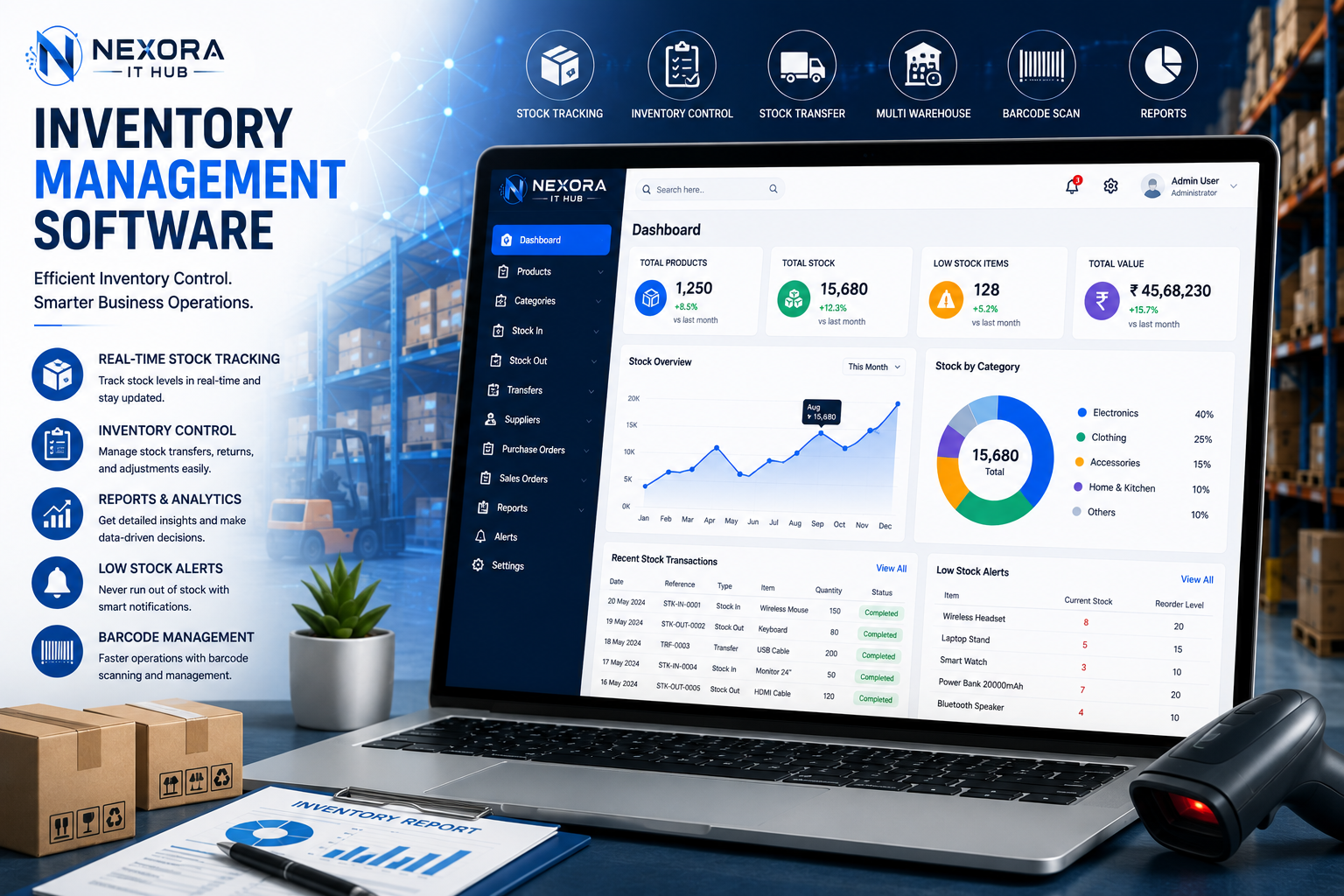
Inventory Management Software
Smart Inventory Management Software for Modern Businesses
Managing products, stock levels, purchases, sales, warehouses, suppliers, and stock movements manually can become difficult as a business grows. Inventory Management Software helps businesses digitally organize their complete inventory operations, monitor stock in real time, reduce stock-related errors, and improve overall operational efficiency.
Nexora IT Hub Inventory Management Software is a professional and customizable inventory solution designed to help businesses manage products, stock, warehouses, purchases, sales, suppliers, customers, and inventory reports from one centralized platform.
Whether you operate a retail store, wholesale business, distributor, supermarket, pharmacy, electronics shop, manufacturing company, e-commerce business, restaurant, or multi-branch organization, a customized inventory management system can help you maintain better control over your stock and business operations.
What is Inventory Management Software?
Inventory Management Software is a digital system that helps businesses track, organize, and manage products and stock throughout their business operations.
A professional inventory system can manage:
- Products
- Categories
- Stock
- Warehouses
- Purchases
- Sales
- Suppliers
- Customers
- Stock Transfers
- Stock Adjustments
- Returns
- Low Stock
- Product Variations
- Barcode
- Batch & Expiry
- Inventory Reports
Instead of maintaining inventory records through spreadsheets or manual registers, businesses can manage their stock through a centralized and structured system.
Benefits of Inventory Management Software
1. Real-Time Stock Management
One of the biggest benefits of inventory management software is improved visibility into stock levels.
Businesses can monitor:
- Available stock
- Sold stock
- Purchased stock
- Reserved stock
- Damaged stock
- Low-stock products
- Warehouse stock
- Stock movement
This helps businesses understand their inventory position more accurately.
2. Reduce Stock Management Errors
Manual inventory management can result in errors related to:
- Product quantities
- Stock updates
- Sales entries
- Purchase entries
- Stock transfers
- Returns
- Pricing
Inventory software can automatically update stock based on configured transactions, helping reduce repetitive manual data entry.
3. Prevent Overstocking & Stockouts
Maintaining the right inventory level is important for business efficiency.
Inventory software can provide low-stock alerts and stock-level information so businesses can identify products that require replenishment.
This can help reduce:
- Unnecessary overstock
- Product shortages
- Missed sales
- Excess inventory holding
4. Faster Inventory Operations
Employees can search products, check stock, create purchases, record sales, and update inventory from one system.
This can make daily inventory operations faster and more organized.
5. Better Purchase Planning
Inventory data can help businesses understand which products need replenishment.
Management can review:
- Current stock
- Previous sales
- Purchase history
- Low-stock products
- Fast-moving products
- Slow-moving products
This can support better purchasing decisions.
6. Centralized Warehouse Management
Businesses with multiple warehouses can manage inventory from a centralized system.
Users can track:
- Warehouse stock
- Stock transfers
- Incoming stock
- Outgoing stock
- Warehouse-wise inventory
- Product availability
This provides better visibility across locations.
Inventory Management Software Features
1. Inventory Dashboard
A professional inventory dashboard provides an overview of stock and business activity.
Dashboard information can include:
- Total Products
- Total Stock
- Low Stock
- Out-of-Stock Products
- Total Warehouses
- Recent Purchases
- Recent Sales
- Stock Transfers
- Fast-Moving Products
- Inventory Value
Charts and reports can make inventory information easier to understand.
2. Product Management
The product management module allows businesses to maintain a centralized product catalog.
Product information can include:
- Product Name
- Product Code
- SKU
- Barcode
- Category
- Brand
- Unit
- Purchase Price
- Selling Price
- Tax
- Stock Quantity
- Product Image
- Description
- Supplier
Businesses can customize product fields according to their requirements.
3. Product Category Management
Products can be organized into different categories.
For example:
- Electronics
- Clothing
- Grocery
- Cosmetics
- Pharmacy
- Furniture
- Stationery
- Hardware
Category-based organization makes product searching and reporting easier.
4. Stock Management
The stock management module provides control over product quantities.
Users can monitor:
- Opening stock
- Available stock
- Incoming stock
- Outgoing stock
- Damaged stock
- Returned stock
- Adjusted stock
Stock changes can be recorded through authorized transactions.
5. Warehouse Management
Businesses can manage multiple warehouses through one inventory platform.
Warehouse features may include:
- Warehouse creation
- Warehouse manager
- Warehouse address
- Stock overview
- Product availability
- Stock transfers
- Warehouse reports
This is especially useful for distributors, wholesalers, manufacturers, and multi-location businesses.
6. Multi-Warehouse Inventory
Multi-warehouse functionality allows businesses to maintain stock separately across different locations.
For example:
Main Warehouse → Kolkata Warehouse → Siliguri Warehouse → Branch Store
Management can view warehouse-wise stock and transfer products between locations according to business requirements.
7. Purchase Management
Inventory software can connect purchases with stock management.
Purchase features may include:
- Purchase orders
- Purchase invoices
- Supplier selection
- Product selection
- Quantity
- Purchase price
- Tax
- Discount
- Payment status
- Purchase history
Once a purchase is received, stock can be updated according to the configured workflow.
8. Sales & Stock Deduction
Inventory management can be integrated with sales or billing.
When a product is sold, the system can update the available stock based on the configured sales workflow.
This helps keep inventory information synchronized with business transactions.
9. Supplier Management
Businesses can maintain supplier information in one centralized platform.
Supplier records can include:
- Supplier name
- Contact information
- Address
- Products supplied
- Purchase history
- Payment information
- Outstanding balance
This makes supplier management more organized.
10. Customer Management
Inventory software can also maintain customer information when integrated with sales or CRM functionality.
Customer records may include:
- Customer name
- Phone
- Address
- Purchase history
- Invoice history
- Payment status
Stock Transfer Management
Businesses with multiple warehouses or branches often need to transfer products between locations.
Inventory software can manage:
Warehouse A → Warehouse B
Transfer records may include:
- Source warehouse
- Destination warehouse
- Product
- Quantity
- Transfer date
- Transfer status
- Authorized user
- Notes
This provides a clear history of stock movement.
Stock Adjustment
Sometimes physical stock and system stock may differ due to:
- Damaged products
- Lost items
- Expired products
- Counting differences
- Manual corrections
Authorized users can record stock adjustments with appropriate reasons and maintain an adjustment history.
Low Stock Alerts
Low-stock notifications can help businesses identify products that are approaching their minimum stock level.
The system can display:
- Product name
- Current quantity
- Minimum stock level
- Recommended action
Notifications can be configured according to business requirements.
Out-of-Stock Management
The system can identify products that have reached zero available stock.
Businesses can use out-of-stock reports to prioritize replenishment and reduce potential lost sales.
Barcode Management
Barcode functionality can make product identification and billing faster.
Depending on the hardware and software requirements, inventory software can support:
- Barcode generation
- Barcode scanning
- Product lookup
- SKU mapping
- Fast stock updates
- POS integration
Barcode support is particularly useful for retail stores, supermarkets, warehouses, and distributors.
Batch & Expiry Management
For businesses dealing with products that have batch numbers or expiry dates, the inventory system can be configured to track:
- Batch number
- Manufacturing date
- Expiry date
- Quantity
- Supplier
- Purchase date
This can be particularly useful for pharmacies, food businesses, cosmetics, and other applicable industries.
Serial Number Management
Businesses selling products with unique serial numbers can maintain product-level tracking.
Examples include:
- Smartphones
- Laptops
- Electronics
- Appliances
- Equipment
The system can track serial numbers during purchase, stock movement, and sales according to the configured workflow.
Inventory Reports & Analytics
Inventory reports help management understand stock performance.
Stock Reports
- Current Stock
- Low Stock
- Out-of-Stock
- Warehouse Stock
- Category-Wise Stock
- Product-Wise Stock
Purchase Reports
- Purchase Summary
- Supplier-Wise Purchase
- Product-Wise Purchase
- Purchase History
Sales Reports
- Product-Wise Sales
- Customer-Wise Sales
- Daily Sales
- Monthly Sales
- Fast-Moving Products
Stock Movement Reports
- Stock In
- Stock Out
- Stock Transfer
- Stock Adjustment
- Return
Fast-Moving & Slow-Moving Product Analysis
Understanding product movement helps businesses optimize inventory.
The system can identify:
Fast-Moving Products
Products that are sold frequently and may require regular replenishment.
Slow-Moving Products
Products that remain in stock for longer periods.
This information can support purchasing, pricing, promotion, and inventory planning decisions.
Inventory Valuation
Depending on the accounting and inventory configuration, the system can provide inventory valuation information.
Businesses may be able to analyze:
- Product quantity
- Purchase value
- Selling value
- Stock value
- Warehouse-wise stock value
The valuation method should be configured according to the organization's accounting requirements.
Purchase Order Management
Inventory software can include purchase order functionality.
A purchase order can contain:
- Supplier
- Product
- Quantity
- Price
- Expected delivery
- Tax
- Discount
- Order status
This helps businesses organize their procurement workflow.
Goods Receiving Management
When purchased products arrive, authorized employees can record the received quantity.
The system can track:
- Purchase order
- Received quantity
- Pending quantity
- Damaged quantity
- Supplier
- Receiving date
Stock can then be updated according to the configured receiving workflow.
Sales Return Management
Businesses can record products returned by customers.
The system can manage:
- Customer
- Invoice
- Returned product
- Quantity
- Return reason
- Return date
- Stock update
This maintains a clear record of returned products.
Purchase Return Management
Businesses can also record products returned to suppliers.
The system can track:
- Supplier
- Purchase invoice
- Product
- Quantity
- Return reason
- Return date
- Stock adjustment
POS Integration
Inventory Management Software can be integrated with POS Billing Software for retail businesses.
The workflow can be:
Product → POS Billing → Sale → Stock Deduction → Sales Report
This helps keep billing and inventory information synchronized.
GST Billing Integration
Inventory can also be integrated with GST billing functionality.
For example:
Product → Inventory → Sales → GST Invoice → Payment
Product information such as price, tax configuration, SKU, and HSN where applicable can be used during billing according to the implemented system.
Accounting Integration
Inventory management can be connected with accounting software to create a more complete business management ecosystem.
For example:
Purchase → Inventory Update → Supplier Account
and
Sales → Stock Deduction → Customer Account → Payment
This can reduce duplicate data entry and improve business data consistency.
CRM Integration
Inventory systems can also work with CRM platforms.
A connected business workflow can be:
Lead → Customer → Quotation → Sales → Inventory → Invoice → Payment
This provides businesses with a more integrated sales and inventory process.
Multi-User Inventory Management
Different employees can access different inventory modules according to their responsibilities.
Admin
Complete inventory management.
Warehouse Manager
Warehouse and stock management.
Purchase Manager
Purchase orders and supplier management.
Sales Executive
Sales and customer-related inventory activities.
Store Manager
Store-level inventory management.
Accountant
Financial and transaction-related access.
Role-based permissions can help maintain better control over inventory operations.
Mobile-Friendly Inventory Software
Modern businesses often need inventory information while working outside the warehouse or office.
A responsive inventory system can be designed for:
- Desktop
- Laptop
- Tablet
- Smartphone
Employees can access authorized inventory features from supported devices.
A dedicated mobile application can also be developed when required.
Cloud-Based Inventory Management Software
Cloud-based inventory software can allow authorized users to access stock information from different locations.
Potential benefits include:
- Remote access
- Centralized data
- Multi-user access
- Multi-branch management
- Centralized backup
- Easier system updates
Cloud infrastructure should include suitable security and access controls.
Inventory Automation
Automation can improve daily inventory operations.
Depending on the business workflow, the system can automate:
- Stock updates
- Low-stock alerts
- Purchase notifications
- Stock transfer records
- Sales-based stock deduction
- Barcode lookup
- Inventory reports
- Product notifications
- Reorder alerts
This can reduce repetitive manual inventory work.
Inventory Management Software for Different Industries
Retail Stores
Manage products, stock, POS billing, purchases, sales, suppliers, customers, and low-stock alerts.
Wholesale Businesses
Manage bulk products, warehouses, suppliers, customers, purchases, sales, and stock transfers.
Supermarkets
Manage large product catalogs, barcode scanning, fast billing, inventory, stock levels, and product movement.
Pharmacies
Manage products, batches, expiry dates, suppliers, purchases, sales, and inventory records according to applicable requirements.
Electronics Stores
Manage products, serial numbers, stock, suppliers, sales, warranty-related information, and customer records.
Manufacturing Companies
Manage raw materials, finished goods, warehouses, stock movement, purchases, production-related inventory, and reports.
E-commerce Businesses
Manage products, inventory, orders, sales, returns, warehouses, and stock synchronization.
Restaurants
Manage ingredients, inventory consumption, purchases, suppliers, and stock levels.
Customized Inventory Management Software Development
Every business has different inventory processes. A customized inventory system can be developed around your specific workflow.
Nexora IT Hub can develop inventory solutions with customized:
- Product Management
- Category Management
- Warehouse Management
- Stock Management
- Purchase Management
- Sales Management
- Supplier Management
- Customer Management
- Stock Transfer
- Stock Adjustment
- Barcode
- Batch & Expiry
- Serial Number
- Low Stock Alerts
- Inventory Reports
- POS Integration
- GST Billing Integration
- Accounting Integration
- CRM Integration
- Multi-Branch Management
- Mobile Application
- API Integration
The system can also be expanded with additional modules as the business grows.
Why Choose Nexora IT Hub for Inventory Software?
Nexora IT Hub provides customized software development solutions designed around real business requirements.
Customized Inventory Solution
Build an inventory system based on your products, warehouses, purchasing process, sales workflow, and reporting needs.
Professional UI/UX
A clean interface makes it easier for employees to search products, update stock, and manage inventory activities.
Scalable System
The platform can be designed to support growing products, transactions, warehouses, users, and branches.
Secure Access
Role-based access and authentication can help protect inventory and business information.
Powerful Reports
Generate customized inventory, sales, purchase, stock movement, and product performance reports.
Integration Ready
The system can be designed to integrate with POS, GST billing, accounting, CRM, e-commerce platforms, barcode devices, and other compatible systems.
Ongoing Support
Technical support and maintenance can help keep the inventory platform aligned with evolving business requirements.
Advantages of Inventory Management Software
A professional inventory solution can help businesses:
- Track stock in real time
- Reduce manual inventory work
- Minimize stock errors
- Prevent stockouts
- Reduce unnecessary overstock
- Improve purchase planning
- Manage multiple warehouses
- Track stock movements
- Manage product returns
- Monitor fast-moving products
- Identify slow-moving products
- Improve sales and purchase visibility
- Automate stock updates
- Generate inventory reports
- Improve operational efficiency
Frequently Asked Questions
What is Inventory Management Software?
Inventory Management Software is a digital platform used to manage products, stock, purchases, sales, warehouses, suppliers, stock movements, and inventory reports.
Who needs Inventory Management Software?
Retailers, wholesalers, distributors, manufacturers, supermarkets, pharmacies, e-commerce businesses, restaurants, electronics stores, and other product-based businesses can benefit from inventory software.
Can inventory software manage multiple warehouses?
Yes. Multi-warehouse functionality can be developed to manage stock across multiple warehouses and locations.
Can inventory software integrate with POS?
Yes. Inventory software can be integrated with POS billing so sales transactions can update inventory according to the configured workflow.
Can inventory software support barcode scanning?
Yes. Barcode generation and scanning functionality can be implemented depending on the required hardware and technical setup.
Can inventory software manage expiry dates?
Yes. Batch and expiry management can be included for businesses that need to track product expiry information.
Can inventory software integrate with accounting software?
Yes. Inventory can be integrated with accounting, GST billing, CRM, and other business systems through suitable integrations.
Can inventory software be customized?
Yes. A customized inventory management system can be designed according to your products, warehouses, business workflow, users, reports, and integration requirements.
Grow Your Business with Smart Inventory Management Software
Effective inventory management is essential for controlling costs, maintaining product availability, and improving business operations. A professional Inventory Management Software solution can help businesses track stock, manage warehouses, organize purchases and sales, monitor product movement, reduce manual work, and generate valuable inventory reports.
Whether you need Inventory Management Software, Stock Management Software, Warehouse Management Software, Retail Inventory Software, Wholesale Inventory Software, Barcode Inventory Software, Multi-Warehouse Inventory Software, or a fully Customized Inventory Management System, Nexora IT Hub can develop a professional solution based on your business requirements.
With the right inventory technology, businesses can gain better control over stock, improve purchasing decisions, reduce inventory-related errors, and build a more efficient digital business workflow.
Build a Smarter Inventory System with Nexora IT Hub
Choose a professional Inventory Management Software solution designed around your business.
Nexora IT Hub – Professional Inventory & Business Software Development Solutions.
📞 8967980910
🌐 www.nexoraithub.com