

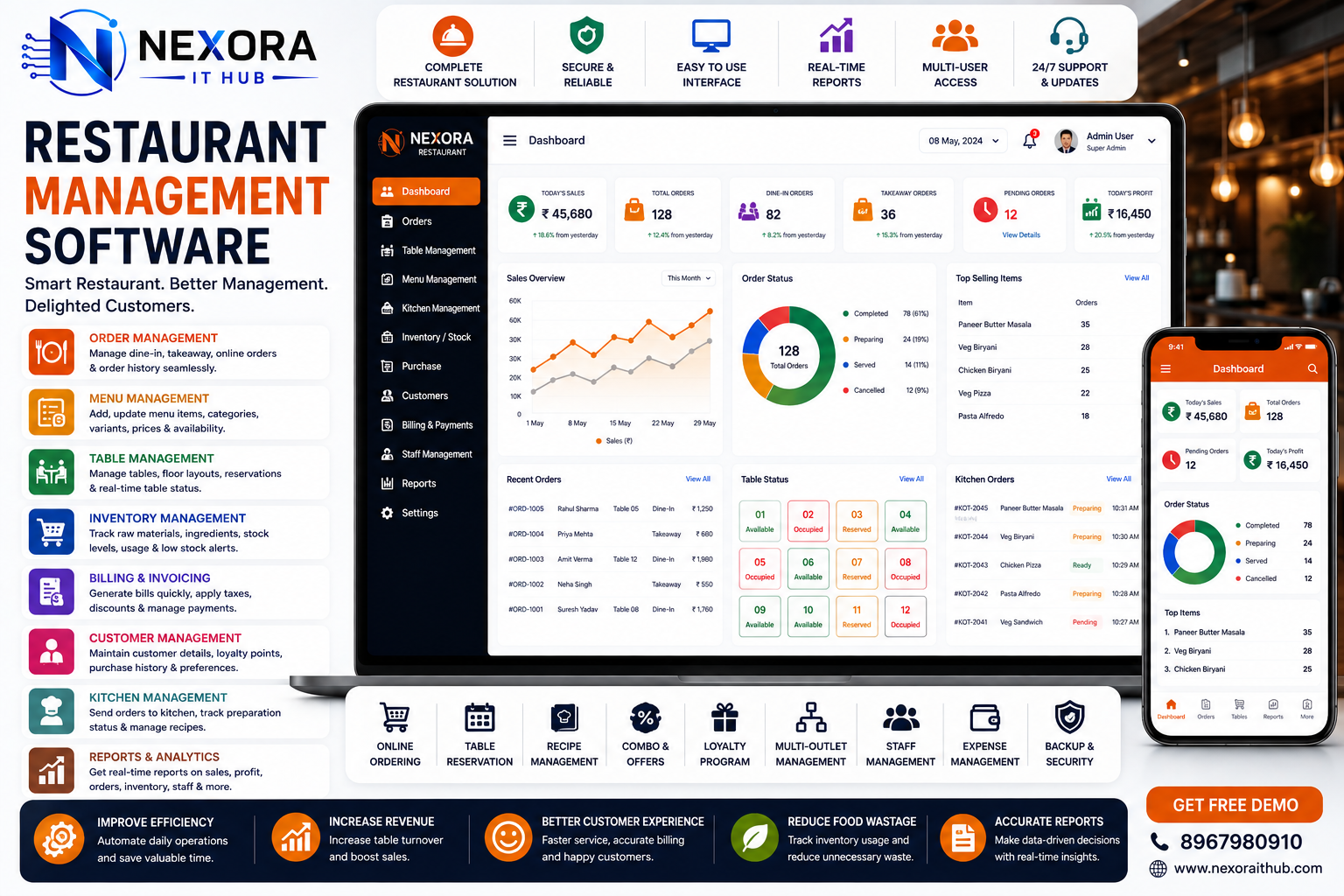
Restaurant Management Software
Restaurant Management Software
Running a successful restaurant requires efficient management of orders, tables, menus, kitchen operations, billing, payments, inventory, staff, customers, suppliers, and daily sales. When these activities are managed manually, restaurants can face delays, billing errors, stock problems, communication gaps, and difficulty tracking business performance.
Nexora IT Hub Restaurant Management Software is a professional and customizable solution designed to bring essential restaurant operations into one centralized platform. It can help restaurants manage dine-in orders, takeaway orders, table reservations, POS billing, kitchen operations, inventory, staff, customers, suppliers, and business reports more efficiently.
Whether you operate a small restaurant, café, fast-food outlet, cloud kitchen, food court, bakery, bar & restaurant, fine-dining restaurant, or multi-branch restaurant business, the software can be customized according to your operational requirements.
What is Restaurant Management Software?
Restaurant Management Software is a digital platform that helps restaurants manage their daily business operations from a centralized system.
A professional restaurant management solution can combine:
- Restaurant POS
- Table Management
- Order Management
- Menu Management
- Kitchen Management
- Billing & Invoicing
- Payment Management
- Inventory Management
- Purchase Management
- Supplier Management
- Customer Management
- Staff Management
- Online Orders
- Delivery Management
- Reservation Management
- Reports & Analytics
- Multi-Branch Management
By connecting these operations, restaurant owners and managers can gain better visibility over sales, orders, inventory, staff activities, and overall business performance.
Benefits of Restaurant Management Software
1. Centralized Restaurant Management
One of the biggest benefits of restaurant management software is the ability to manage multiple business operations through one platform.
Instead of using separate systems for billing, inventory, orders, tables, and reports, the restaurant can manage these functions through a centralized solution.
This can help reduce repetitive data entry and make important business information easier to access.
2. Faster POS Billing
A professional Restaurant POS Software can make the billing process faster and more organized.
Staff can:
- Select tables
- Add menu items
- Modify quantities
- Apply discounts
- Add taxes where applicable
- Generate bills
- Process payments
- Print receipts
- Track order history
A streamlined POS workflow can help reduce waiting time during busy restaurant hours.
3. Efficient Order Management
Restaurant Management Software can centralize dine-in, takeaway, and other supported order types.
Orders can be tracked through stages such as:
New Order → Confirmed → Preparing → Ready → Served / Completed
This helps staff maintain better control over the order lifecycle.
4. Better Kitchen Coordination
Kitchen communication is critical to restaurant operations.
A Kitchen Display System (KDS) can receive orders directly from the POS and display relevant information for kitchen staff.
The kitchen team can see:
- Order number
- Table number
- Items
- Quantity
- Special instructions
- Order time
- Order status
This can reduce dependence on handwritten order slips.
5. Real-Time Table Management
Table management allows staff to monitor the restaurant floor.
The system can show:
- Available tables
- Occupied tables
- Reserved tables
- Tables with active orders
- Tables awaiting payment
- Table status
This can help reception and service staff manage seating more efficiently.
6. Better Inventory Management
Restaurant inventory can include food ingredients, beverages, packaging materials, cleaning products, and other supplies.
The system can help track:
- Products
- Ingredients
- Stock quantity
- Purchases
- Suppliers
- Stock usage
- Wastage
- Stock adjustments
- Low-stock items
This provides better visibility into inventory levels.
7. Reduce Food Wastage
Food wastage can affect restaurant profitability.
Inventory and recipe-based stock management can help restaurants monitor ingredient usage and identify unusual consumption or wastage patterns.
Management can review:
- Wastage records
- Stock adjustments
- Ingredient usage
- Purchase quantities
- Fast-moving products
- Slow-moving products
This can support better inventory planning.
8. Improve Business Reporting
Restaurant owners need to understand their daily and monthly performance.
The software can generate reports for:
- Sales
- Orders
- Products
- Menu items
- Tables
- Inventory
- Purchases
- Expenses
- Staff
- Customers
- Payments
- Branches
These reports can help management make more informed business decisions.
Restaurant Management Software Features
1. Restaurant Dashboard
A professional dashboard provides an overview of restaurant activities.
It can display:
- Today's sales
- Total orders
- Pending orders
- Completed orders
- Available tables
- Occupied tables
- Today's reservations
- Inventory alerts
- Expenses
- Revenue summary
The dashboard can be customized according to the restaurant's requirements.
2. Restaurant POS System
The Point of Sale (POS) module is one of the most important parts of restaurant management software.
POS features can include:
- Quick billing
- Table selection
- Menu selection
- Product search
- Quantity management
- Item modifiers
- Discounts
- Taxes
- Order notes
- Payment processing
- Invoice generation
- Receipt printing
- Order history
A fast and user-friendly POS interface can help restaurant staff handle busy periods more efficiently.
3. Table Management
The table management module helps staff monitor the restaurant floor.
Features can include:
- Table creation
- Table numbers
- Seating capacity
- Table status
- Table assignment
- Table transfer
- Table merging
- Reservation status
- Active orders
A visual table layout can make it easier for staff to identify available and occupied tables.
4. Order Management
Restaurants can manage different order types through one system.
Dine-In Orders
Manage table-based restaurant orders.
Takeaway Orders
Create orders for customers collecting food from the restaurant.
Delivery Orders
Manage supported delivery orders and customer details.
Online Orders
Online ordering can be integrated with a restaurant website or supported third-party platforms where required.
5. Menu Management
Restaurant administrators can create and manage menus digitally.
Menu management can include:
- Menu categories
- Food items
- Item descriptions
- Prices
- Variants
- Add-ons
- Modifiers
- Availability
- Images
- Tax configuration
Menu items can be updated without changing the entire POS system.
6. Category Management
Restaurants can organize menu items into categories such as:
- Starters
- Main Course
- Rice
- Noodles
- Pizza
- Burgers
- Sandwiches
- Desserts
- Beverages
- Snacks
Category-based organization makes POS billing and menu management easier.
7. Kitchen Display System
A Kitchen Display System (KDS) can connect the front counter with the kitchen.
When a customer places an order, relevant information can appear on the kitchen screen.
Kitchen staff can update order statuses such as:
New → Preparing → Ready → Completed
This can improve coordination between waiters, cashiers, and kitchen staff.
8. Kitchen Order Ticket Management
For restaurants that prefer printed kitchen tickets, the system can support kitchen order printing.
Tickets can include:
- Order number
- Table number
- Food items
- Quantity
- Special instructions
- Order time
Kitchen printing workflows can be configured according to the restaurant setup.
9. Billing & Invoice Management
Restaurant billing software can generate professional customer bills.
Invoices can include:
- Restaurant details
- Table/order number
- Customer information where required
- Food items
- Quantity
- Price
- Discounts
- Taxes
- Total amount
- Payment method
- Invoice number
10. Payment Management
The software can maintain payment information for restaurant transactions.
Supported payment methods can include:
- Cash
- Card
- UPI
- Bank Transfer
- Other configured methods
Payment records can be connected with orders and invoices.
11. Split Billing
Split billing can be useful when multiple customers at one table want separate bills.
The system can support workflows for:
- Splitting items
- Splitting amounts
- Multiple payment methods
- Separate customer bills
This can improve flexibility at the restaurant counter.
12. Discounts & Offers
Restaurants can create configurable discounts and promotional offers.
Examples include:
- Percentage discount
- Fixed amount discount
- Item-based discount
- Customer-specific offers
- Promotional campaigns
Discount permissions can be restricted to authorized users.
Inventory Management
13. Restaurant Inventory Management
A restaurant can manage inventory for:
- Raw materials
- Food ingredients
- Beverages
- Packaging
- Cleaning supplies
- Kitchen supplies
The system can track stock quantities and movements.
14. Ingredient Management
Restaurants can maintain individual ingredient records.
For example:
Burger → Bun + Patty + Cheese + Sauce + Vegetables
A recipe-based inventory system can estimate ingredient consumption based on recorded sales, depending on how the restaurant configures recipes and stock rules.
15. Recipe Management
Recipe management can help restaurants standardize food preparation and inventory usage.
Recipe records can include:
- Menu item
- Ingredients
- Quantity
- Unit
- Preparation instructions
- Cost information
This can help management analyze food costs and ingredient usage.
16. Purchase Management
Restaurants purchase ingredients and supplies regularly.
The purchase module can manage:
- Purchase orders
- Suppliers
- Purchase invoices
- Product quantities
- Purchase prices
- Discounts
- Taxes where applicable
- Payment status
- Purchase history
17. Supplier Management
Supplier information can be stored centrally.
Supplier records can include:
- Supplier name
- Company
- Contact details
- Products supplied
- Purchase history
- Payment history
- Outstanding balance
18. Stock Alerts
Restaurants can configure minimum stock levels for important ingredients.
The system can identify:
- Low-stock items
- Out-of-stock items
- Reorder items
This can help prevent unexpected ingredient shortages.
Customer Management
19. Customer Management
The system can maintain customer information where appropriate.
Customer records may include:
- Name
- Phone number
- Address
- Order history
- Preferences
- Loyalty information
Customer data should be collected and managed according to applicable privacy requirements.
20. Customer Loyalty Management
Restaurants can implement loyalty programs to encourage repeat business.
Possible features include:
- Loyalty points
- Customer tiers
- Rewards
- Promotional offers
- Customer purchase history
Online Restaurant Management
21. Online Food Ordering
A restaurant website can be connected with the management system to receive online orders.
Customers can:
- Browse menu
- Select items
- Add items to cart
- Enter customer details
- Select delivery or pickup
- Place order
- Make payment where supported
- Track order status
22. Online Reservation
Customers can request or make table reservations through an online booking interface where implemented.
The reservation module can manage:
- Customer
- Date
- Time
- Number of guests
- Table
- Reservation status
- Special requests
Restaurant Staff Management
23. Employee Management
Restaurants can manage employees from different departments:
- Cashier
- Waiter
- Chef
- Kitchen Staff
- Manager
- Delivery Staff
- Cleaning Staff
Employee information can be maintained centrally.
24. Role-Based Access
Different employees can receive different permissions.
Super Admin
Complete system control.
Restaurant Manager
Access to operations, reports, staff, inventory, and management functions.
Cashier
Access to POS, orders, billing, and payments.
Waiter
Access to tables and order creation.
Kitchen Staff
Access to kitchen orders and preparation status.
Role-based access helps limit sensitive business information to authorized users.
Reports & Analytics
25. Sales Reports
The system can generate:
- Daily sales
- Weekly sales
- Monthly sales
- Product-wise sales
- Category-wise sales
- Payment-wise sales
- Branch-wise sales
26. Order Reports
Order reports can include:
- Total orders
- Dine-in orders
- Takeaway orders
- Delivery orders
- Cancelled orders
- Completed orders
- Average order value
27. Product Performance Reports
Management can identify:
- Best-selling items
- Slow-moving items
- Popular categories
- Sales trends
This can support menu and promotional decisions.
28. Inventory Reports
Inventory reports can include:
- Current stock
- Low stock
- Stock movement
- Purchase history
- Ingredient usage
- Wastage
- Stock adjustments
29. Staff Reports
Depending on the configured system, management can monitor:
- Orders handled
- Sales activities
- Attendance
- Assigned tasks
- Performance metrics
Multi-Branch Restaurant Management
Restaurant groups can use centralized management for multiple locations.
Features may include:
- Multiple branches
- Branch-wise POS
- Branch-wise inventory
- Branch-wise employees
- Branch-wise sales
- Branch-wise purchases
- Branch-wise expenses
- Centralized reports
Management can compare branch performance and monitor operations from a centralized dashboard.
Cloud-Based Restaurant Management Software
A cloud-based restaurant system can allow authorized users to access their business platform through an internet-connected device.
Benefits can include:
- Centralized data
- Remote access
- Automatic synchronization
- Easier updates
- Centralized reporting
Cloud architecture should be designed with appropriate authentication, backups, access control, and security practices.
Mobile-Friendly Restaurant Software
Restaurant owners and managers may need access to business information while away from the restaurant.
A responsive system can be designed for:
- Desktop
- Laptop
- Tablet
- Smartphone
A dedicated Android or iOS application can also be developed when required.
Restaurant Management Software Security
Restaurant systems can contain business, employee, customer, and transaction information. Professional software should therefore use appropriate security controls.
Depending on the project, these may include:
- Secure login
- Role-based access
- Permission management
- Password protection
- Secure API communication
- Database security
- Activity logs
- Backup management
- Session control
Payment processing should use appropriate payment providers and security practices rather than storing sensitive payment credentials unnecessarily.
Customized Restaurant Management Software
Every restaurant has a different workflow.
A small café may need:
POS + Menu + Tables + Billing + Inventory + Reports
A large restaurant may require:
POS + KDS + Table Management + Online Ordering + Inventory + Recipe Management + Staff + CRM + Accounting + Multi-Branch
Nexora IT Hub can develop a customized Restaurant Management System based on the restaurant's operational requirements.
Customization can include:
- POS interface
- Table layout
- Menu structure
- Order workflow
- Kitchen workflow
- Billing format
- Inventory system
- Recipe management
- Staff roles
- Reports
- Online ordering
- Customer loyalty
- Payment integrations
- Multi-branch management
Why Choose Nexora IT Hub?
Customized Restaurant Software
Build a system based on your restaurant's actual workflow.
Professional UI/UX
A clean and easy-to-use interface helps restaurant staff manage orders and billing efficiently.
Scalable Technology
The system can be designed to support additional users, products, branches, and modules as the business grows.
Integrated POS & Operations
Connect billing, tables, orders, kitchen, inventory, and reporting in one system.
Business Reports
Customized reports help management monitor sales, inventory, expenses, and performance.
Integration Ready
Required APIs and third-party services can be integrated according to technical requirements.
Ongoing Technical Support
Continuous maintenance and updates can help keep the system reliable as your restaurant grows.
Restaurant Management Software for Different Businesses
Nexora IT Hub can develop solutions for:
- Restaurants
- Cafés
- Fast-Food Restaurants
- Cloud Kitchens
- Bakeries
- Food Courts
- Fine-Dining Restaurants
- Casual Dining
- QSR Businesses
- Bars & Restaurants
- Takeaway Outlets
- Multi-Branch Restaurant Chains
Key Advantages
A professional Restaurant Management Software solution can help restaurants:
- Speed up billing
- Manage tables
- Track orders
- Improve kitchen coordination
- Manage menu items
- Monitor inventory
- Track ingredients
- Reduce operational wastage
- Manage suppliers
- Track purchases
- Manage customers
- Process payments
- Manage staff
- Generate reports
- Manage multiple branches
- Improve operational visibility
Frequently Asked Questions
What is Restaurant Management Software?
Restaurant Management Software is a centralized platform for managing restaurant POS, orders, tables, kitchen operations, billing, inventory, customers, staff, and business reports.
Can it manage restaurant POS billing?
Yes. POS functionality can manage menu items, tables, orders, discounts, taxes, payments, invoices, and receipts.
Can the software manage kitchen orders?
Yes. A Kitchen Display System or kitchen printing workflow can be integrated to send orders from the POS to the kitchen.
Can it manage inventory?
Yes. Inventory can include ingredients, food products, beverages, packaging materials, and other restaurant supplies.
Can it manage recipes?
Yes. Recipe management can be developed to connect menu items with ingredients and configured quantities.
Can customers order food online?
Yes. An online ordering system can be developed and connected with the restaurant's website or supported platforms.
Can it manage multiple branches?
Yes. Multi-branch restaurant management functionality can be developed for restaurant groups.
Can Restaurant Management Software work on mobile?
Yes. The system can be made responsive for smartphones, tablets, laptops, and desktops. A dedicated mobile application can also be developed.
Grow Your Restaurant with Smart Digital Management
Restaurant operations become increasingly complex as the number of customers, menu items, employees, orders, and branches grows. A professional Restaurant Management Software solution can bring POS billing, table management, orders, kitchen operations, inventory, purchases, customers, staff, and reporting together in one centralized system.
With features such as Restaurant POS, Table Management, Order Management, Kitchen Display System, Menu Management, Inventory Management, Recipe Management, Purchase Management, Customer Management, Online Ordering, Billing, Payment Management, Staff Management, Reports, and Multi-Branch Management, restaurants can build a more organized digital workflow.
Whether you operate a small café, fast-food outlet, cloud kitchen, full-service restaurant, bakery, food court, or multi-branch restaurant business, Nexora IT Hub can develop a customized solution according to your requirements.
Build a Smarter Restaurant with Nexora IT Hub
Professional. Customized. Scalable. Business-Focused.
Nexora IT Hub provides customized Restaurant Management Software Development for modern food businesses.
Get a Free Consultation & Software Demo
Nexora IT Hub
📞 8967980910
🌐 www.nexoraithub.com