

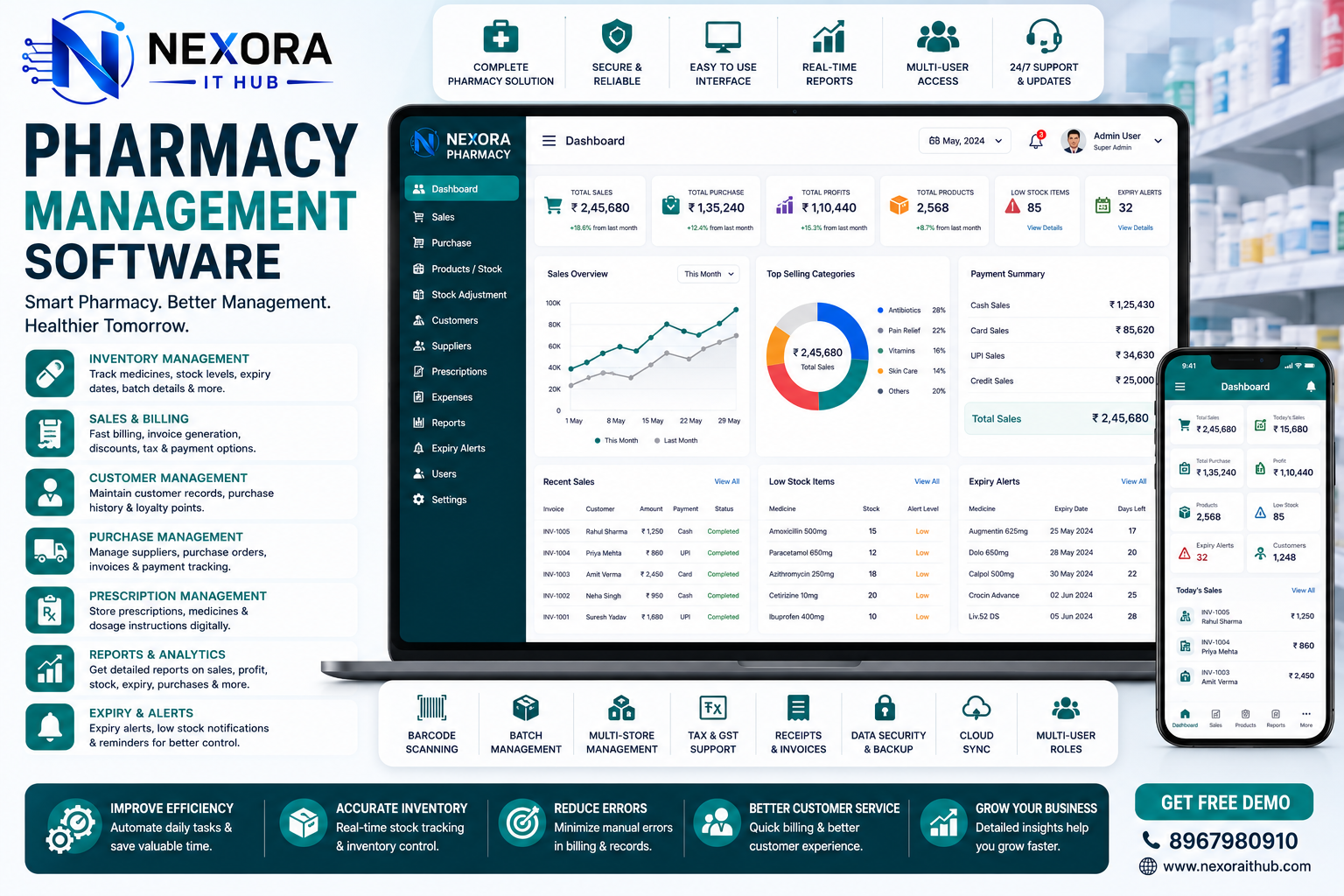
Pharmacy Management Software
Pharmacy Management Software
Managing a modern pharmacy involves much more than selling medicines. Pharmacy owners and staff need to handle medicine inventory, stock levels, batches, expiry dates, purchases, suppliers, sales, billing, customers, payments, returns, reports, and daily business operations efficiently.
Manual registers and spreadsheets can make these activities time-consuming and increase the possibility of data-entry mistakes. Pharmacy Management Software provides a centralized digital platform that helps pharmacies organize their daily operations, monitor inventory, manage billing, track purchases, and maintain business records more efficiently.
Nexora IT Hub Pharmacy Management Software can be customized for independent pharmacies, retail medical stores, wholesale pharmacies, pharmacy chains, hospital pharmacies, and multi-branch pharmacy businesses.
The system can bring essential pharmacy operations together into one professional platform, helping owners and staff save time, improve visibility, and manage their business with greater control.
What is Pharmacy Management Software?
Pharmacy Management Software is a specialized business management solution designed to help pharmacies manage their sales, purchases, inventory, suppliers, customers, billing, and operational records through a centralized digital system.
A professional pharmacy management system can include modules such as:
- Medicine Management
- Inventory Management
- Batch Management
- Expiry Management
- Purchase Management
- Supplier Management
- Sales Management
- POS Billing
- Invoice Management
- Customer Management
- Payment Management
- Medicine Return Management
- Stock Adjustment
- Low Stock Alerts
- Expiry Alerts
- Reports & Analytics
- User & Role Management
- Multi-Branch Management
- Barcode Support
- Accounting Integration
The exact modules can be customized according to the pharmacy's business model and operational requirements.
Why Pharmacy Management Software is Important
Pharmacies handle a large number of products, transactions, suppliers, customers, and inventory records. As the business grows, managing everything manually becomes increasingly difficult.
Pharmacy Management Software helps bring these operations into a single system.
Instead of maintaining separate records for:
- Medicine purchases
- Medicine sales
- Stock
- Suppliers
- Customers
- Expiry dates
- Payments
- Returns
- Reports
the business can manage them through one centralized platform.
This creates a more organized workflow and gives pharmacy owners better visibility into their operations.
Key Benefits of Pharmacy Management Software
1. Centralized Pharmacy Management
A pharmacy management system allows owners and authorized employees to manage important business activities from one platform.
The system can connect:
Purchasing + Inventory + Sales + Billing + Suppliers + Customers + Payments + Reports
This reduces the need to maintain multiple disconnected records and makes information easier to find.
2. Efficient Medicine Inventory Management
Inventory management is one of the most important functions of a pharmacy.
The software can help track:
- Medicine name
- Brand
- Generic name
- Category
- Batch number
- Manufacturing date
- Expiry date
- Purchase price
- Selling price
- Available quantity
- Supplier
- Storage location
- Stock status
Pharmacy staff can quickly check available stock before processing a sale or purchase.
3. Batch Management
Medicines may be purchased in different batches with different expiry dates and prices.
A pharmacy management system can maintain batch-level information such as:
- Batch number
- Expiry date
- Purchase price
- Selling price
- Quantity
- Supplier
- Purchase invoice
- Stock movement
This provides better visibility into individual inventory batches.
4. Expiry Date Management
Expiry tracking is an essential inventory-management requirement for pharmacies.
The software can provide expiry-related reports and alerts based on configured time periods.
For example, administrators can identify:
- Expiring medicines
- Recently expired stock
- Near-expiry inventory
- Batch-wise expiry information
This can help pharmacy staff review inventory and take appropriate action according to applicable regulations and business procedures.
5. Low Stock Alerts
Running out of frequently sold products can affect business operations.
Pharmacy Management Software can identify products that reach their configured minimum stock level.
The system can display:
- Low-stock medicines
- Out-of-stock products
- Reorder-level products
- Fast-moving products
This can help pharmacy owners plan purchases more efficiently.
Pharmacy Management Software Features
1. Professional Dashboard
A centralized dashboard provides an overview of pharmacy activities.
The dashboard can display:
- Today's Sales
- Today's Purchases
- Total Products
- Available Stock
- Low Stock Items
- Near-Expiry Items
- Total Customers
- Total Suppliers
- Pending Payments
- Recent Transactions
- Sales Summary
This allows owners and managers to understand important business information quickly.
2. Medicine Master Management
The Medicine Master module provides a centralized database for products.
Each medicine record can contain:
- Medicine name
- Product code
- Barcode
- Generic name
- Brand
- Category
- Manufacturer
- Unit
- Pack size
- Tax configuration
- Purchase price
- Selling price
- Minimum stock
- Maximum stock
- Prescription-related classification where applicable
- Status
The fields can be customized according to the pharmacy's requirements.
3. Medicine Category Management
Pharmacies can organize products into categories.
Examples include:
- Tablets
- Capsules
- Syrups
- Injections
- Creams
- Ointments
- Drops
- Medical Devices
- Personal Care
- Surgical Products
- Health & Wellness Products
Category-based organization makes product management and reporting easier.
4. Barcode Management
Barcode functionality can make pharmacy billing faster.
The system can support barcode-based workflows for:
- Product identification
- Sales billing
- Stock entry
- Inventory search
- Product management
Barcode support can be configured based on the pharmacy's hardware and operational requirements.
5. POS Billing System
A professional Pharmacy POS Billing Software module allows staff to process sales efficiently.
The billing screen can include:
- Product search
- Barcode scanning
- Quantity
- Price
- Discount
- Applicable taxes
- Customer selection
- Payment method
- Invoice generation
- Print receipt
- Sales history
This can significantly simplify counter billing operations.
6. Purchase Management
Pharmacy businesses regularly purchase products from distributors and suppliers.
Purchase management can include:
- Purchase orders
- Purchase invoices
- Supplier selection
- Product selection
- Batch number
- Expiry date
- Purchase price
- Quantity
- Discount
- Taxes where applicable
- Payment status
- Purchase history
When a purchase is completed, inventory can be updated according to the configured workflow.
7. Supplier Management
The supplier module allows pharmacies to maintain organized supplier information.
Supplier records can include:
- Supplier name
- Company name
- Contact person
- Phone number
- Address
- GST/tax information where applicable
- Purchase history
- Payment history
- Outstanding balance
This makes supplier management more systematic.
8. Customer Management
Pharmacy businesses can maintain customer records where appropriate.
Customer profiles may include:
- Customer name
- Phone number
- Address
- Purchase history
- Invoice history
- Payment information
- Loyalty information
- Notes
Customer information should be collected and managed in accordance with applicable privacy and data-protection requirements.
9. Sales Management
The sales module records pharmacy transactions in an organized manner.
It can manage:
- Cash sales
- Credit sales
- Customer sales
- Product sales
- Discounts
- Taxes
- Invoice numbers
- Payment status
- Sales returns
- Sales history
Managers can use sales reports to understand business performance.
10. Purchase Return Management
Sometimes products need to be returned to suppliers.
The software can manage:
- Returned products
- Return quantities
- Batch details
- Supplier
- Purchase invoice
- Return reason
- Return date
- Stock adjustment
This keeps purchase and inventory records connected.
11. Sales Return Management
The system can also support sales-return workflows based on the pharmacy's policies and applicable requirements.
The module can record:
- Customer
- Invoice
- Product
- Batch
- Quantity
- Return date
- Return reason
- Refund or adjustment
- Stock update
Advanced Inventory Features
12. Stock Adjustment
Inventory quantities can sometimes differ because of:
- Damaged products
- Expired products
- Stock counting differences
- Data-entry corrections
- Internal adjustments
Authorized users can record stock adjustments with appropriate reasons and maintain an audit trail.
13. Stock Transfer
For businesses operating multiple locations, stock can be transferred between branches or warehouses.
The system can record:
- Source branch
- Destination branch
- Product
- Batch
- Quantity
- Transfer date
- Transfer status
- Authorized user
This can improve inventory visibility across multiple locations.
14. Warehouse Management
Larger pharmacies may need multiple storage locations.
Warehouse functionality can help manage:
- Warehouses
- Shelves
- Storage locations
- Stock quantities
- Transfers
- Product movements
15. Near-Expiry Report
The system can generate a report showing products approaching their configured expiry threshold.
For example:
| Product | Batch | Expiry | Quantity |
|---|---|---|---|
| Medicine A | B102 | Upcoming | 25 |
| Medicine B | B208 | Upcoming | 18 |
| Medicine C | B311 | Upcoming | 42 |
The actual expiry thresholds can be configured according to the pharmacy's operational policies.
Billing & Financial Features
16. Invoice Management
Professional invoice management can help pharmacies create organized sales documents.
Invoices can include:
- Pharmacy details
- Customer information
- Product details
- Quantity
- Price
- Discount
- Applicable taxes
- Total amount
- Payment status
- Invoice number
- Date
17. Payment Management
The system can track payment information related to sales and purchases.
Possible payment methods include:
- Cash
- Card
- UPI
- Bank Transfer
- Other configured methods
Payment records can be connected with the corresponding transaction.
18. Expense Management
Pharmacy owners can also track operational expenses such as:
- Rent
- Electricity
- Staff expenses
- Transportation
- Maintenance
- Office expenses
- Other business expenses
This can provide better visibility into overall business costs.
Reports & Analytics
19. Sales Reports
Generate reports such as:
- Daily sales
- Weekly sales
- Monthly sales
- Product-wise sales
- Category-wise sales
- Employee-wise sales
- Branch-wise sales
- Payment-wise sales
20. Purchase Reports
Purchase reports can include:
- Supplier-wise purchases
- Product-wise purchases
- Date-wise purchases
- Purchase value
- Purchase history
- Purchase returns
21. Inventory Reports
Inventory reporting can help identify:
- Current stock
- Low-stock products
- Out-of-stock products
- Near-expiry products
- Expired products
- Stock valuation
- Batch-wise inventory
- Stock movement
22. Profit & Business Reports
Depending on the accounting configuration, the system can generate business reports that help management understand:
- Sales
- Purchases
- Expenses
- Revenue
- Product performance
- Business transaction trends
For formal accounting and tax compliance, the software should be configured according to the business's accounting practices and applicable regulations.
User & Role Management
A pharmacy may have different employees with different responsibilities.
The system can provide role-based access for:
Super Admin
Complete system management.
Pharmacy Owner
Business dashboards, reports, inventory, sales, purchases, and management functions.
Pharmacist / Authorized Staff
Access to relevant inventory and sales workflows according to assigned permissions.
Billing Executive
Access to POS billing, invoices, customers, and payment functions.
Inventory Manager
Access to products, batches, stock, purchases, transfers, and inventory reports.
Role-based access helps ensure employees only access the information and functionality required for their responsibilities.
Multi-Branch Pharmacy Management
For pharmacy businesses with multiple locations, a centralized system can provide branch-level management.
Features can include:
- Branch management
- Branch-wise inventory
- Branch-wise sales
- Branch-wise purchases
- Branch-wise employees
- Stock transfers
- Branch reports
- Centralized administration
Owners can get a consolidated overview while allowing branch employees to operate within their assigned location.
Pharmacy Management Software for Different Businesses
Retail Pharmacy
Manage everyday medicine sales, inventory, POS billing, suppliers, purchases, and customer transactions.
Wholesale Pharmacy
Manage large-volume purchases, inventory, distributors, customers, invoices, and payments.
Hospital Pharmacy
Manage pharmacy inventory, sales, purchases, departments, authorized users, and reporting according to the hospital's workflow.
Multi-Branch Pharmacy
Manage multiple branches, warehouses, employees, inventory, sales, and transfers through a centralized platform.
Medical Store
Manage product inventory, billing, purchases, suppliers, customers, and daily business reports.
Mobile-Friendly Pharmacy Software
Modern business owners often need access to business information outside the pharmacy.
A responsive Pharmacy Management System can be designed for:
- Desktop
- Laptop
- Tablet
- Smartphone
Authorized users can access dashboards, inventory information, reports, and other permitted functions remotely.
A dedicated Android or iOS application can also be developed when required.
Pharmacy Software Security
Pharmacy systems can contain sensitive business and customer information. A professional implementation should therefore include appropriate security measures.
Depending on the project requirements, these may include:
- Secure authentication
- Role-based access
- Permission management
- Password protection
- Database security
- Secure API communication
- Activity logs
- Backup systems
- Session management
- Controlled access to documents
The final security architecture should be designed according to the pharmacy's data practices and applicable legal and regulatory requirements.
Custom Pharmacy Management Software Development
Every pharmacy has different operational requirements.
A small retail pharmacy may only need:
POS + Inventory + Purchase + Supplier + Reports
A large pharmacy chain may require:
Multi-Branch + Warehouse + Inventory + Purchase + POS + Accounting + Employee Management + Advanced Reports
Nexora IT Hub can develop customized Pharmacy Management Software according to the required modules and workflow.
Customization can include:
- Dashboard
- POS design
- Medicine fields
- Inventory workflow
- Batch management
- Expiry tracking
- Billing format
- User roles
- Reports
- Notifications
- Branch management
- API integrations
- Mobile application
- Customer portal
Why Choose Nexora IT Hub for Pharmacy Management Software?
Customized Solution
Build a system around your pharmacy's actual workflow rather than adapting your business to a generic system.
Professional UI/UX
A clean interface can make billing, inventory management, and daily operations easier for staff.
Scalable Architecture
The system can be designed to support additional products, users, branches, warehouses, and modules as your business grows.
Inventory-Focused Development
Batch, expiry, stock, purchase, sales, and transfer workflows can be designed around your operational requirements.
Reporting & Analytics
Customized reports can provide management with better visibility into business performance.
Integration Support
Required third-party services and APIs can be integrated based on technical feasibility and applicable requirements.
Ongoing Technical Support
Maintenance, bug fixes, updates, and future enhancements can help keep your pharmacy software aligned with changing business requirements.
Key Advantages of Pharmacy Management Software
A professional pharmacy management solution can help your business:
- Manage medicines digitally
- Track inventory efficiently
- Monitor batch information
- Identify near-expiry products
- Monitor low-stock items
- Process billing faster
- Manage purchases
- Manage suppliers
- Track sales
- Manage returns
- Maintain customer records
- Monitor payments
- Generate reports
- Manage multiple branches
- Reduce repetitive manual work
- Improve operational visibility
- Support better business decisions
Pharmacy Management Software Workflow
A typical workflow can be structured as:
Supplier → Purchase → Batch Entry → Inventory → POS Sale → Invoice → Payment → Stock Update → Reports
For returns:
Customer → Sales Return → Batch Verification → Return Processing → Stock/Financial Adjustment
For supplier returns:
Inventory → Purchase Return → Supplier → Stock Adjustment → Purchase Records
This connected workflow helps keep different parts of the pharmacy operation synchronized.
Frequently Asked Questions
What is Pharmacy Management Software?
Pharmacy Management Software is a digital platform that helps pharmacies manage products, inventory, purchases, sales, billing, suppliers, customers, payments, expiry tracking, and reports.
Who can use Pharmacy Management Software?
Retail pharmacies, medical stores, wholesale pharmacies, hospital pharmacies, pharmacy chains, and multi-branch pharmacy businesses can use customized pharmacy management solutions.
Can the software manage medicine expiry dates?
Yes. Batch and expiry management can be included to help authorized staff identify products approaching their configured expiry thresholds.
Can Pharmacy Software manage batch numbers?
Yes. Batch-level inventory management can record batch numbers, expiry dates, quantities, purchase prices, selling prices, and suppliers.
Can it provide low-stock alerts?
Yes. Minimum stock levels can be configured so the system can identify products that require inventory review or replenishment.
Can Pharmacy Software support barcode scanning?
Yes. Barcode functionality can be integrated into medicine search, inventory, and POS billing workflows depending on the hardware and software requirements.
Can it manage multiple pharmacy branches?
Yes. Multi-branch functionality can be developed for businesses operating multiple pharmacy locations.
Can Pharmacy Software generate invoices?
Yes. The POS and billing module can generate professional invoices and receipts according to the pharmacy's requirements.
Can customers book or order medicines online?
An e-commerce or online ordering module can be developed separately where appropriate. Any online sale, prescription-related workflow, and medicine distribution process should follow applicable laws, licensing requirements, and pharmacy regulations.
Can the software integrate with accounting systems?
Yes. Accounting modules or third-party accounting integrations can be implemented according to the required workflow and technical specifications.
Transform Your Pharmacy with Smart Digital Management
Managing hundreds or thousands of products manually can become difficult as a pharmacy grows. A professional Pharmacy Management Software solution can bring inventory, purchasing, sales, billing, suppliers, customers, payments, and reporting together in one centralized system.
With features such as Medicine Inventory Management, Batch Management, Expiry Tracking, Low Stock Alerts, POS Billing, Purchase Management, Supplier Management, Sales Management, Returns, Barcode Support, Multi-Branch Management, and Business Reports, pharmacies can build a more organized and efficient digital workflow.
Whether you are running a small medical store, retail pharmacy, wholesale pharmacy, hospital pharmacy, or multi-branch pharmacy chain, Nexora IT Hub can create a customized software solution based on your operational requirements.
Build a Smarter Pharmacy with Nexora IT Hub
Professional. Customized. Scalable. Business-Focused.
Nexora IT Hub provides customized Pharmacy Management Software Development for modern pharmacy businesses.
Get a Free Consultation & Software Demo
Nexora IT Hub
📞 8967980910
🌐 www.nexoraithub.com
*6=-