

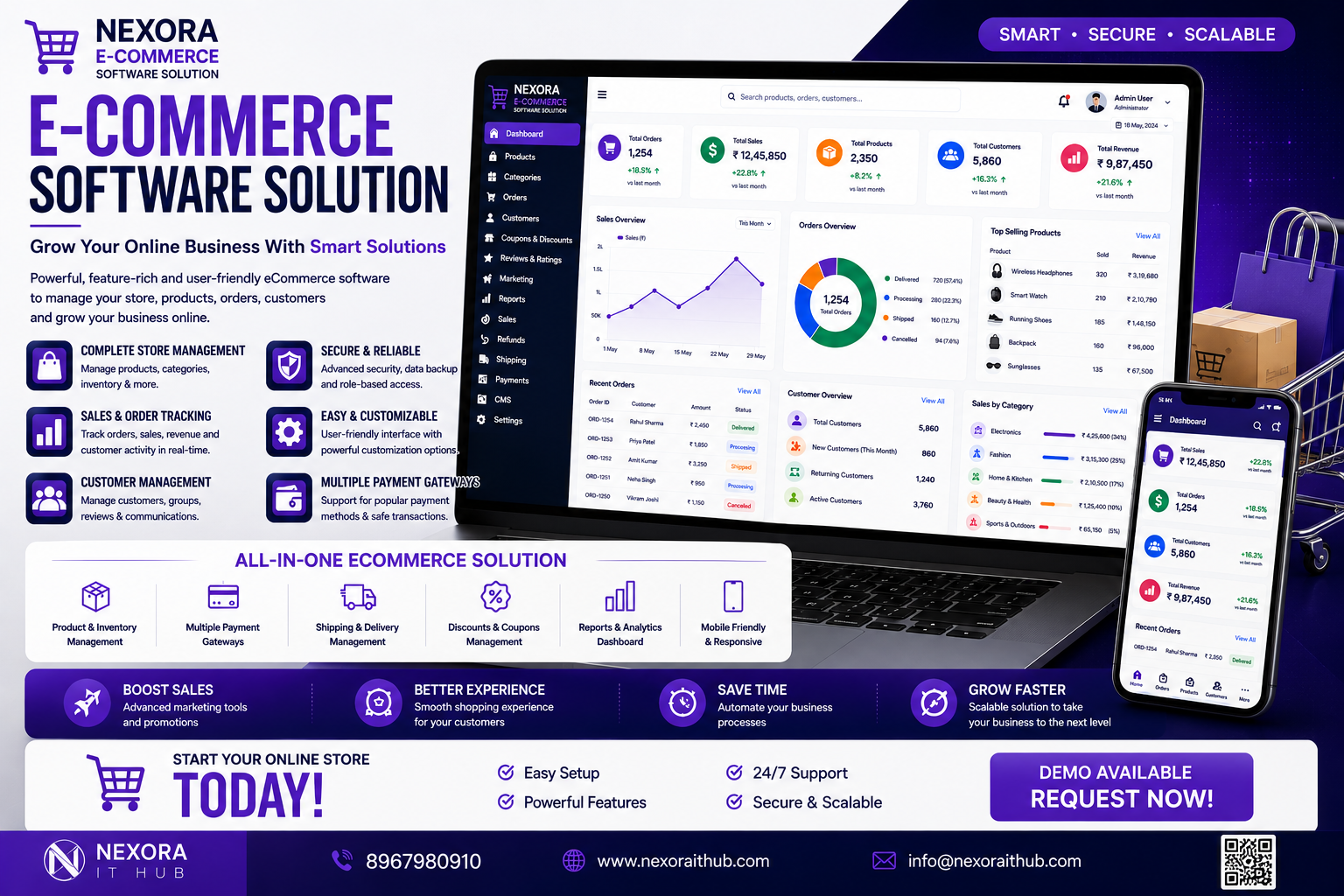
Ecommerce Software
Ecommerce Software
In today’s digital marketplace, businesses need more than a basic online store. A professional Ecommerce Software solution provides a complete digital platform for managing products, customers, orders, payments, inventory, shipping, discounts, marketing, and business analytics from one centralized system.
Nexora IT Hub Ecommerce Software is a customizable ecommerce solution designed to help businesses build, manage, and scale their online stores. From product listing and shopping cart functionality to order processing, payment integration, inventory management, customer accounts, and advanced reports, the platform can be developed around your specific business requirements.
Whether you are starting a small online store, fashion business, electronics shop, grocery business, cosmetics store, wholesale marketplace, B2B ecommerce business, or multi-vendor marketplace, ecommerce software can provide the technology required to manage your online business efficiently.
What is Ecommerce Software?
Ecommerce Software is a digital platform that allows businesses to sell products or services online and manage their complete online-store operations.
A professional ecommerce system can include:
- Product Management
- Category Management
- Shopping Cart
- Checkout
- Customer Management
- Order Management
- Inventory Management
- Payment Gateway Integration
- Shipping Management
- Coupon & Discount Management
- Wishlist
- Product Reviews
- Tax Management
- Invoice Management
- Returns & Refunds
- Reports & Analytics
- Admin Dashboard
- Customer Dashboard
- Marketing Tools
- Multi-Vendor Support
- Multi-Branch Management
The exact features can be customized according to the business model, product type, target market, and operational requirements.
Benefits of Ecommerce Software
1. Build Your Own Online Store
Ecommerce Software allows businesses to create their own branded online shopping platform.
Instead of depending completely on third-party marketplaces, businesses can have greater control over:
- Website design
- Product presentation
- Customer experience
- Pricing
- Promotions
- Customer data
- Order management
- Brand identity
A customized ecommerce website can be designed around the company's brand and business goals.
2. Sell Products 24/7
An online store can remain available to customers beyond normal business hours.
Customers can:
- Browse products
- Search products
- Add items to cart
- Place orders
- Make payments
- Track orders
This allows businesses to accept orders online whenever customers choose to shop.
3. Centralized Business Management
Ecommerce Software brings important business operations together.
Businesses can manage:
Products + Customers + Orders + Payments + Inventory + Shipping + Marketing + Reports
from one centralized admin panel.
This can reduce repetitive manual work and improve operational visibility.
4. Better Customer Experience
A professional ecommerce platform can provide a smooth shopping journey:
Product Search → Product Details → Add to Cart → Checkout → Payment → Order Confirmation → Delivery → Review
A clean user interface, fast navigation, responsive design, and convenient checkout can improve the overall shopping experience.
5. Manage Unlimited Products
A scalable ecommerce platform can support a large product catalog.
Administrators can manage:
- Product names
- Product descriptions
- Images
- Prices
- SKUs
- Categories
- Variants
- Stock
- Discounts
- Specifications
The number of products supported depends on the technical architecture and hosting environment.
6. Automate Order Processing
Ecommerce software can streamline the complete order workflow.
A typical process can be:
New Order → Payment Verification → Processing → Packed → Shipped → Delivered
Order status can be updated from the admin panel and displayed to customers through their accounts.
7. Improve Inventory Control
Inventory management is essential for online businesses.
The system can track:
- Available stock
- Sold quantity
- Reserved stock
- Low-stock products
- Out-of-stock products
- SKU
- Product variants
- Stock adjustments
- Purchase records
This can help businesses maintain better control over their inventory.
8. Expand Business Reach
An ecommerce website can allow businesses to sell beyond their physical location.
Depending on logistics and business operations, products can be offered to customers across:
- Local areas
- Cities
- States
- Countries
Shipping, taxation, payment, and regulatory requirements should be configured according to the target market.
Ecommerce Software Features
1. Professional Admin Dashboard
The ecommerce admin dashboard provides centralized control over the online store.
It can display:
- Total Sales
- Today's Orders
- Total Customers
- Pending Orders
- Completed Orders
- Products
- Low Stock Items
- Revenue
- Refunds
- Recent Orders
Dashboard widgets can be customized according to business requirements.
2. Product Management
Administrators can add, edit, update, and manage products.
Product information can include:
- Product Name
- SKU
- Product Code
- Category
- Brand
- Price
- Sale Price
- Product Images
- Description
- Specifications
- Stock Quantity
- Product Variants
- Weight
- Dimensions
- Status
3. Product Category Management
Products can be organized into categories and subcategories.
For example:
Fashion → Men → Shirts
Electronics → Mobile → Smartphones
Beauty → Skincare → Face Care
This improves navigation and helps customers discover products more easily.
4. Product Variants
Ecommerce Software can support products with multiple variants.
Examples include:
- Size
- Color
- Weight
- Material
- Model
- Pack Size
Each variant can have its own SKU, price, stock quantity, and image where required.
5. Product Search & Filters
A professional ecommerce website should make it easy for customers to find products.
Search and filtering can include:
- Product name
- Category
- Brand
- Price range
- Rating
- Color
- Size
- Availability
- Product attributes
Advanced filtering can be customized according to the product catalog.
6. Shopping Cart
Customers can add multiple products to their shopping cart.
Cart functionality can include:
- Add to cart
- Update quantity
- Remove product
- Apply coupon
- Calculate subtotal
- Shipping charges
- Taxes
- Final total
7. Wishlist
Customers can save products for future purchases.
Wishlist functionality can allow users to:
- Add products
- Remove products
- View saved products
- Move products to cart
This can help encourage customers to return to products they are interested in.
8. Customer Registration & Login
Customers can create accounts and manage their shopping information.
The customer dashboard can include:
- Profile
- Orders
- Addresses
- Wishlist
- Reviews
- Payment-related information
- Returns
- Support requests
Guest checkout can also be implemented where appropriate.
9. Checkout Management
A simple checkout process can reduce friction during purchasing.
Checkout can include:
- Customer details
- Delivery address
- Billing address
- Shipping method
- Payment method
- Coupon
- Order summary
- Final amount
The checkout workflow can be customized according to business requirements.
10. Payment Gateway Integration
Ecommerce Software can integrate with supported payment gateways.
Possible payment methods can include:
- UPI
- Credit Card
- Debit Card
- Net Banking
- Wallets
- Bank Transfer
- Cash on Delivery
The exact payment methods depend on the selected payment provider and business requirements.
Payment credentials and sensitive payment information should be handled by compliant payment providers rather than unnecessarily stored by the ecommerce application.
11. Order Management
Administrators can manage orders from the backend.
Order information can include:
- Order ID
- Customer
- Products
- Quantity
- Payment status
- Order status
- Shipping address
- Invoice
- Delivery information
- Return status
12. Order Tracking
Customers can track their orders through their account.
Typical statuses include:
Order Placed → Confirmed → Processing → Packed → Shipped → Out for Delivery → Delivered
Integration with shipping providers can provide more detailed tracking where supported.
13. Shipping Management
Shipping functionality can manage:
- Shipping zones
- Delivery charges
- Shipping methods
- Delivery addresses
- Courier integration
- Tracking numbers
- Shipping status
Businesses can configure shipping rules based on location, weight, product, order value, or other criteria.
14. Coupon & Discount Management
Administrators can create promotional offers.
Discount types can include:
- Percentage Discount
- Fixed Amount Discount
- Product Discount
- Category Discount
- First Order Discount
- Minimum Order Discount
- Promotional Coupon
Validity periods, usage limits, and eligibility conditions can also be configured.
15. Tax Management
Ecommerce Software can support configurable tax rules.
Depending on the business location and applicable regulations, administrators can manage:
- Tax rates
- Product-level taxes
- Category-level taxes
- Tax-inclusive pricing
- Tax-exclusive pricing
- Tax reports
Tax configuration should be reviewed according to applicable local laws.
16. Invoice Management
The system can generate professional customer invoices.
Invoices can include:
- Business information
- Customer information
- Invoice number
- Product details
- Quantity
- Price
- Discount
- Applicable taxes
- Shipping charges
- Total amount
- Payment status
17. Return & Refund Management
Customers may need to return products according to the store's return policy.
The system can manage:
- Return request
- Product
- Quantity
- Return reason
- Order reference
- Approval status
- Refund status
- Return history
Refund processing can be connected to supported payment gateways where available.
18. Customer Support
An ecommerce platform can include customer support functionality.
Customers can:
- Submit support requests
- Ask product questions
- Report order issues
- Request return assistance
- Track ticket status
Support tickets can be managed through the admin panel.
19. Product Reviews & Ratings
Customers can submit reviews and ratings for eligible products.
Review functionality can include:
- Star ratings
- Written reviews
- Review moderation
- Verified-purchase indicators where implemented
- Admin approval
This can help businesses collect customer feedback.
20. Inventory Management
The inventory module can track:
- Stock quantity
- SKU
- Product variants
- Stock adjustments
- Low-stock products
- Out-of-stock products
- Purchase records
- Stock movement
Inventory can be connected with order processing so stock quantities can be updated according to the configured workflow.
21. Supplier & Purchase Management
Businesses that maintain their own inventory can manage suppliers and purchases.
Supplier information may include:
- Supplier name
- Company
- Contact information
- Products
- Purchase history
- Payment records
Purchase management can include purchase orders, invoices, quantities, prices, and stock updates.
22. Customer Management
The admin panel can provide a centralized view of customer activity.
Administrators can manage:
- Customer profiles
- Order history
- Addresses
- Wishlist
- Reviews
- Support requests
- Purchase activity
Access to customer information should be controlled according to applicable privacy requirements.
23. Marketing & Promotional Tools
Ecommerce Software can support different marketing activities.
Possible features include:
- Coupons
- Discounts
- Promotional banners
- Featured products
- Related products
- Cross-selling
- Upselling
- Newsletter integration
- Abandoned-cart workflows
- Promotional campaigns
Marketing integrations can be added according to business requirements.
24. SEO-Friendly Ecommerce Website
A professional ecommerce website should be designed with SEO in mind.
SEO features can include:
- SEO-friendly URLs
- Meta titles
- Meta descriptions
- Product schema
- Category optimization
- Image alt text
- XML sitemap
- Canonical URLs
- Breadcrumb navigation
- Mobile-friendly design
- Fast-loading pages
Good SEO architecture can help search engines understand the store's products and categories.
25. Mobile Responsive Design
Most online shoppers use mobile devices.
A responsive ecommerce website can provide a consistent shopping experience across:
- Smartphones
- Tablets
- Laptops
- Desktop computers
For larger businesses, dedicated Android or iOS shopping applications can also be developed.
26. Multi-Vendor Ecommerce
A multi-vendor marketplace allows multiple sellers to sell products through one ecommerce platform.
Vendor features can include:
- Vendor registration
- Vendor dashboard
- Product management
- Inventory management
- Order management
- Sales reports
- Commission management
- Payout records
This model can be used for marketplace businesses where multiple sellers operate under one platform.
27. Vendor Commission Management
For multi-vendor platforms, administrators can configure marketplace commissions.
The system can track:
- Vendor sales
- Platform commission
- Vendor earnings
- Refund adjustments
- Payout status
The exact commission model can be customized.
28. Multi-Branch Ecommerce Management
Businesses with multiple physical stores can connect branches with the ecommerce system.
Features can include:
- Branch inventory
- Branch orders
- Stock transfers
- Branch sales
- Centralized reporting
This can provide better inventory visibility across locations.
29. Reports & Analytics
A professional ecommerce platform can provide detailed business reports.
Sales Reports
- Daily sales
- Weekly sales
- Monthly sales
- Product-wise sales
- Category-wise sales
- Customer-wise sales
Order Reports
- New orders
- Pending orders
- Completed orders
- Cancelled orders
- Returned orders
Inventory Reports
- Current stock
- Low stock
- Out of stock
- Stock movement
Customer Reports
- New customers
- Returning customers
- Customer purchases
- Customer activity
30. Ecommerce Analytics Dashboard
Management can monitor important business metrics such as:
- Total revenue
- Orders
- Average order value
- Conversion trends
- Top-selling products
- Customer growth
- Product performance
- Return trends
Analytics integrations such as supported web analytics platforms can also be implemented.
Advanced Ecommerce Features
Abandoned Cart Management
The system can identify carts that were created but not converted into orders.
Depending on the implementation, automated reminders can be sent through supported communication channels.
Subscription Ecommerce
Businesses selling recurring products or services can implement subscription functionality.
Possible features include:
- Subscription plans
- Billing cycles
- Renewal management
- Subscription status
- Customer subscription dashboard
B2B Ecommerce
For wholesale and business customers, ecommerce software can support:
- Business accounts
- Bulk pricing
- Minimum order quantity
- Customer-specific pricing
- Purchase orders
- Credit limits
- Wholesale catalogs
Wholesale Ecommerce
Wholesale businesses can manage:
- Bulk products
- Quantity-based pricing
- Dealer accounts
- Distributor pricing
- Large orders
- Wholesale invoices
Ecommerce Software Security
An ecommerce platform handles customer, order, business, and potentially payment-related information, so security should be built into the architecture.
Depending on project requirements, security measures can include:
- Secure authentication
- Role-based access
- HTTPS
- Secure API communication
- Password hashing
- Database security
- Activity logs
- Backup management
- Admin permission controls
- Fraud-monitoring integrations
- Secure payment gateway integration
Sensitive payment credentials should be handled through appropriate payment providers.
Why Choose Nexora IT Hub for Ecommerce Software?
Customized Ecommerce Development
Build an ecommerce platform around your products, customers, pricing, shipping, and business workflow.
Professional UI/UX
Create a modern shopping interface designed for easy navigation and conversion.
Scalable Architecture
The system can be designed to accommodate growing products, customers, orders, and traffic.
SEO-Friendly Development
Implement SEO-friendly technical architecture to support long-term organic search visibility.
Mobile-Friendly
Responsive ecommerce websites can work across smartphones, tablets, and desktop devices.
Payment & Shipping Integration
Integrate suitable payment gateways and shipping services according to the business requirements.
Custom Admin Panel
Manage products, orders, customers, inventory, payments, shipping, and reports through a centralized backend.
Ongoing Support
Technical maintenance, security updates, improvements, and feature enhancements can support long-term ecommerce operations.
Ecommerce Software for Different Businesses
Nexora IT Hub can develop customized ecommerce solutions for:
- Fashion Stores
- Clothing Businesses
- Electronics Stores
- Grocery Stores
- Cosmetics Businesses
- Jewellery Stores
- Furniture Stores
- Book Stores
- Pharmacy E-commerce
- Sports Stores
- Food Businesses
- B2B Businesses
- Wholesale Businesses
- Manufacturer Stores
- Multi-Vendor Marketplaces
Key Advantages of Ecommerce Software
A professional ecommerce platform can help businesses:
- Sell products online
- Accept orders 24/7
- Manage products
- Manage inventory
- Process payments
- Track orders
- Manage shipping
- Manage customers
- Create discounts
- Generate invoices
- Handle returns
- Improve customer experience
- Monitor sales
- Generate business reports
- Build a stronger online brand
- Expand into new markets
Ecommerce Software Workflow
A typical ecommerce process can be:
Customer Visits Website
↓
Browses Products
↓
Searches / Filters Products
↓
Product Details
↓
Add to Cart
↓
Checkout
↓
Payment
↓
Order Confirmation
↓
Order Processing
↓
Packing & Shipping
↓
Delivery
↓
Customer Review
The workflow can be customized according to the business model.
Frequently Asked Questions
What is Ecommerce Software?
Ecommerce Software is a digital platform that allows businesses to sell products or services online while managing products, customers, orders, payments, inventory, shipping, and reports.
Can Ecommerce Software be customized?
Yes. The website design, product structure, checkout, payment methods, shipping rules, admin panel, reports, and integrations can be customized.
Can I manage unlimited products?
A properly designed ecommerce system can support a large product catalog. The practical limit depends on the hosting environment, database architecture, server resources, and application design.
Can customers pay online?
Yes. Payment gateways can be integrated to support available payment methods such as UPI, cards, net banking, wallets, or other supported options.
Can Ecommerce Software manage inventory?
Yes. Product stock, variants, low-stock alerts, stock adjustments, purchases, and inventory reports can be included.
Can I create a multi-vendor marketplace?
Yes. A multi-vendor ecommerce platform can provide separate vendor dashboards, product management, orders, commissions, and payout workflows.
Can customers track orders?
Yes. Customers can view order status and shipping information through their account.
Can the ecommerce website be SEO-friendly?
Yes. Technical SEO features such as SEO-friendly URLs, meta information, structured data, sitemap, breadcrumbs, canonical URLs, and mobile responsiveness can be implemented.
Can I manage the ecommerce website from mobile?
Yes. A responsive admin panel can be designed for mobile and tablet access. Dedicated mobile apps can also be developed if required.
Grow Your Online Business with Nexora IT Hub
The modern ecommerce market requires a combination of professional design, reliable technology, smooth checkout, secure payments, efficient inventory management, fast order processing, and strong customer experience.
A professional Ecommerce Software solution brings these essential functions together in one centralized platform.
With features such as Product Management, Shopping Cart, Checkout, POS Integration, Payment Gateway, Order Management, Inventory Management, Shipping Management, Customer Management, Coupons, Reviews, Returns & Refunds, SEO Tools, Analytics, Multi-Vendor Support, and Multi-Branch Management, businesses can build a scalable online shopping platform.
Whether you are launching a small online store, growing an established ecommerce business, starting a wholesale portal, or building a multi-vendor marketplace, Nexora IT Hub can develop a customized ecommerce solution around your business requirements.
Build Your Ecommerce Business with Nexora IT Hub
Professional. Customized. Scalable. SEO-Friendly.
Nexora IT Hub provides customized Ecommerce Software Development for businesses looking to establish and grow their online presence.
Get a Free Consultation & Software Demo
Nexora IT Hub
📞 8967980910
🌐 www.nexoraithub.com