

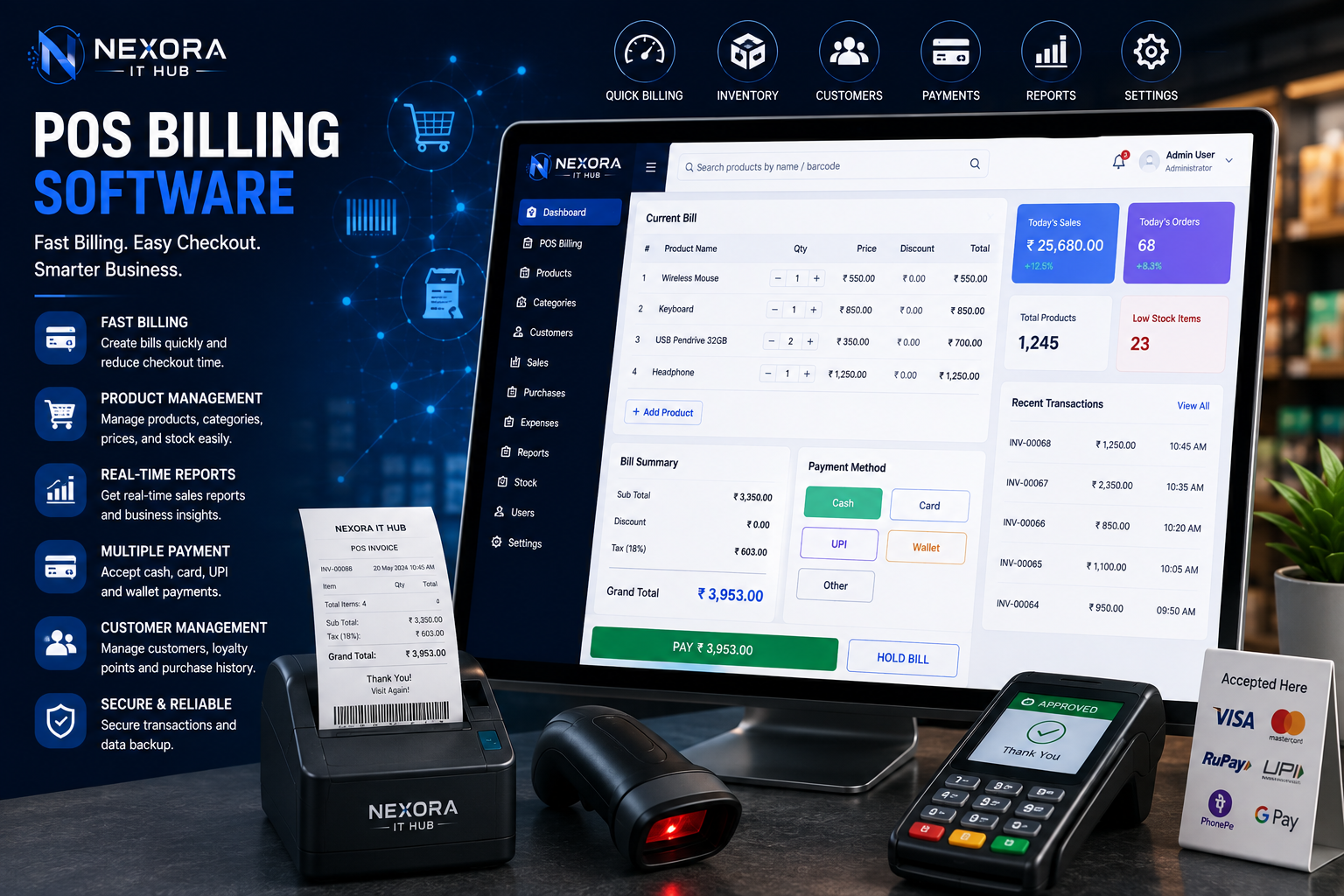
POS Billing Software
POS Billing Software
POS Billing Software (Point of Sale Billing Software) is a digital solution designed to help businesses manage sales, billing, products, inventory, customers, payments, invoices, and business reports from one centralized system.
For modern businesses, fast and accurate billing is essential. Manual billing and traditional cash-register systems can make it difficult to track sales, inventory, customer information, and daily business performance. A professional POS system can streamline these operations and provide business owners with better control over their day-to-day activities.
Nexora IT Hub POS Billing Software can be customized for different types of businesses, including retail stores, supermarkets, grocery shops, clothing stores, electronics shops, pharmacies, restaurants, cafés, salons, wholesalers, and other businesses.
What is POS Billing Software?
POS Billing Software is a computerized point-of-sale system used to process customer transactions and manage business operations.
A complete POS solution can include:
- POS Billing
- Product Management
- Inventory Management
- Sales Management
- Purchase Management
- Customer Management
- Supplier Management
- Barcode Management
- Invoice Generation
- Payment Management
- Discount Management
- Tax Management
- Return & Refund Management
- Employee Management
- Expense Management
- Reports & Analytics
- Admin Dashboard
Instead of maintaining separate records for sales, products, inventory, and customers, businesses can manage these operations through one integrated platform.
Benefits of POS Billing Software
1. Faster Billing
A professional POS system can significantly simplify the billing process.
Cashiers can quickly:
- Search products
- Scan barcodes
- Select products
- Change quantities
- Apply discounts
- Calculate taxes
- Select payment methods
- Generate invoices
- Print receipts
This can help reduce customer waiting time, particularly during busy business hours.
2. Accurate Billing
Manual calculations can result in billing errors.
POS Billing Software can automatically calculate:
- Product price
- Quantity
- Subtotal
- Discount
- Applicable taxes
- Shipping or service charges
- Final payable amount
Automated calculations can help improve billing accuracy.
3. Real-Time Sales Tracking
Business owners can monitor sales activity through the POS dashboard.
Depending on the system configuration, reports can show:
- Today's sales
- Total transactions
- Cash sales
- Digital payments
- Product sales
- Category-wise sales
- Sales by employee
- Sales by branch
This provides better visibility into business performance.
4. Better Inventory Management
POS Billing Software can connect sales transactions with inventory.
When a product is sold, the system can update its stock according to the configured inventory workflow.
Businesses can monitor:
- Current stock
- Sold quantity
- Low-stock products
- Out-of-stock products
- Stock adjustments
- Product returns
- Purchase stock
This can make inventory management more organized.
5. Reduce Manual Work
Instead of maintaining separate registers for sales, products, customers, and stock, businesses can manage information digitally.
This can reduce:
- Manual data entry
- Repetitive calculations
- Paper-based records
- Duplicate records
- Manual report preparation
POS Billing Software Features
1. Professional POS Dashboard
The POS dashboard provides a quick overview of business activity.
It can display:
- Total Sales
- Today's Orders
- Total Products
- Low Stock Items
- Total Customers
- Pending Payments
- Today's Expenses
- Recent Transactions
Dashboard modules can be customized according to business requirements.
2. Fast POS Billing
The main POS screen can be designed for quick transactions.
Cashiers can:
- Search or scan a product
- Add quantity
- Apply discount
- Select payment method
- Generate invoice
- Print or share receipt
A simple interface can help new employees learn the system quickly.
3. Barcode Scanning
Barcode functionality can make retail billing faster.
The system can support barcode-based product identification.
A cashier can scan a product barcode and automatically retrieve information such as:
- Product name
- Price
- SKU
- Available stock
- Variant
- Applicable tax
Barcode support can be configured according to the hardware used by the business.
4. Product Management
Administrators can manage products through the backend.
Product information can include:
- Product Name
- SKU
- Barcode
- Category
- Brand
- Purchase Price
- Selling Price
- Discount
- Tax
- Stock Quantity
- Product Image
- Product Status
5. Category Management
Products can be organized into categories and subcategories.
For example:
Electronics → Mobile Accessories
Grocery → Beverages
Fashion → Men's Clothing
This makes product search and management easier.
6. Product Variants
Businesses selling products with different sizes, colors, models, or weights can manage variants.
Examples include:
- Small / Medium / Large
- Black / White / Blue
- 500g / 1kg / 5kg
- Different product models
Each variant can have its own SKU, barcode, price, and inventory quantity.
7. Inventory Management
The inventory module helps businesses track stock levels.
Features can include:
- Stock quantity
- Stock adjustment
- Stock transfer
- Low-stock alerts
- Out-of-stock tracking
- Purchase stock
- Sales deduction
- Return stock
- Inventory reports
8. Low Stock Alerts
Businesses can configure minimum stock levels.
When stock reaches the configured threshold, the system can display a low-stock alert.
For example:
Product: Wireless Mouse
Current Stock: 5
Minimum Stock: 10
The administrator can identify the product as requiring restocking.
9. Purchase Management
Businesses can manage purchases from suppliers.
Purchase records can include:
- Supplier
- Product
- Quantity
- Purchase price
- Discount
- Tax
- Total amount
- Purchase date
- Payment status
Purchase transactions can also update inventory according to the configured workflow.
10. Supplier Management
The supplier module can store:
- Supplier name
- Company
- Phone number
- Address
- Products supplied
- Purchase history
- Payment information
This creates a centralized supplier database.
11. Customer Management
POS software can maintain customer information where appropriate.
Customer records can include:
- Name
- Phone
- Address
- Purchase history
- Total purchases
- Loyalty information
Businesses should collect and use customer data according to applicable privacy requirements.
12. Customer Purchase History
The system can provide authorized staff with customer purchase history.
This may include:
- Previous invoices
- Products purchased
- Purchase dates
- Total transaction values
- Returns
This can help businesses provide better customer service.
13. Multiple Payment Methods
POS Billing Software can support multiple payment methods.
Depending on the business and payment provider, these can include:
- Cash
- UPI
- Debit Card
- Credit Card
- Net Banking
- Wallet
- Bank Transfer
- Other configured payment methods
Payment gateway integration can be added where required.
14. Split Payment
For businesses that need flexible payment handling, split payment functionality can allow one transaction to be settled through multiple configured payment methods.
For example:
₹2,000 Total
- ₹1,000 Cash
- ₹1,000 UPI
This feature can be customized according to business requirements.
15. Invoice Generation
The system can generate professional invoices automatically.
Invoices can contain:
- Business Name
- Business Address
- Invoice Number
- Date
- Customer Details
- Product Details
- Quantity
- Price
- Discount
- Applicable Taxes
- Total Amount
- Payment Method
Invoice formats can be customized according to business requirements.
16. Thermal Printer Support
POS systems can be configured to work with supported thermal receipt printers.
Receipts can contain:
- Store information
- Invoice number
- Items
- Quantity
- Price
- Discount
- Tax
- Total
- Payment method
Printer compatibility depends on the selected hardware and operating environment.
17. A4 Invoice Printing
For businesses requiring detailed invoices, the system can also generate A4-format invoices.
This can be useful for:
- Wholesale businesses
- Distributors
- Corporate sales
- B2B transactions
18. GST & Tax Management
For businesses operating in India, the system can be configured to manage applicable GST and other tax information.
Possible functionality includes:
- Tax configuration
- Product tax rates
- Tax-inclusive pricing
- Tax-exclusive pricing
- Invoice tax calculation
- Tax reports
Tax rules should be configured according to the business's applicable requirements.
19. Discount Management
Administrators can create different discount types.
Examples include:
- Percentage discount
- Fixed discount
- Product discount
- Category discount
- Customer-specific discount
- Promotional discount
Discount permissions can also be controlled through user roles.
20. Return & Refund Management
The POS system can manage product returns according to the store's policies.
The return workflow can include:
Return Request → Product Verification → Approval → Stock Adjustment → Refund / Credit
Return reports can also be generated.
21. Sales Return
When a customer returns a product, the system can record:
- Original invoice
- Product
- Quantity
- Return reason
- Return amount
- Refund method
- Return date
Inventory can be adjusted according to the configured return process.
22. Exchange Management
Businesses that allow product exchanges can manage:
- Original product
- Replacement product
- Price difference
- Customer details
- Original invoice
- Exchange history
This can simplify store-level exchange processing.
Employee Management
23. Employee Management
POS systems can provide different accounts for employees such as:
- Cashier
- Sales Executive
- Store Manager
- Inventory Manager
- Accountant
- Administrator
Each user can receive appropriate access permissions.
24. Role-Based Access Control
Role-based access helps protect sensitive business information.
For example:
Admin
Full system access.
Manager
Sales, inventory, reports, and operational access.
Cashier
POS billing and assigned transaction functions.
Inventory Staff
Stock and purchase-related functions.
Accountant
Financial reports and payment records.
25. Employee Sales Tracking
Businesses can monitor sales activity by employee.
Reports may include:
- Total sales
- Number of transactions
- Average transaction value
- Discounts applied
- Returns processed
This can help management understand sales activity.
Reports & Analytics
26. Sales Reports
POS software can generate:
- Daily sales report
- Weekly sales report
- Monthly sales report
- Product-wise sales
- Category-wise sales
- Employee-wise sales
- Branch-wise sales
27. Purchase Reports
Businesses can monitor:
- Total purchases
- Supplier purchases
- Product purchases
- Purchase value
- Purchase history
28. Inventory Reports
Inventory reports can include:
- Current stock
- Low-stock products
- Out-of-stock products
- Stock movement
- Stock valuation
- Stock adjustments
29. Profit & Performance Reports
Depending on the accounting configuration, the system can provide business performance information based on recorded purchase and sales data.
Possible reports include:
- Sales value
- Purchase value
- Gross margin indicators
- Discounts
- Returns
- Expenses
Detailed accounting and tax reporting can be integrated where required.
30. Expense Management
Businesses can record operating expenses such as:
- Electricity
- Rent
- Transport
- Maintenance
- Packaging
- Staff-related expenses
- Other business expenses
Expense reports can provide better visibility into operating costs.
Advanced POS Features
Multi-Branch POS
Businesses with multiple locations can manage several branches through a centralized platform.
Features may include:
- Branch-wise POS
- Branch inventory
- Branch employees
- Branch sales
- Stock transfer
- Branch reports
Offline POS
For businesses with unreliable internet connectivity, an offline-capable POS architecture can be considered.
Depending on implementation, transactions can be stored locally and synchronized when connectivity returns.
This requires careful conflict handling and synchronization design.
Cloud-Based POS
A cloud-based POS system can allow authorized users to access business information from supported devices.
Benefits can include:
- Centralized data
- Remote reporting
- Automatic synchronization
- Easier system updates
- Centralized management
Mobile POS
A responsive POS interface can allow supported operations from:
- Tablets
- Smartphones
- Laptops
- Desktop computers
Dedicated mobile applications can also be developed where required.
Customer Loyalty Program
Businesses can implement loyalty programs to encourage repeat purchases.
Possible features include:
- Loyalty points
- Reward points
- Customer tiers
- Reward redemption
- Promotional offers
Gift Cards
A POS platform can be customized to support digital or physical gift cards.
Features can include:
- Gift card creation
- Gift card code
- Balance tracking
- Redemption
- Expiry configuration
Quotation Management
For B2B and wholesale businesses, quotation functionality can allow staff to prepare customer quotations.
The workflow can be:
Quotation → Customer Approval → Order → Invoice
Wholesale POS
Wholesale businesses may require additional functionality such as:
- Dealer pricing
- Bulk quantity
- Minimum order quantity
- Customer-specific pricing
- Wholesale invoices
- Credit management
These features can be customized according to the business model.
POS Software for Different Businesses
Nexora IT Hub can develop customized POS Billing Software for:
- Retail Stores
- Supermarkets
- Grocery Shops
- Clothing Stores
- Electronics Stores
- Mobile Shops
- Furniture Stores
- Jewellery Stores
- Pharmacies
- Bakeries
- Restaurants
- Cafés
- Fast-Food Shops
- Salons
- Beauty Stores
- Hardware Stores
- Book Stores
- Wholesale Businesses
- Distributors
POS Billing Software Security
A POS system can contain sensitive business and customer information. Appropriate security controls should therefore be implemented.
Depending on the project, these can include:
- Secure login
- Role-based permissions
- Password hashing
- HTTPS
- Database security
- API authentication
- Activity logs
- Backup management
- Session controls
- Admin approval workflows
Payment processing should use appropriate payment providers and secure integration methods.
Why Choose Nexora IT Hub?
Customized POS Development
Build POS software according to your business workflow.
Professional Interface
A clean and simple interface can help employees process transactions efficiently.
Scalable Technology
The system can be designed to support growing products, users, transactions, and branches.
Inventory Integration
Connect sales and inventory to maintain better stock visibility.
Advanced Reports
Get useful sales, purchase, inventory, customer, and employee reports.
Hardware Integration
Supported barcode scanners, receipt printers, and other POS hardware can be integrated according to technical requirements.
Ongoing Support
Maintenance, updates, improvements, and technical support can help keep the POS platform reliable.
POS Billing Software Workflow
A typical retail POS workflow can be:
Product Search / Barcode Scan
↓
Add Product to Cart
↓
Select Quantity
↓
Apply Discount / Tax
↓
Customer Selection
↓
Payment
↓
Generate Invoice
↓
Print / Share Receipt
↓
Update Inventory
↓
Sales Report Updated
The exact workflow can be customized according to the business.
Frequently Asked Questions
What is POS Billing Software?
POS Billing Software is a digital system used to process sales transactions and manage billing, products, inventory, customers, payments, and reports.
Can POS software manage inventory?
Yes. Inventory management can track products, stock quantities, low-stock items, purchases, sales, returns, and stock adjustments.
Can barcode scanners be connected?
Yes. Compatible barcode scanners can be integrated depending on the POS hardware and software environment.
Can I print thermal receipts?
Yes. Supported thermal receipt printers can be integrated into the POS system.
Can POS software generate GST invoices?
The software can be configured to generate invoices containing applicable GST information. Tax configuration should match the business's current requirements.
Can multiple employees use the POS?
Yes. Multiple users can be created with different roles and permissions.
Can I manage multiple branches?
Yes. Multi-branch POS functionality can be developed for businesses operating across multiple locations.
Can POS software work offline?
An offline-capable architecture can be developed where required, with synchronization when connectivity becomes available.
Can customers pay through UPI?
UPI payment functionality can be integrated through suitable payment providers or supported payment workflows.
Can POS software manage returns?
Yes. Product returns, refunds, exchanges, and related inventory adjustments can be included.
Grow Your Business with Professional POS Billing Software
A modern business needs more than a basic billing system. A professional POS Billing Software solution can connect billing, inventory, products, customers, suppliers, employees, purchases, payments, and reports into one centralized platform.
With features such as Fast POS Billing, Barcode Scanning, Product Management, Inventory Management, GST & Tax Management, Customer Management, Supplier Management, Purchase Management, Discounts, Returns, Refunds, Employee Management, Multi-Branch Support, Reports, and Analytics, businesses can build a more organized and efficient sales operation.
Whether you run a retail store, supermarket, grocery shop, pharmacy, restaurant, café, clothing store, electronics shop, wholesale business, or multi-branch business, Nexora IT Hub can develop a customized POS solution based on your requirements.
Build Your POS System with Nexora IT Hub
Professional. Fast. Customized. Scalable.
Nexora IT Hub provides customized POS Billing Software Development for businesses looking to digitize their sales and business management operations.
Get a Free Consultation & Software Demo
Nexora IT Hub
📞 8967980910
🌐 www.nexoraithub.com