

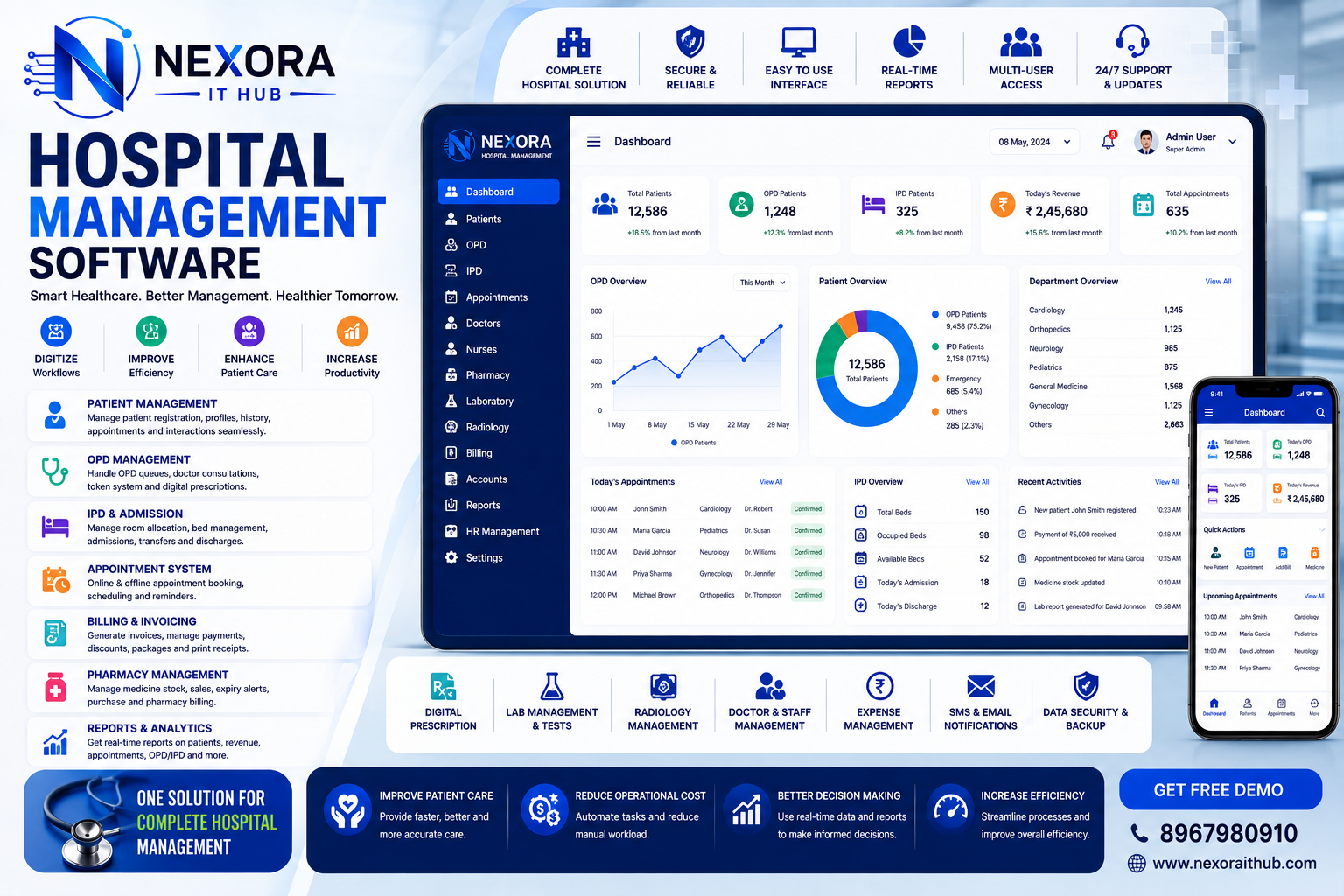
Hospital Management Software
Complete Hospital Management Software for Modern Healthcare Institutions
Managing patients, doctors, appointments, admissions, billing, pharmacy, laboratory services, medical records, staff, and hospital administration manually can be complex and time-consuming. Hospital Management Software (HMS) provides a centralized digital platform that helps hospitals organize their day-to-day operations, improve administrative efficiency, reduce paperwork, and provide a smoother experience for patients and healthcare staff.
Nexora IT Hub Hospital Management Software is a professional and customizable hospital management solution designed for hospitals, nursing homes, healthcare centers, and multi-department medical institutions. The system can bring patient management, doctor management, appointments, admissions, billing, pharmacy, laboratory, inventory, reports, and administration together in one platform.
What is Hospital Management Software?
Hospital Management Software is a digital healthcare management system used to manage the administrative and operational activities of a hospital or healthcare organization.
A professional Hospital Management System can include:
- Patient Management
- Doctor Management
- Appointment Management
- OPD Management
- IPD Management
- Emergency Management
- Admission Management
- Discharge Management
- Billing Management
- Pharmacy Management
- Laboratory Management
- Medical Records
- Prescription Management
- Bed Management
- Staff Management
- Inventory Management
- Blood Bank Management
- Insurance Management
- Reports & Analytics
- Notifications
- User Roles & Permissions
The exact modules can be customized according to the hospital's size, departments, workflow, and operational requirements.
Benefits of Hospital Management Software
1. Centralized Hospital Management
Hospital Management Software brings important hospital operations together in one centralized platform.
Administrators can manage:
- Patients
- Doctors
- Departments
- Appointments
- Admissions
- Beds
- Billing
- Pharmacy
- Laboratory
- Inventory
- Staff
- Reports
This can help hospitals create a more organized workflow and reduce dependence on disconnected manual records.
2. Reduce Paperwork
Healthcare organizations generate a large amount of documentation every day. Digital hospital management can reduce dependency on:
- Patient registers
- Appointment registers
- Billing records
- Admission forms
- Discharge records
- Pharmacy registers
- Laboratory records
- Inventory registers
- Manual reports
Digital records can make information easier to search, manage, and retrieve for authorized users.
3. Faster Patient Registration
A digital patient registration module can help reception staff create patient profiles quickly.
Patient information may include:
- Patient name
- Patient ID
- Contact information
- Address
- Date of birth
- Gender
- Emergency contact
- Medical information as appropriate
- Previous visit information
Once registered, the patient profile can be reused for future visits according to the hospital's workflow.
4. Efficient Appointment Management
Hospital Management Software can simplify appointment scheduling.
Reception staff can manage:
- Doctor availability
- Appointment slots
- Patient appointments
- Appointment status
- Department
- Consultation type
- Appointment history
Patients can also be provided with online appointment booking where required.
5. Better Patient Record Management
A centralized patient record system can help authorized healthcare staff access relevant patient information efficiently.
Depending on the implemented scope, records may include:
- Patient profile
- Visit history
- Doctor consultations
- Prescriptions
- Laboratory reports
- Diagnoses
- Procedures
- Billing history
- Admission history
Access to sensitive medical information should be controlled through appropriate permissions and security measures.
Hospital Management Software Features
1. Hospital Dashboard
A professional HMS dashboard can provide a quick overview of hospital activities.
Dashboard information may include:
- Total Patients
- Today's Appointments
- Today's Admissions
- Today's Discharges
- Available Beds
- Occupied Beds
- Doctors
- Staff
- Pending Bills
- Pharmacy Transactions
- Laboratory Tests
- Revenue Summary
Management can use dashboard analytics to monitor operational activity.
2. Patient Management
The patient management module maintains centralized patient profiles.
Features can include:
- Patient registration
- Patient ID generation
- Patient profile
- Contact details
- Emergency contact
- Visit history
- Appointment history
- Prescription history
- Medical records
- Billing history
The information displayed to each user can be restricted based on their role.
3. Doctor Management
Hospitals can maintain detailed doctor profiles.
Doctor information may include:
- Doctor name
- Doctor ID
- Department
- Specialization
- Qualification
- Experience
- Consultation schedule
- Availability
- Contact information
- Assigned appointments
The doctor schedule can be connected with appointment management.
4. Department Management
The system can manage multiple hospital departments.
Examples include:
- General Medicine
- Cardiology
- Orthopedics
- Pediatrics
- Dermatology
- Gynecology
- ENT
- Neurology
- Radiology
- Pathology
Departments can be connected with doctors, appointments, patients, laboratory services, and billing workflows.
5. OPD Management
The OPD module can manage outpatient visits.
Features may include:
- Patient registration
- Doctor assignment
- Consultation
- Visit records
- Prescription
- Follow-up
- OPD billing
- Visit history
This can help streamline outpatient operations.
6. IPD Management
The IPD module can help hospitals manage admitted patients.
Features can include:
- Admission
- Ward allocation
- Bed allocation
- Doctor assignment
- Nursing information
- Treatment records
- Billing
- Discharge
- Admission history
IPD workflows can be customized according to hospital requirements.
7. Appointment Management
The appointment module can help manage doctor schedules and patient bookings.
Features may include:
- New appointment
- Doctor selection
- Department selection
- Date & time
- Appointment status
- Rescheduling
- Cancellation
- Appointment history
- Online appointment booking
8. Online Appointment Booking
A hospital website can be integrated with the appointment system.
Patients can potentially:
Select Department → Select Doctor → Choose Date → Choose Time → Submit Appointment
The hospital can then manage the appointment through the administration dashboard.
9. Emergency Management
Emergency departments require fast access to essential information.
An emergency module can help manage:
- Emergency patient registration
- Emergency admission
- Doctor assignment
- Initial records
- Bed allocation
- Billing
- Emergency reports
The workflow can be designed according to the hospital's operational procedures.
10. Bed & Ward Management
Hospitals can monitor bed availability across different wards.
The system can manage:
- Wards
- Rooms
- Beds
- Bed types
- Available beds
- Occupied beds
- Reserved beds
- Patient allocation
- Bed transfer
This can provide administrators with a clear overview of bed utilization.
11. Admission Management
The admission module can help staff manage inpatient admissions.
Features can include:
- Patient selection
- Admission date
- Department
- Doctor
- Ward
- Room
- Bed
- Admission type
- Attendant information
- Admission history
12. Discharge Management
The discharge module can organize patient discharge workflows.
Depending on the hospital's process, it may include:
- Patient information
- Admission details
- Treatment summary
- Doctor information
- Discharge date
- Billing status
- Follow-up information
- Discharge documentation
The system can generate relevant discharge documents according to the configured format.
13. Prescription Management
Authorized doctors can create and manage digital prescriptions.
Prescription information can include:
- Patient details
- Doctor details
- Medicine
- Dosage
- Frequency
- Duration
- Instructions
- Prescription date
Prescription functionality should be designed around the hospital's clinical workflow and applicable healthcare requirements.
14. Pharmacy Management
Hospital pharmacies can manage medicines and pharmacy inventory through an integrated module.
Features may include:
- Medicine management
- Medicine categories
- Purchase
- Sales
- Stock
- Batch numbers
- Expiry dates
- Supplier management
- Prescription-based billing
- Pharmacy reports
This helps hospitals maintain better visibility over medicine inventory.
15. Pharmacy Inventory Management
The pharmacy module can track:
- Available stock
- Low stock
- Expired medicines
- Batch numbers
- Purchase price
- Selling price
- Supplier
- Stock movement
Low-stock alerts can help staff identify medicines that require replenishment.
16. Laboratory Management
A Laboratory Information module can help hospitals manage diagnostic test workflows.
Features can include:
- Test management
- Test categories
- Patient test requests
- Sample collection
- Test status
- Result entry
- Laboratory reports
- Doctor access
- Billing
The exact laboratory workflow can be customized according to the facility.
17. Diagnostic Report Management
Laboratory reports can be stored and associated with patient records.
Reports may include:
- Patient information
- Test name
- Test date
- Test results
- Reference information where applicable
- Laboratory details
- Authorized report verification
Access should be restricted to authorized users.
18. Hospital Billing Management
The billing module can manage patient-related financial transactions.
Possible billing components include:
- Consultation
- OPD services
- IPD services
- Laboratory tests
- Pharmacy
- Room charges
- Bed charges
- Procedures
- Other hospital services
The exact billing structure can be configured according to hospital requirements.
19. Digital Billing & Receipts
The system can generate professional invoices and receipts.
Documents may include:
- Patient name
- Patient ID
- Service details
- Quantity
- Amount
- Discount where applicable
- Tax where applicable
- Payment status
- Receipt number
- Payment method
Digital receipts can be printed or shared according to the hospital's workflow.
20. Payment Management
The system can maintain payment information for patient transactions.
Payment statuses may include:
- Paid
- Partially Paid
- Pending
- Refunded where applicable
Payment records can include:
- Amount
- Payment date
- Payment method
- Transaction/reference number
- Outstanding amount
21. Insurance Management
Hospitals that handle insurance patients can include an insurance management module.
Features can include:
- Insurance provider
- Patient insurance information
- Policy information
- Claim records
- Claim status
- Documentation
- Insurance billing information
The exact workflow can be customized according to the hospital and insurer requirements.
22. Inventory Management
Hospital inventory management can track medical and non-medical supplies.
Inventory categories may include:
- Medicines
- Medical equipment
- Surgical supplies
- Consumables
- Laboratory supplies
- Office supplies
The system can manage:
- Stock
- Purchases
- Suppliers
- Stock transfers
- Stock adjustments
- Low-stock alerts
- Inventory reports
23. Supplier Management
Hospitals can maintain supplier records for medicines, equipment, and other supplies.
Supplier information may include:
- Supplier name
- Contact information
- Address
- Products supplied
- Purchase history
- Payment records
- Outstanding amounts
24. Staff Management
Hospital Management Software can maintain staff information.
Staff categories may include:
- Doctors
- Nurses
- Receptionists
- Pharmacists
- Laboratory staff
- Administrative staff
- Support staff
Staff profiles can include department, designation, contact information, joining date, attendance, and other relevant details.
25. Staff Attendance Management
The system can manage staff attendance according to hospital requirements.
Possible features include:
- Daily attendance
- Shift-based attendance
- Leave
- Attendance history
- Department-wise reports
Integration with compatible biometric systems can also be considered.
26. Shift Management
Hospitals operate across multiple shifts.
A shift management module can help administrators organize:
- Morning shift
- Evening shift
- Night shift
- Doctor schedules
- Nurse schedules
- Staff schedules
- Department schedules
Shift assignments can be connected with attendance and staff management.
27. Blood Bank Management
For hospitals operating blood bank services, a dedicated module can be developed.
Possible features include:
- Blood group
- Donor information
- Blood inventory
- Collection records
- Issue records
- Expiry tracking
- Blood availability
- Blood bank reports
This module should be configured according to applicable healthcare and regulatory requirements.
28. Ambulance Management
Hospitals can manage ambulance-related information.
Features may include:
- Ambulance details
- Driver information
- Availability
- Trip records
- Patient information
- Destination
- Emergency requests
- Ambulance reports
29. Medical Equipment Management
Hospitals can maintain records of medical equipment.
Information can include:
- Equipment name
- Equipment ID
- Department
- Purchase date
- Warranty
- Maintenance history
- Status
- Location
This can help hospitals organize equipment-related information.
30. Maintenance Management
The system can track maintenance activities for equipment and facilities.
Features may include:
- Maintenance schedules
- Service records
- Equipment status
- Maintenance requests
- Service providers
- Maintenance history
31. Reports & Analytics
A professional HMS can generate detailed operational reports.
Patient Reports
- Daily patients
- OPD patients
- IPD patients
- Department-wise patients
- Patient history
Appointment Reports
- Daily appointments
- Doctor-wise appointments
- Department-wise appointments
- Completed appointments
- Cancelled appointments
Billing Reports
- Daily revenue
- Service-wise billing
- Payment collection
- Pending payments
- Department-wise billing
Pharmacy Reports
- Medicine sales
- Medicine purchases
- Stock
- Expired medicines
- Low-stock medicines
Laboratory Reports
- Tests conducted
- Pending tests
- Completed tests
- Department-wise tests
32. Hospital Dashboard & Analytics
Management can monitor important hospital activities through visual dashboards.
Dashboard elements may include:
- Patient statistics
- Appointment statistics
- Bed occupancy
- Revenue summary
- Pharmacy stock
- Laboratory activity
- Doctor schedules
- Pending payments
Analytics can help management make informed operational decisions.
33. Patient Portal
A patient portal can provide access to permitted information.
Patients may be able to:
- Book appointments
- View appointments
- View prescriptions
- Access available reports
- View bills
- Check payment information
- Request services
- Update selected profile information
The exact functionality can be customized according to the hospital's policies.
34. Doctor Portal
Doctors can access their assigned activities through a dedicated portal.
Possible features include:
- Appointments
- Patient information
- Consultation records
- Prescriptions
- Laboratory reports
- Follow-up information
- Schedule
Access should be limited to authorized patient and clinical information.
35. Mobile-Friendly Hospital Management System
A responsive HMS can be designed for:
- Desktop
- Laptop
- Tablet
- Smartphone
Dedicated Android or iOS applications can also be developed for patients, doctors, staff, or administrators where required.
36. Cloud-Based Hospital Management Software
Cloud deployment can allow authorized users to access the system from multiple locations.
Potential benefits include:
- Remote access
- Centralized data
- Multi-user access
- Multi-branch management
- Centralized backup
- Scalable infrastructure
Because healthcare data is sensitive, cloud deployment should include appropriate security, access controls, encryption, backup, and compliance considerations.
37. Multi-Branch Hospital Management
Healthcare organizations operating multiple branches can manage different facilities through a centralized system.
Features may include:
- Multiple branches
- Branch-wise patients
- Branch-wise doctors
- Branch-wise appointments
- Branch-wise billing
- Branch-wise pharmacy
- Branch-wise inventory
- Centralized reports
38. Role-Based Access Control
Hospital systems contain sensitive patient and operational information. Role-based access can help ensure users only access the information necessary for their responsibilities.
Super Admin
Complete system administration.
Hospital Administrator
Manage hospital operations.
Doctor
Access assigned patient and clinical information.
Receptionist
Manage registrations and appointments.
Accountant
Manage billing and financial records.
Pharmacist
Manage pharmacy and medicine inventory.
Laboratory Staff
Manage assigned laboratory workflows.
Nurse/Staff
Access permitted patient-care information.
User permissions can be customized according to the hospital's organizational structure.
39. Data Security & Privacy
Healthcare information requires strong security controls.
A professional hospital management platform can incorporate:
- Secure authentication
- Role-based permissions
- Password protection
- Activity logs
- Data backups
- Access controls
- Secure database management
- Encrypted connections
- Controlled document access
Security and compliance requirements should be evaluated according to the hospital's location, applicable laws, regulations, and healthcare standards.
Why Choose Nexora IT Hub for Hospital Management Software?
Nexora IT Hub provides customized software development solutions designed around the operational requirements of healthcare organizations.
Customized Hospital Software
Build a Hospital Management System around your departments, workflows, services, users, and reporting requirements.
Professional UI/UX
A clean interface can help administrative and operational staff navigate the system efficiently.
Scalable Architecture
The system can be designed to support growing patients, doctors, departments, transactions, branches, and users.
Secure Access
Role-based access and authentication can help protect sensitive hospital information.
Powerful Reports
Generate customized patient, appointment, billing, pharmacy, laboratory, inventory, and operational reports.
Integration Ready
The platform can be designed to integrate with payment gateways, SMS, email, biometric systems, laboratory devices, accounting systems, and other compatible services.
Mobile Ready
Responsive web access and dedicated mobile applications can be developed according to requirements.
Ongoing Support
Technical maintenance and support can help keep the hospital's digital system reliable and aligned with changing operational needs.
Hospital Management Software for Different Healthcare Institutions
Hospitals
Manage patients, doctors, appointments, OPD, IPD, billing, pharmacy, laboratory, beds, staff, and reports.
Nursing Homes
Manage admissions, patients, doctors, billing, pharmacy, appointments, and medical records.
Multi-Specialty Hospitals
Manage multiple departments, doctors, appointments, patients, diagnostics, billing, pharmacy, and inventory.
Healthcare Centers
Manage patient registration, appointments, doctors, billing, reports, and communication.
Diagnostic Centers
Customize laboratory management, patient registration, test management, reports, billing, and inventory.
Customized Hospital Management Software Development
Every healthcare organization has different workflows. Nexora IT Hub can develop a customized Hospital Management System based on your operational requirements.
Possible modules include:
- Patient Management
- Doctor Management
- Department Management
- Appointment Management
- OPD Management
- IPD Management
- Emergency Management
- Admission Management
- Discharge Management
- Bed & Ward Management
- Pharmacy Management
- Laboratory Management
- Prescription Management
- Billing Management
- Insurance Management
- Inventory Management
- Blood Bank Management
- Ambulance Management
- Staff Management
- Attendance Management
- Shift Management
- Medical Equipment Management
- Patient Portal
- Doctor Portal
- Reports & Analytics
- Multi-Branch Management
- Mobile Application
- Payment Integration
- SMS/Email Integration
Additional modules can be added according to the healthcare organization's needs.
Advantages of Hospital Management Software
A professional Hospital Management System can help healthcare organizations:
- Reduce paperwork
- Centralize patient information
- Simplify appointments
- Improve registration workflows
- Manage OPD and IPD operations
- Monitor bed availability
- Organize doctor schedules
- Manage pharmacy inventory
- Manage laboratory workflows
- Simplify hospital billing
- Track payments
- Manage suppliers
- Monitor inventory
- Generate operational reports
- Improve internal communication
- Support multi-branch operations
- Improve administrative efficiency
Frequently Asked Questions
What is Hospital Management Software?
Hospital Management Software is a digital platform that helps healthcare organizations manage patients, doctors, appointments, admissions, billing, pharmacy, laboratory services, inventory, staff, and administrative operations.
Who can use Hospital Management Software?
Hospitals, nursing homes, healthcare centers, diagnostic centers, and other healthcare organizations can use customized Hospital Management Software.
Can the software manage OPD and IPD?
Yes. OPD and IPD management modules can be developed to support outpatient and inpatient workflows.
Can hospitals manage appointments online?
Yes. Online appointment booking can be integrated with the hospital website or patient portal.
Can Hospital Management Software manage pharmacy inventory?
Yes. Pharmacy management can include medicines, stock, purchases, suppliers, batch information, expiry dates, billing, and reports.
Can the system manage laboratory reports?
Yes. Laboratory management functionality can be developed for test requests, sample tracking, result entry, and report management.
Can the software manage hospital billing?
Yes. Billing can cover consultations, procedures, room/bed charges, laboratory services, pharmacy, and other configurable hospital services.
Can Hospital Management Software support multiple branches?
Yes. Multi-branch functionality can be developed for healthcare organizations operating multiple facilities.
Can the system be accessed from mobile devices?
Yes. A responsive web application can be accessed through smartphones and tablets. Dedicated mobile applications can also be developed.
Transform Healthcare Operations with Smart Hospital Management Software
Modern healthcare organizations need reliable digital systems to manage complex administrative and operational processes. A professional Hospital Management Software solution can help hospitals centralize patient information, manage appointments, streamline admissions and discharges, monitor beds, organize billing, manage pharmacy and laboratory operations, track inventory, and generate useful reports.
Whether you need Hospital Management Software, Hospital ERP Software, Patient Management Software, Clinic Management Software, Hospital Billing Software, Pharmacy Management Software, Laboratory Management Software, Doctor Appointment Software, or a fully Customized Hospital Management System, Nexora IT Hub can develop a professional solution based on your healthcare organization's requirements.
With the right technology, hospitals can reduce manual work, improve administrative efficiency, organize information more effectively, and create a smoother digital workflow for authorized staff and patients.
Build a Smarter Hospital with Nexora IT Hub
Choose a professional Hospital Management Software solution designed around your healthcare organization.
Nexora IT Hub – Professional Hospital Management & Healthcare Software Development Solutions.
📞 8967980910
🌐 www.nexoraithub.com