

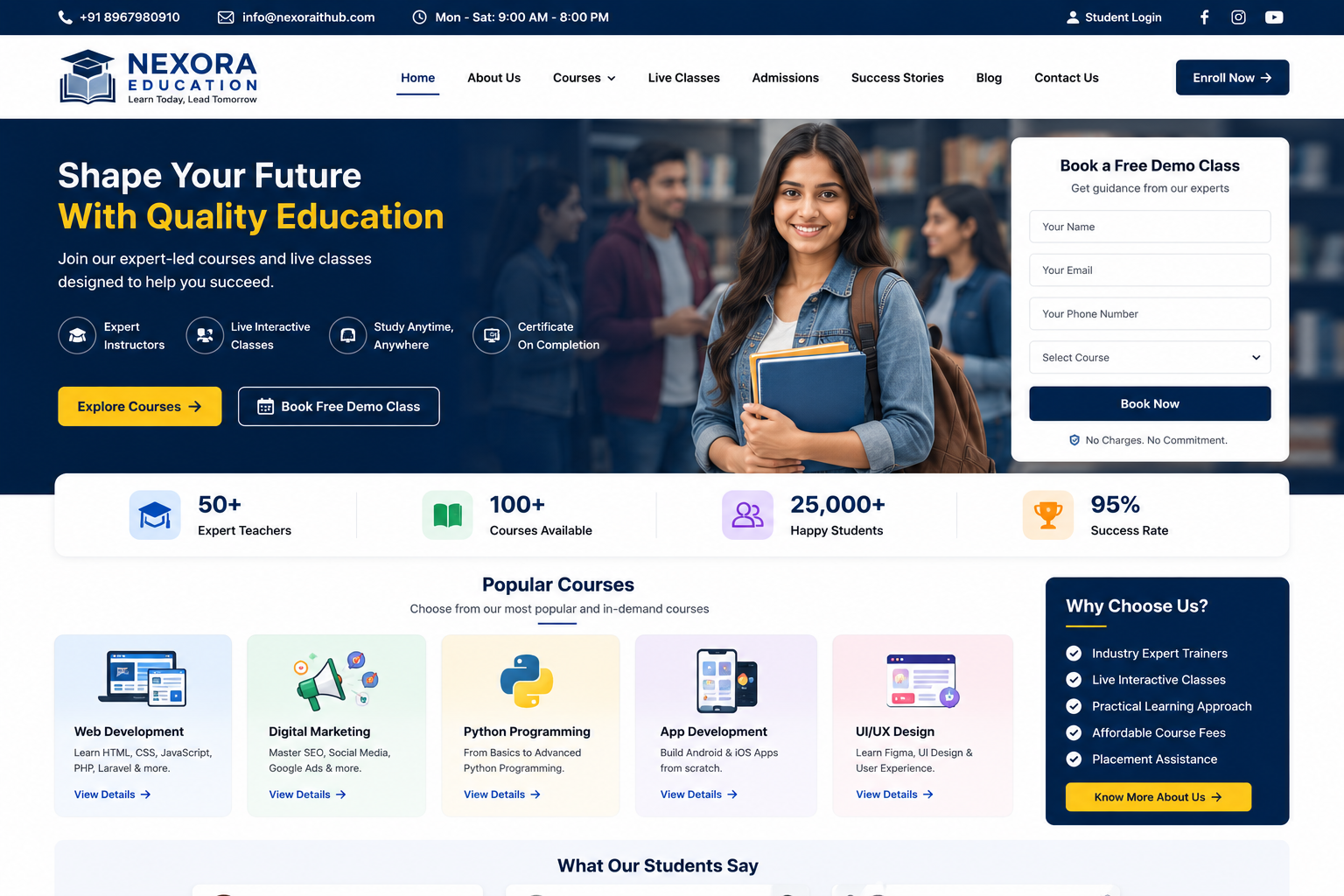
Education / Coaching Website
Education & Coaching Website Development
In today’s digital education industry, students and parents increasingly search online for schools, coaching institutes, courses, tutors, training programs, admission information, study materials, and educational services. A professional Education / Coaching Website helps institutions build credibility, showcase courses, attract students, manage enquiries, and provide important educational information from one centralized platform.
At Nexora IT Hub, we develop modern, responsive, secure, fast-loading, user-friendly, and SEO-friendly Education & Coaching Websites customized for schools, coaching institutes, training centers, tutors, educational consultants, online educators, skill-development institutes, competitive exam centers, and academic organizations.
A professional education website can include course listings, faculty profiles, admission forms, online registration, student enquiries, class schedules, study materials, notices, events, testimonials, results, galleries, blogs, FAQs, contact information, and a powerful admin panel.
Whether you operate a Coaching Institute, Tuition Center, Competitive Exam Institute, Skill Development Center, Computer Training Institute, Language Institute, Online Education Business, Academic Coaching Center, or Private Tutor Service, we can create a professional digital platform according to your requirements.
What Is an Education / Coaching Website?
An Education / Coaching Website is an online platform that provides students and parents with important information about an educational institution, coaching center, training institute, or tutor.
The website can showcase:
- Courses
- Subjects
- Classes
- Faculty
- Admission Information
- Course Fees
- Batch Timings
- Study Materials
- Results
- Student Achievements
- Notices
- Events
- Testimonials
- Gallery
- Blogs
- FAQs
- Contact Information
- Online Enquiry
- Registration
An advanced platform can also include student login, online classes, payment integration, attendance, assignments, online exams, certificates, learning management features, and student dashboards.
Why Does an Education / Coaching Business Need a Professional Website?
A professional education website can become the central digital platform for attracting students and communicating with parents.
Build Trust & Credibility
A well-designed website can present your institution, faculty, courses, results, achievements, and educational approach professionally.
Attract New Students
Students can discover your courses, coaching programs, and admission information through search engines and other digital channels.
Showcase Courses
Clearly display subjects, course duration, fees, eligibility, batch schedules, and course benefits.
Generate Admission Enquiries
Online enquiry and registration forms make it easier for prospective students to contact your institution.
Promote Results & Achievements
Showcase verified academic results, student achievements, awards, and success stories.
Reduce Manual Enquiries
Students and parents can find important information directly from the website.
Key Features of a Professional Education / Coaching Website
1. Modern & Professional Education Website Design
The website should create a trustworthy and student-friendly experience.
The design can include:
- Professional Logo
- Hero Banner
- Course Search
- Featured Courses
- About Institute
- Faculty Section
- Results
- Student Achievements
- Admission CTA
- Testimonials
- Events
- Gallery
- Blog
- Contact Section
The design can be customized according to your education brand.
2. Fully Responsive Design
Students and parents may access your website through smartphones, tablets, laptops, and desktops.
A responsive website provides a smooth experience across different screen sizes.
Visitors can easily:
- Explore Courses
- Check Fees
- View Faculty
- Submit Enquiries
- Register for Courses
- Read Notices
- Contact the Institute
3. Professional Homepage
The homepage can provide a complete overview of your educational organization.
Possible sections include:
- Hero Section
- Search Courses
- Popular Courses
- About Institute
- Why Choose Us
- Faculty
- Results
- Student Achievements
- Upcoming Batches
- Testimonials
- Events
- Latest News
- Blog
- Admission Enquiry
- Contact
Clear Apply Now, Enquire Now, or Book a Demo Class buttons can encourage visitors to take action.
4. Course Management
Create dedicated pages for every course.
Each course page can include:
- Course Name
- Course Overview
- Duration
- Fees
- Eligibility
- Subjects
- Syllabus
- Batch Timing
- Course Benefits
- Faculty
- Admission Information
- Enquiry Button
This makes course information easy for students to understand.
5. Course Categories
Organize courses into different categories.
Examples include:
- School Tuition
- Competitive Exams
- Entrance Exams
- Computer Courses
- Digital Marketing
- Programming
- Spoken English
- Professional Courses
- Skill Development
- Government Exam Preparation
Categories can be managed through the admin panel.
6. Course Detail Pages
Each course can have a dedicated SEO-friendly landing page.
For example:
Digital Marketing Course
The page can contain:
- Course Overview
- Modules
- Duration
- Fees
- Learning Outcomes
- Faculty
- Class Schedule
- Certification Information
- Student Reviews
- Admission Form
Dedicated course pages can also support targeted SEO.
7. Online Admission Enquiry
Students can submit admission enquiries directly through the website.
The form can collect:
- Student Name
- Parent Name
- Phone Number
- Course
- Class
- Preferred Batch
- Location
- Message
Enquiries can be managed through the admin dashboard.
8. Online Course Registration
Students can register for courses online.
The registration process may include:
- Select Course
- Enter Student Details
- Select Batch
- Submit Registration
- Receive Confirmation
The workflow can be customized according to the institution.
9. Online Payment Integration
If required, payment gateway integration can allow students to pay applicable course fees online.
Supported payment methods depend on the selected provider and may include:
- UPI
- Debit Card
- Credit Card
- Net Banking
- Other supported payment methods
Payment functionality should be implemented with appropriate security measures.
10. Student Login & Dashboard
An advanced education platform can provide students with personal accounts.
Students may be able to:
- View Courses
- Check Class Schedule
- Access Study Materials
- View Assignments
- Check Attendance
- Take Online Tests
- View Results
- Download Certificates
- Manage Profile
The exact features can be customized.
11. Online Classes
For institutions offering online education, the website can provide access to online classes.
Depending on requirements, the platform can integrate supported tools or meeting services.
Students can access:
- Live Classes
- Class Links
- Recorded Resources where offered
- Class Schedules
- Learning Materials
12. Study Material Management
Educational resources can be organized into a dedicated section.
Materials may include:
- PDF Notes
- E-books
- Practice Sheets
- Assignments
- Question Papers
- Study Guides
- Reference Materials
Access can be public or restricted to registered students.
13. Online Exam & Test System
An advanced coaching platform can provide online tests.
Features may include:
- Multiple Choice Questions
- Subject-Based Tests
- Mock Tests
- Timed Exams
- Automatic Evaluation
- Score Calculation
- Result Generation
This is especially useful for competitive exam preparation.
14. Assignment Management
Teachers can upload assignments and students can submit their work online.
The system can support:
- Assignment Title
- Instructions
- Deadline
- File Upload
- Submission Status
- Teacher Feedback
15. Faculty / Teacher Profiles
Showcase your teachers and academic experts.
A faculty profile can include:
- Teacher Name
- Profile Photo
- Qualification
- Experience
- Subject
- Specialization
- Short Biography
Professional faculty profiles can help students understand the teaching team.
16. Student Results
Showcase verified student achievements and results.
The results section can include:
- Exam Name
- Student Achievement
- Score
- Rank where applicable
- Year
- Course
- Achievement Details
Results should be displayed accurately and responsibly.
17. Student Success Stories
Share genuine student experiences.
A success story can include:
- Student Name where permitted
- Course
- Achievement
- Student Experience
- Testimonial
- Photo where appropriate
Proper consent should be obtained before publishing personal information or images.
18. Testimonials
Display genuine feedback from students and parents.
Testimonials can include:
- Name
- Course
- Review
- Rating
- Photo where permitted
Authentic testimonials can help build trust.
19. Batch Schedule
Display upcoming and ongoing batches.
Information can include:
- Course
- Batch Name
- Start Date
- Class Time
- Days
- Mode
- Seats where applicable
Students can quickly identify suitable batches.
20. Admission Open Section
Promote upcoming admissions prominently.
Examples include:
- New Batch Starting Soon
- Admission Open
- Limited Seats
- New Course Launch
- Early Registration
Information should be accurate and updated regularly.
21. Notice Board
Create a digital notice board for students and parents.
Notices may include:
- Exam Dates
- Class Updates
- Holiday Notices
- Admission Announcements
- Result Updates
- Event Announcements
- Schedule Changes
Notices can be managed through the admin panel.
22. Events Management
Showcase educational events such as:
- Seminars
- Workshops
- Webinars
- Career Counselling
- Parent Meetings
- Orientation Programs
- Competitions
- Annual Events
Each event can have its own information page.
23. Online Event Registration
Students can register for selected events through an online form.
The form can collect:
- Name
- Phone
- Course
- Number of Participants
- Message
Registration data can be managed through the admin panel.
24. Educational Blog
A blog can attract students searching for educational information.
Possible topics include:
- Exam Preparation Tips
- Study Techniques
- Career Guidance
- Course Guides
- Educational Updates
- Interview Preparation
- Skill Development
- Learning Resources
- Student Motivation
Useful original content can support long-term SEO growth.
25. FAQ Section
Create a dedicated FAQ section to answer common questions.
Examples:
- What courses do you offer?
- What are the course fees?
- What is the course duration?
- When does the next batch start?
- Are online classes available?
- How can I register?
- Do you provide study materials?
FAQs can improve user experience and may support relevant search visibility when properly implemented.
26. Career Counselling Section
Educational organizations can offer career guidance services.
The section can include:
- Career Guidance
- Course Selection
- Skill Assessment
- Academic Counselling
- Career Planning
- Higher Education Guidance
A counselling enquiry form can capture prospective student leads.
27. Download Section
Create a dedicated download area for useful resources.
Students may access:
- Prospectus
- Course Brochure
- Syllabus
- Application Form
- Timetable
- Notices
- Study Materials
- Result Documents
Access can be public or restricted according to requirements.
28. Gallery
Showcase the institute's environment and activities.
Gallery categories can include:
- Classroom
- Campus
- Events
- Seminars
- Workshops
- Student Activities
- Faculty
- Achievements
High-quality images can improve the visual presentation of the institution.
29. Video Gallery
Video content can help prospective students understand your teaching environment.
Videos can include:
- Institute Introduction
- Classroom Sessions
- Faculty Introduction
- Student Testimonials
- Seminar Highlights
- Course Introduction
- Educational Videos
30. WhatsApp Integration
A WhatsApp button can provide a quick communication option for students and parents.
They can ask about:
- Courses
- Fees
- Admissions
- Batch Timings
- Demo Classes
- Online Classes
31. Contact & Enquiry Management
All enquiries can be collected and managed through the admin panel.
The system can organize:
- New Enquiries
- Course Enquiries
- Admission Leads
- Counselling Requests
- Follow-Ups
This can help the admissions team manage prospective students more efficiently.
32. CRM Integration
For larger educational organizations, the website can integrate with a CRM system.
Lead information can include:
- Student Details
- Course Interest
- Lead Source
- Follow-Up Status
- Counsellor
- Admission Status
This can help streamline the admission process.
33. SEO-Friendly Education Website
A professional education website can include important SEO foundations such as:
- SEO-Friendly URLs
- Unique Page Titles
- Meta Descriptions
- Proper Heading Structure
- Image Alt Text
- Internal Linking
- XML Sitemap
- Mobile Optimization
- Structured Data where appropriate
- Fast Loading Pages
SEO provides a strong foundation for search visibility, but rankings depend on competition, content quality, authority, technical factors, and other signals.
34. Local SEO for Coaching Institutes
Local SEO can help students discover coaching centers in relevant locations.
Examples:
- Coaching Institute in Kolkata
- Computer Training Institute in Kalyani
- Digital Marketing Course in West Bengal
- Competitive Exam Coaching in Kolkata
Location pages should contain genuinely useful information rather than repetitive location keywords.
35. Course-Based SEO
Each major course can have its own optimized page.
Examples:
- Digital Marketing Course
- Web Development Course
- Spoken English Course
- Computer Course
- Programming Course
- Competitive Exam Coaching
This allows each page to target a specific search intent.
36. Google Map Integration
If the institute operates from a physical location, a map can help students find the center.
The contact page can include:
- Address
- Map
- Directions
- Phone
- Working Hours
37. Social Media Integration
Connect the institution's official social media channels.
Possible platforms include:
- YouTube
Social media can promote:
- New Courses
- Results
- Student Achievements
- Events
- Educational Tips
- Admission Updates
38. Email Notifications
Automated emails can be configured for:
- Registration Confirmation
- Admission Enquiry
- Course Registration
- Payment Confirmation
- Class Updates
- Exam Notifications
- Result Updates
39. Admin Dashboard
A powerful admin panel can allow authorized staff to manage:
- Courses
- Students
- Teachers
- Batches
- Admissions
- Enquiries
- Study Materials
- Exams
- Results
- Events
- Notices
- Blogs
- Gallery
- Testimonials
- Payments
- Website Content
40. Secure & Scalable Development
Educational websites may store student, parent, teacher, and payment-related information.
Security-conscious development can include:
- HTTPS/SSL
- Secure Login
- Role-Based Access
- Input Validation
- Secure Password Handling
- Database Protection
- Regular Backups
- Software Updates
The platform can also be designed to scale as student numbers, courses, and content grow.
Benefits of a Professional Education / Coaching Website
1. Attract More Students
Make your courses and educational services discoverable online.
2. Generate Admission Leads
Online enquiry forms can capture prospective student information.
3. Build Trust
Showcase faculty, results, achievements, testimonials, and educational facilities.
4. Promote Courses 24/7
Students can explore courses, fees, schedules, and admission information anytime.
5. Improve Student Communication
Notices, schedules, blogs, events, and announcements can be published in one place.
6. Reduce Manual Work
Online forms and dashboards can simplify admission and enquiry management.
7. Support Online Education
Integrate online classes, study materials, tests, assignments, and student dashboards where required.
8. Improve Local Visibility
SEO and local search optimization can help prospective students discover your institute.
9. Strengthen Your Education Brand
A professional digital presence can differentiate your institute from competitors.
10. Scale Your Education Business
Add new courses, batches, teachers, students, locations, and digital learning features as your organization grows.
Education / Coaching Website Development Process
1. Requirement Analysis
We understand your institution, courses, students, faculty, admission process, learning model, and required features.
2. Website Planning
We plan the website structure, course categories, admission flow, student sections, faculty pages, and content architecture.
3. UI/UX Design
We create a clean, modern, professional, and student-friendly interface.
4. Website Development
The approved design is developed into a responsive and functional platform.
5. Content Integration
Courses, faculty, batches, results, notices, events, gallery, and other content are integrated.
6. Feature Integration
Admission forms, online payments, student login, study materials, tests, and other required features are implemented.
7. SEO Setup
Technical and on-page SEO foundations are configured.
8. Testing
The website is tested across mobile, tablet, laptop, and desktop devices.
Forms, registration, login, course pages, payments, downloads, and other functionality are reviewed.
9. Security & Performance Review
The website is reviewed for appropriate security and performance practices.
10. Launch
After final approval, the website is deployed to the selected domain and hosting environment.
11. Maintenance & Support
Ongoing technical support, security updates, content changes, performance improvements, and future development can be provided.
SEO Strategy for Education & Coaching Websites
A successful education SEO strategy should focus on courses, subjects, locations, student intent, educational resources, and useful content.
Course SEO
Create dedicated pages for important courses.
Location SEO
Target areas where the institution actually provides services.
Subject SEO
Create useful pages for relevant subjects and learning programs.
Admission SEO
Publish accurate admission information and upcoming batch details.
Educational Blog SEO
Create useful content around:
- Exam Preparation
- Study Tips
- Career Guidance
- Course Selection
- Learning Resources
- Skill Development
Local SEO
Optimize your Google Business Profile and website location information where applicable.
Technical SEO
Maintain:
- Mobile-Friendly Design
- Fast Loading
- Clean URLs
- XML Sitemap
- Internal Linking
- Secure HTTPS
- Structured Data where appropriate
- Accessible Content
Why Choose Nexora IT Hub for Education / Coaching Website Development?
At Nexora IT Hub, we develop professional digital solutions for educational institutions, coaching centers, tutors, training organizations, and online educators.
Professional Education Design
Create a trustworthy and engaging website that communicates your courses and educational approach clearly.
Responsive Development
Provide a smooth experience across mobile, tablet, laptop, and desktop devices.
Admission & Lead Generation Features
Capture course enquiries, counselling requests, and admission leads through online forms.
Student Management Features
Add student dashboards, study materials, assignments, exams, results, and other learning features according to requirements.
SEO-Friendly Architecture
Build a strong technical and content foundation for long-term search optimization.
Secure Development
Use security-conscious practices for student accounts, forms, payments, and administrative access.
Scalable Platform
Start with a professional education website and expand it into a larger learning platform as your organization grows.
Easy Content Management
Manage courses, teachers, batches, students, notices, blogs, events, and website content through an admin panel.
Ongoing Technical Support
Receive support for maintenance, updates, improvements, and future development.
Build Your Education / Coaching Website with Nexora IT Hub
A professional Education / Coaching Website can transform the way your institute attracts students, communicates with parents, showcases courses, and manages educational information.
From course pages and faculty profiles to admission enquiries, online registration, student dashboards, study materials, online tests, results, notices, events, blogs, testimonials, galleries, and SEO-friendly content, everything can be brought together into one powerful digital platform.
At Nexora IT Hub, we develop professional, modern, responsive, secure, fast-loading, user-friendly, and SEO-friendly Education & Coaching Websites customized according to your institution's requirements.
Whether you are launching a new coaching center, tuition institute, training academy, competitive exam center, skill-development institute, or online education business, we can create a scalable solution designed to help you attract more students, generate admission enquiries, build credibility, and grow your education brand online.
Teach Better. Reach More Students. Grow Your Education Brand.
Professional Design • Responsive • SEO-Friendly • Secure • Fast • Scalable • Easy to Manage