

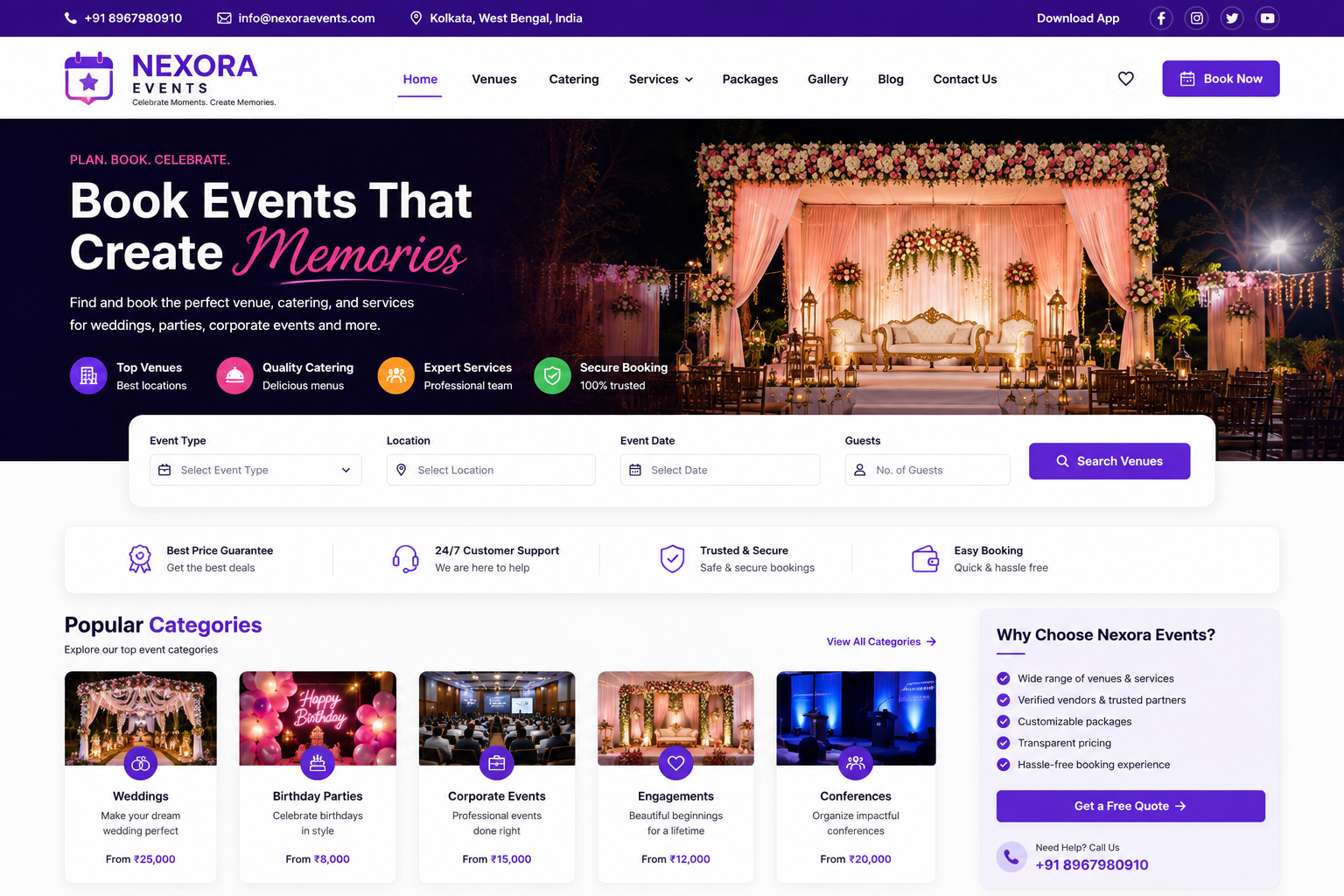
Event Booking Website
Event Booking Website Development
A professional Event Booking Website provides a powerful digital platform for event organizers, businesses, venues, event management companies, conference organizers, entertainment companies, and individual event hosts to promote events, manage registrations, sell tickets, and connect with attendees online.
At Nexora IT Hub, we develop modern, responsive, secure, fast-loading, user-friendly, and SEO-friendly Event Booking Websites customized according to your event business model. Whether you organize corporate events, conferences, seminars, workshops, concerts, exhibitions, cultural programs, entertainment events, webinars, networking events, sports events, or private functions, we can create a professional platform to manage your complete event booking process.
A professional event booking website can include Event Listings, Event Categories, Advanced Search, Event Details, Online Registration, Ticket Booking, Online Payments, Multiple Ticket Types, Seat Selection, Booking Confirmation, QR Code Tickets, Attendee Management, Organizer Dashboard, Venue Information, Event Calendar, Coupons, Featured Events, Notifications, Reviews, Blogs, and Admin Management.
What Is an Event Booking Website?
An Event Booking Website is an online platform that allows visitors to discover events, view event information, register for events, purchase tickets, and receive booking confirmations.
Event organizers can use the platform to:
- Create Events
- Publish Event Details
- Manage Tickets
- Set Ticket Prices
- Track Bookings
- Manage Attendees
- Promote Events
- View Revenue Reports
- Send Notifications
Customers can:
- Search Events
- Filter Events
- View Event Details
- Select Tickets
- Make Payments
- Receive Booking Confirmation
- Download Tickets
- Access QR Codes
- View Booking History
An advanced platform can also support multiple organizers, multiple venues, recurring events, discount coupons, seat maps, event reviews, and organizer subscriptions.
Why Does Your Business Need an Event Booking Website?
The event industry depends heavily on visibility, registrations, ticket sales, and attendee management. A professional website can bring these activities together in one digital platform.
Increase Event Visibility
Showcase upcoming events and make them easier for potential attendees to discover.
Simplify Event Registration
Allow customers to register or purchase tickets online without manual processing.
Sell Tickets Online
Provide convenient online ticket booking and payment options.
Reduce Manual Work
Automate booking confirmations, ticket generation, attendee management, and notifications.
Build Your Event Brand
Create a professional online presence for your event company or organization.
Manage Multiple Events
Manage different events, venues, ticket types, and attendees from one platform.
Key Features of a Professional Event Booking Website
1. Modern & Professional Design
An event website should create an engaging experience while making event discovery and booking simple.
The website can include:
- Professional Homepage
- Event Search
- Featured Events
- Upcoming Events
- Popular Events
- Event Categories
- Event Calendar
- Venue Information
- Organizer Information
- Ticket Booking
- Registration CTA
- Testimonials
- Gallery
- Blog
- Contact Section
The complete design can be customized according to your brand identity.
2. Fully Responsive Website
Many customers discover and book events using smartphones.
A responsive website works smoothly across:
- Smartphones
- Tablets
- Laptops
- Desktop Computers
Visitors can search events, view ticket information, register, and complete bookings from different devices.
3. Professional Homepage
The homepage can provide a complete overview of your event platform.
Possible sections include:
- Search Events
- Upcoming Events
- Featured Events
- Popular Categories
- Events Near You
- Event Calendar
- Top Organizers
- Special Offers
- Latest Events
- Testimonials
- Blog
- Newsletter
- Contact
A clear Book Now or Get Tickets button can guide visitors toward conversion.
4. Event Categories
Organize events into relevant categories.
Examples include:
- Conferences
- Seminars
- Workshops
- Concerts
- Exhibitions
- Cultural Events
- Corporate Events
- Sports Events
- Networking Events
- Entertainment
- Webinars
- Educational Events
- Community Events
Categories can be managed through the admin panel.
5. Advanced Event Search
Visitors can quickly find suitable events using search functionality.
Search options can include:
- Event Name
- Keyword
- Category
- Location
- Date
- Organizer
- Venue
Advanced search helps users find relevant events more efficiently.
6. Event Filters
Users can filter events by:
- Date
- Location
- Category
- Price
- Event Type
- Online / Offline
- Free / Paid
- Organizer
Filters can be customized according to the event platform.
7. Event Detail Page
Every event can have a dedicated page containing:
- Event Name
- Event Description
- Date
- Start Time
- End Time
- Venue
- Location
- Organizer
- Event Images
- Event Videos
- Ticket Types
- Ticket Prices
- Available Seats
- Terms & Conditions
- Booking Button
A detailed event page helps attendees make informed booking decisions.
8. Online Event Registration
Customers can register for free or paid events online.
The registration process can include:
- Select Event
- Select Ticket
- Enter Attendee Details
- Review Booking
- Make Payment where applicable
- Receive Confirmation
The registration workflow can be customized according to event requirements.
9. Online Ticket Booking
Customers can purchase tickets directly from the website.
The system can support different ticket categories such as:
- General
- Standard
- Premium
- VIP
- Early Bird
- Student
- Corporate
- Group Tickets
Ticket availability can be updated based on successful bookings.
10. Multiple Ticket Types
Organizers can create different ticket packages.
Each ticket can have:
- Ticket Name
- Price
- Quantity
- Sale Start Date
- Sale End Date
- Description
- Benefits
- Availability
This provides flexibility for different event pricing models.
11. Seat Selection
For events with assigned seating, an advanced booking system can provide seat selection.
Customers can:
- View Seat Layout
- Select Available Seats
- See Occupied Seats
- Select Multiple Seats
- Complete Booking
Seat maps can be customized according to the venue.
12. Online Payment Integration
Payment gateway integration can allow customers to complete ticket purchases online.
Depending on the selected payment provider, payment methods may include:
- UPI
- Debit Card
- Credit Card
- Net Banking
- Other Supported Methods
Payment processing should follow appropriate security requirements.
13. Booking Confirmation
After successful registration or payment, customers can receive booking confirmation.
Confirmation can include:
- Booking ID
- Event Name
- Date
- Time
- Venue
- Ticket Type
- Quantity
- Payment Status
- Attendee Information
Confirmation can be displayed on-screen and/or delivered through supported communication channels.
14. Digital Ticket
The platform can generate digital event tickets.
Tickets may include:
- Event Name
- Attendee Name
- Ticket Type
- Booking ID
- Date
- Venue
- QR Code
Digital tickets make event check-in more efficient.
15. QR Code Ticket
Each booking can generate a unique QR code.
At the venue, authorized staff can scan the QR code to verify tickets.
This can help with:
- Entry Verification
- Duplicate Ticket Prevention
- Attendee Check-In
- Attendance Tracking
QR validation should be implemented securely.
16. Attendee Management
Organizers can manage registered attendees through the dashboard.
Possible information includes:
- Attendee Name
- Phone
- Ticket Type
- Booking ID
- Payment Status
- Check-In Status
This can make event management more organized.
17. Event Check-In System
An event management dashboard can provide attendee check-in functionality.
Authorized staff can:
- Scan QR Codes
- Verify Tickets
- Mark Attendance
- View Check-In Status
- Monitor Attendance
This is particularly useful for large events.
18. Organizer Registration
Event organizers can register and create profiles.
Registration can include:
- Organizer Name
- Organization
- Phone
- Website
- Description
- Logo
- Location
Administrators can approve organizer accounts where required.
19. Organizer Dashboard
Organizers can manage events through a dedicated dashboard.
Possible features include:
- Create Events
- Edit Events
- Manage Tickets
- View Bookings
- Manage Attendees
- Track Sales
- View Reports
- Update Organizer Profile
20. Multi-Organizer Event Marketplace
An advanced platform can support multiple event organizers.
Each organizer can:
- Create Events
- Sell Tickets
- Manage Bookings
- View Attendees
- Track Revenue
The administrator can manage all organizers and events from the main dashboard.
21. Event Calendar
A calendar view can help visitors discover upcoming events.
Users can browse events by:
- Day
- Week
- Month
- Event Category
This is particularly useful when many events are listed on the platform.
22. Location-Based Event Search
Visitors can discover events based on location.
Examples:
- Events in Kolkata
- Events in Delhi
- Events in Mumbai
- Events in Bangalore
- Events in Hyderabad
Location-based pages can also support local SEO when they contain useful, unique information.
23. Online & Offline Events
The platform can support different event formats.
Offline Events
Display:
- Venue
- Address
- Map
- Directions
- Entry Information
Online Events
Display:
- Online Event Details
- Meeting or Streaming Information
- Access Instructions
- Start Time
Access links should only be provided to authorized registrants where appropriate.
24. Recurring Events
Organizers can create recurring events.
Examples:
- Weekly Workshops
- Monthly Seminars
- Regular Training Sessions
- Recurring Classes
Recurring event functionality can reduce repetitive event creation.
25. Featured Events
Selected events can receive prominent placement.
Featured events may appear on:
- Homepage
- Featured Section
- Category Pages
- Search Results
This feature can be part of a paid organizer package if desired.
26. Event Promotions
Promote upcoming events using:
- Homepage Banners
- Featured Listings
- Promotional Sections
- Social Media Integration
- Email Notifications
Promotional content can be managed through the admin panel.
27. Coupon & Discount System
An event platform can provide promotional coupon functionality.
Coupons may include:
- Percentage Discount
- Fixed Discount
- Early Bird Offer
- Student Discount
- Group Discount
- Limited-Time Offer
Rules can be configured according to your business requirements.
28. Early Bird Tickets
Organizers can offer discounted tickets for early bookings.
The system can automatically apply pricing based on configured dates or ticket availability.
29. Group Booking
Allow users to book multiple tickets for a group.
Group booking can be useful for:
- Corporate Events
- Conferences
- Workshops
- Educational Events
- Community Programs
30. Booking History
Registered users can view their previous and upcoming bookings.
The dashboard can show:
- Event Name
- Booking Date
- Ticket Type
- Quantity
- Amount
- Booking Status
- Payment Status
- Ticket
31. Cancellation & Refund Management
Where applicable, event organizers can define cancellation and refund policies.
The platform can manage:
- Cancellation Requests
- Booking Status
- Refund Status
- Refund Rules
Refund processing should follow the organizer's published terms and the payment provider's capabilities.
32. Event Reviews & Ratings
Attendees can optionally submit reviews after attending an event.
Reviews can include:
- Rating
- Feedback
- Event Experience
- Organizer Experience
Administrators can moderate reviews to maintain quality.
33. Event Gallery
Showcase event images through dedicated galleries.
Examples include:
- Previous Events
- Concerts
- Conferences
- Workshops
- Exhibitions
- Corporate Events
High-quality visuals can help promote future events.
34. Event Video Gallery
Add videos such as:
- Event Highlights
- Promotional Videos
- Speaker Sessions
- Interviews
- Previous Event Clips
Video content can help visitors understand the event experience.
35. Speaker & Guest Profiles
For conferences, seminars, and workshops, create dedicated speaker profiles.
Profiles can include:
- Name
- Photo
- Designation
- Organization
- Biography
- Expertise
- Session Details
This can increase the informational value of event pages.
36. Venue Management
Organizers can provide detailed venue information.
A venue page can include:
- Venue Name
- Address
- Map
- Capacity
- Facilities
- Parking Information
- Accessibility Information
- Event Schedule
37. Event Sponsors
Showcase event sponsors and partners.
The section can include:
- Sponsor Logo
- Sponsor Name
- Website
- Sponsorship Category
Sponsor information should be kept current and accurate.
38. Email & Notification System
Automated notifications can be configured for:
- Registration Confirmation
- Payment Confirmation
- Booking Confirmation
- Event Reminder
- Event Updates
- Cancellation
- Ticket Information
Notifications can be sent through supported email or messaging services.
39. Event Reminder
Automated reminders can help reduce missed events.
Reminders can be scheduled before the event, such as:
- 7 Days Before
- 24 Hours Before
- 1 Hour Before
Timing can be customized.
40. Admin Dashboard
A powerful admin dashboard provides centralized control over the event platform.
Administrators can manage:
- Events
- Organizers
- Attendees
- Tickets
- Bookings
- Payments
- Venues
- Categories
- Coupons
- Reviews
- Sponsors
- Reports
- Pages
- Blogs
- Gallery
- Users
- Website Settings
Benefits of a Professional Event Booking Website
1. Increase Event Bookings
Make it easier for attendees to discover and book events online.
2. Sell Tickets 24/7
Allow customers to purchase tickets whenever they want.
3. Reduce Manual Registration
Automate event registration and booking management.
4. Improve Attendee Experience
Provide convenient search, ticket booking, digital tickets, and booking history.
5. Manage Multiple Events
Organize different events from one centralized platform.
6. Improve Event Promotion
Use featured events, SEO, social media, email, and promotional tools.
7. Simplify Event Check-In
QR code tickets can make attendee verification faster.
8. Build Your Event Brand
Create a professional digital identity for your event business.
9. Generate Revenue
Possible revenue models include ticket commissions, organizer subscriptions, featured events, promotional listings, and other legitimate platform services.
10. Scale Your Business
A scalable platform can support additional organizers, venues, events, categories, and users as the business grows.
Event Booking Website Development Process
1. Requirement Analysis
We understand your event types, booking process, ticketing model, organizers, venues, payment requirements, and business goals.
2. Website Planning
We plan the event structure, categories, search, booking flow, organizer dashboard, attendee system, and admin management.
3. UI/UX Design
We create a modern and user-friendly interface focused on event discovery and booking.
4. Website Development
The approved design is converted into a responsive and functional event booking platform.
5. Booking & Ticket Integration
Event registration, ticketing, payment, digital tickets, QR codes, and attendee management are implemented according to requirements.
6. Dashboard Development
Organizer, attendee, and administrator dashboards are developed.
7. SEO Setup
Technical and on-page SEO foundations are configured for event, category, organizer, and location pages.
8. Testing
The platform is tested across mobile, tablet, laptop, and desktop devices.
Booking, registration, payment, ticket generation, QR codes, notifications, and other functionality are reviewed.
9. Security & Performance Review
The website is reviewed for appropriate security and performance practices.
10. Launch
After final approval, the platform is deployed to the selected domain and hosting environment.
11. Maintenance & Support
Ongoing technical support, security updates, performance optimization, and future feature development can be provided.
SEO Strategy for Event Booking Websites
A strong Event Booking SEO strategy should focus on event names, event types, locations, dates, venues, organizers, and useful event-related content.
Event-Based SEO
Create dedicated pages for individual events with clear information.
Location-Based SEO
Create useful location pages such as:
- Events in Kolkata
- Events in Delhi
- Events in Mumbai
Category SEO
Optimize pages for relevant categories:
- Conference Events
- Concert Events
- Workshop Events
- Seminar Events
- Corporate Events
Venue SEO
Create useful venue information pages where applicable.
Event Blog SEO
Publish useful content such as:
- Upcoming Events
- Event Guides
- Conference Tips
- Event Planning Tips
- Local Event Guides
Technical SEO
Maintain:
- Mobile-Friendly Design
- Fast Loading
- Clean URLs
- XML Sitemap
- Internal Linking
- Secure HTTPS
- Appropriate Event Structured Data
- Accessible Content
Structured data should be used only where the event page meets applicable search-engine requirements.
Why Choose Nexora IT Hub for Event Booking Website Development?
At Nexora IT Hub, we develop professional digital platforms for event organizers, businesses, agencies, venues, and entrepreneurs.
Professional Event Website Design
Create an engaging and conversion-focused platform for discovering and booking events.
Online Ticket Booking
Integrate ticket categories, booking workflows, payments, digital tickets, and QR codes.
Organizer Dashboard
Allow organizers to manage events, tickets, bookings, attendees, and reports.
SEO-Friendly Architecture
Build a strong foundation for event, category, location, venue, and organizer SEO.
Secure Development
Use security-conscious practices for user accounts, bookings, payment processing, and administrative access.
Scalable Platform
Start with a simple event booking website and expand it into a multi-organizer marketplace when required.
Easy Management
Manage events, tickets, bookings, users, organizers, payments, content, and promotions from the admin panel.
Ongoing Support
Get technical support for maintenance, updates, improvements, and future development.
Build Your Event Booking Website with Nexora IT Hub
A professional Event Booking Website can simplify event discovery, registration, ticket sales, attendee management, and event promotion through one powerful digital platform.
From event listings and advanced search to online registration, ticket booking, multiple ticket types, seat selection, online payments, digital tickets, QR code check-in, organizer dashboards, attendee management, event calendars, coupons, reviews, venues, sponsors, and SEO-friendly event pages, everything can be integrated into a customized solution.
At Nexora IT Hub, we develop modern, responsive, secure, fast-loading, user-friendly, and SEO-friendly Event Booking Websites designed around your business requirements.
Whether you are launching an event management company website, conference booking platform, concert ticketing website, workshop registration platform, corporate event website, or multi-organizer event marketplace, we can create a scalable digital solution designed to help you increase event visibility, simplify bookings, improve attendee experience, and grow your event business online.
Discover Events. Book Tickets. Create Experiences.
Professional Design • Responsive • SEO-Friendly • Secure • Fast • Scalable • Easy to Manage