

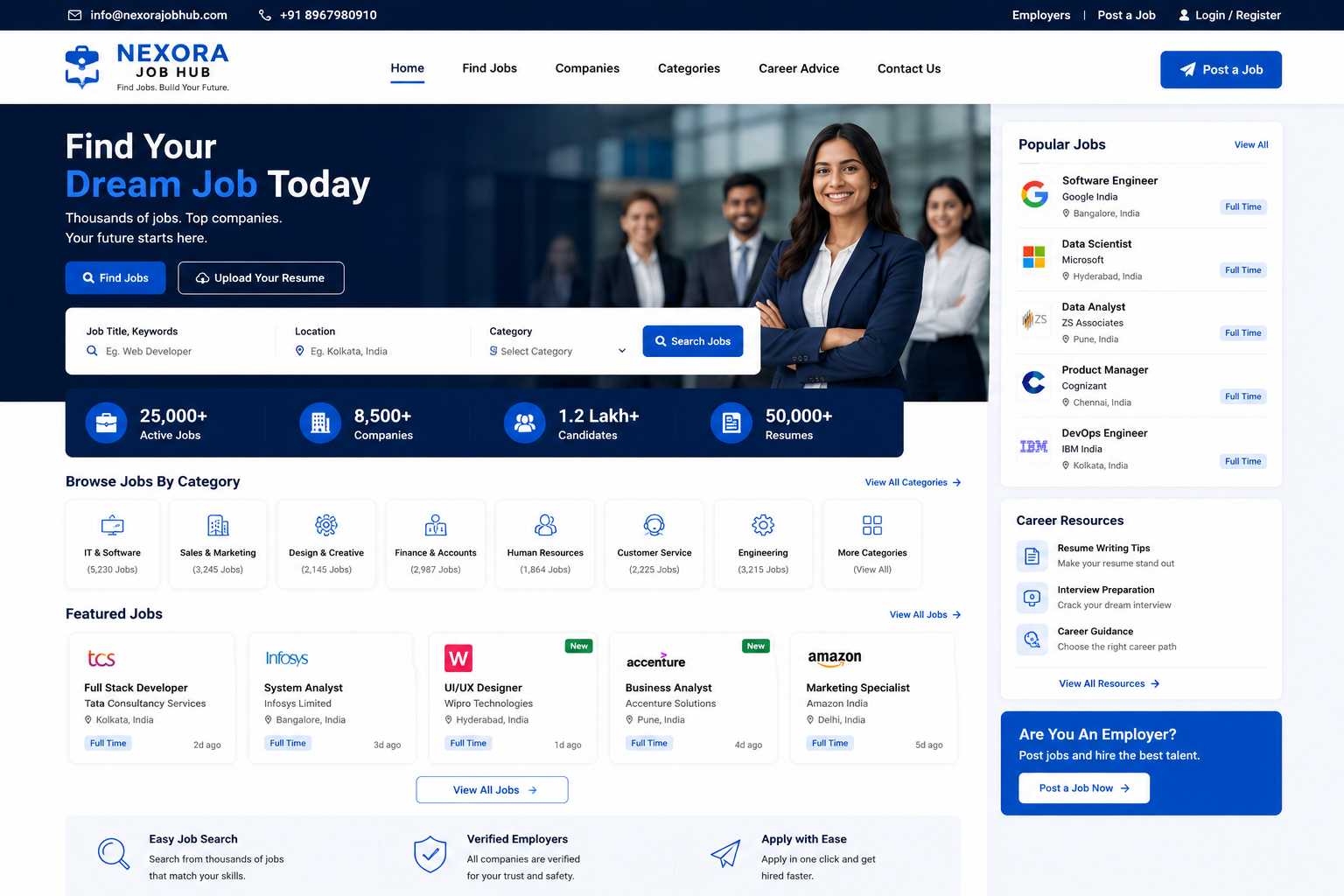
Job Portal Website
Job Portal Website Development
A professional Job Portal Website provides a powerful digital platform where employers can publish job vacancies and job seekers can discover suitable career opportunities, create profiles, upload resumes, apply for jobs, and manage their applications online.
At Nexora IT Hub, we develop modern, responsive, secure, fast-loading, user-friendly, and SEO-friendly Job Portal Websites customized for recruitment agencies, HR companies, employment platforms, staffing businesses, corporate organizations, educational institutions, and entrepreneurs launching their own recruitment marketplace.
A professional job portal can include Job Search, Advanced Filters, Job Posting, Employer Registration, Candidate Registration, Resume Upload, Candidate Profiles, Online Applications, Application Tracking, Recruiter Dashboard, Employer Dashboard, Admin Panel, Job Alerts, Email Notifications, Featured Jobs, Resume Database, Company Profiles, Salary Information, Location-Based Search, and SEO-Friendly Job Pages.
Whether you want to build a General Job Portal, Local Job Portal, IT Job Portal, Government Job Listing Platform, Recruitment Website, Freelance Job Portal, Internship Portal, Work-from-Home Job Portal, or Industry-Specific Recruitment Platform, we can create a scalable solution according to your business requirements.
What Is a Job Portal Website?
A Job Portal Website is an online recruitment platform that connects job seekers and employers.
Job seekers can:
- Search for jobs
- Create an account
- Build a profile
- Upload resumes
- Apply for vacancies
- Track applications
- Save jobs
- Set job alerts
Employers and recruiters can:
- Create company profiles
- Publish job vacancies
- Search candidates
- Review applications
- Shortlist candidates
- Manage recruitment activities
- Contact suitable applicants
Administrators can manage the complete platform through a centralized dashboard.
Why Does Your Business Need a Professional Job Portal?
The recruitment industry is increasingly digital. A professional job portal can simplify the process of connecting employers with potential candidates.
Connect Employers & Job Seekers
Create a centralized platform where companies can publish vacancies and candidates can discover relevant opportunities.
Increase Job Applications
A simple search and application process can make it easier for candidates to apply.
Generate Recruitment Leads
Recruitment companies can use the platform to attract employers and candidates.
Build a Recruitment Brand
A professional website can establish your organization as a reliable digital recruitment platform.
Automate Recruitment Management
Dashboards and application management features can reduce manual administrative work.
Create Multiple Revenue Opportunities
Depending on your business model, revenue options may include featured job listings, recruiter subscriptions, employer packages, resume access, advertisements, and other legitimate services.
Key Features of a Professional Job Portal Website
1. Modern & Professional Design
A job portal should provide a clean interface where users can quickly find jobs and recruitment information.
The website can include:
- Professional Header
- Job Search Bar
- Featured Jobs
- Latest Jobs
- Popular Categories
- Top Companies
- Location-Based Jobs
- Career Resources
- Employer Section
- Candidate Section
- Registration Buttons
- Login
- Footer
The design can be customized according to your brand.
2. Fully Responsive Design
Job seekers frequently use smartphones to search and apply for jobs.
A responsive job portal works across:
- Smartphones
- Tablets
- Laptops
- Desktop Computers
Candidates can search jobs, review descriptions, upload resumes, and submit applications from different devices.
3. Professional Homepage
The homepage can provide a complete overview of your recruitment platform.
Possible sections include:
- Search Jobs
- Latest Jobs
- Featured Jobs
- Popular Job Categories
- Jobs by Location
- Top Companies
- Work-from-Home Jobs
- Internship Opportunities
- Career Resources
- Employer Registration
- Candidate Registration
A clear search interface should remain one of the main elements of the homepage.
4. Advanced Job Search
Candidates can search for jobs using multiple criteria.
Search options can include:
- Job Title
- Keyword
- Company
- Location
- Salary
- Experience
- Job Type
- Industry
- Department
- Education
- Skills
Advanced search helps candidates find relevant vacancies more efficiently.
5. Job Filters
Users can filter job listings based on:
- Full-Time
- Part-Time
- Internship
- Contract
- Freelance
- Remote
- Work From Home
- On-Site
- Hybrid
Additional filters can be added according to the portal's requirements.
6. Job Category Management
Jobs can be organized into categories.
Examples include:
- IT & Software
- Sales & Marketing
- Finance & Accounting
- Human Resources
- Healthcare
- Education
- Engineering
- Customer Support
- Design
- Administration
- Construction
- Hospitality
- Retail
Categories can be managed through the admin panel.
7. Job Location Search
Candidates can search for jobs by location.
Examples include:
- Kolkata Jobs
- Delhi Jobs
- Mumbai Jobs
- Bangalore Jobs
- Hyderabad Jobs
- Chennai Jobs
- Pune Jobs
- Remote Jobs
Location-based job pages can also support local SEO.
8. Job Detail Page
Every vacancy can have a dedicated job detail page containing:
- Job Title
- Company Name
- Location
- Salary
- Experience
- Employment Type
- Department
- Required Skills
- Job Description
- Responsibilities
- Requirements
- Benefits
- Application Deadline
- Apply Now Button
A clear job description helps candidates understand the opportunity before applying.
9. Employer Registration
Companies can register on the platform and create employer accounts.
Registration can collect:
- Company Name
- Phone
- Industry
- Website
- Company Description
- Location
- Logo
Employer accounts can be reviewed or approved by administrators where required.
10. Company Profile Pages
Each employer can have a dedicated company profile.
The profile can display:
- Company Logo
- Company Name
- About Company
- Industry
- Location
- Website
- Open Positions
- Company Information
This allows candidates to learn more about employers before applying.
11. Employer Dashboard
Employers can manage recruitment activities through a dedicated dashboard.
Possible features include:
- Post Jobs
- Edit Jobs
- Manage Jobs
- View Applications
- Shortlist Candidates
- Reject Applications
- View Candidate Profiles
- Manage Company Profile
- Track Recruitment Activity
12. Job Posting System
Employers can publish vacancies through a structured job posting form.
The form can include:
- Job Title
- Job Category
- Location
- Salary
- Experience
- Job Type
- Skills
- Job Description
- Responsibilities
- Requirements
- Benefits
- Application Deadline
The admin can review and approve listings where required.
13. Candidate Registration
Job seekers can create accounts on the portal.
Candidate registration can include:
- Name
- Phone
- Location
- Education
- Experience
- Skills
- Job Preferences
Candidates can update their profiles whenever required.
14. Candidate Profile
A professional candidate profile can include:
- Profile Photo
- Professional Summary
- Skills
- Education
- Work Experience
- Certifications
- Languages
- Portfolio Links
- Resume
This allows employers to understand candidate qualifications.
15. Resume Upload
Candidates can upload their resumes.
Supported formats can be configured according to requirements, such as:
- DOC
- DOCX
The system can associate uploaded resumes with candidate profiles and applications.
16. Resume Builder
An optional resume builder can allow candidates to create professional resumes through predefined templates.
Users can enter:
- Personal Details
- Career Objective
- Education
- Experience
- Skills
- Certifications
- Projects
- Languages
The completed resume can be generated in a supported downloadable format.
17. Online Job Application
Candidates can apply directly through the website.
The application process may include:
- Open Job
- Review Details
- Click Apply
- Select Resume
- Add Cover Letter if required
- Submit Application
- Receive Confirmation
This provides a simple recruitment workflow.
18. Application Tracking
Candidates can track their applications from their dashboard.
Possible statuses include:
- Applied
- Under Review
- Shortlisted
- Interview
- Selected
- Rejected
- Withdrawn
Actual statuses depend on employer workflow.
19. Recruiter Application Management
Employers can manage received applications from their dashboard.
Recruiters can:
- View Applicants
- Review Resumes
- Shortlist Candidates
- Reject Candidates
- Add Notes
- Update Application Status
This can streamline recruitment operations.
20. Candidate Search
An advanced recruitment portal can provide candidate search functionality for employers.
Recruiters can search candidates based on:
- Skills
- Experience
- Location
- Education
- Job Role
- Industry
- Keywords
Access to candidate information should follow the platform's privacy rules and user permissions.
21. Job Alerts
Candidates can receive alerts for relevant vacancies.
Alerts can be based on:
- Job Title
- Skills
- Location
- Category
- Job Type
Notifications may be delivered through supported email or other communication services.
22. Email Notifications
Automated email notifications can be configured for:
- Account Registration
- Job Application
- Application Status
- New Job Alerts
- Employer Registration
- Job Approval
- Interview Updates
Email templates can be customized according to the platform's branding.
23. Interview Management
An advanced recruitment platform can include interview management.
Employers may be able to record:
- Interview Date
- Interview Time
- Interview Type
- Interview Status
- Interview Notes
Notifications can be sent to candidates where supported.
24. Saved Jobs
Candidates can save interesting vacancies for later.
A Saved Jobs section can help users return to jobs they want to review or apply for later.
25. Job Comparison
An advanced portal can allow candidates to compare selected job listings.
Comparison criteria may include:
- Salary
- Location
- Experience
- Job Type
- Company
- Benefits
This feature is particularly useful for large job marketplaces.
26. Featured Jobs
Employers can promote selected vacancies through featured placement.
Featured jobs can appear in:
- Homepage
- Search Results
- Category Pages
- Featured Jobs Section
Featured listings can be part of a paid employer package if desired.
27. Urgent Job Listings
Recruiters can highlight urgent hiring requirements.
Examples:
- Immediate Hiring
- Urgent Vacancy
- Walk-In Interview
- Hiring Now
The labels should be used accurately.
28. Work From Home Jobs
A dedicated section can showcase remote and work-from-home opportunities.
Candidates can filter jobs by:
- Remote
- Hybrid
- Work From Home
This can make remote opportunities easier to discover.
29. Internship Portal
A dedicated internship section can help students and fresh graduates discover opportunities.
Internship listings can include:
- Internship Title
- Company
- Duration
- Location
- Stipend where applicable
- Skills
- Eligibility
- Application Deadline
30. Fresher Jobs
Create a dedicated section for entry-level employment opportunities.
Categories may include:
- Freshers Jobs
- Graduate Jobs
- Entry-Level Jobs
- Trainee Jobs
This can help new candidates find relevant opportunities.
31. Government Job Section
If your platform covers public-sector recruitment information, a dedicated section can organize relevant listings.
It can include:
- Job Title
- Organization
- Eligibility
- Application Dates
- Exam Information
- Official Application Information
Important information should be accurate and linked to authoritative sources where appropriate.
32. Career Blog
A career blog can attract organic traffic and provide useful information.
Possible topics include:
- Resume Writing
- Interview Preparation
- Career Advice
- Job Search Tips
- Skill Development
- Career Planning
- Workplace Advice
- Industry Trends
Useful content can also support SEO growth.
33. Resume & Career Resources
Create a dedicated resource section containing:
- Resume Templates
- Cover Letter Tips
- Interview Questions
- Career Guides
- Skill Development Resources
- Job Search Guides
This can increase the value of your job portal beyond job listings.
34. Employer Pricing Plans
A job portal can offer different recruitment packages.
For example:
Basic Plan
- Limited Job Posts
- Standard Listing
- Basic Dashboard
Professional Plan
- More Job Posts
- Featured Listings
- Candidate Management
Premium Plan
- Advanced Recruitment Features
- Candidate Search
- Priority Support
Pricing and features can be customized according to your business model.
35. Subscription System
Employers can subscribe to recruitment packages.
Subscription management can include:
- Plan Selection
- Billing Cycle
- Subscription Status
- Renewal
- Invoice
- Payment History
The exact functionality depends on the selected business model.
36. Online Payment Integration
Payment gateways can be integrated for paid recruitment services.
Possible payment methods depend on the selected provider and may include:
- UPI
- Debit Cards
- Credit Cards
- Net Banking
- Other supported methods
Payment processing should use appropriate security practices.
37. Invoice Management
For paid employer services, the platform can generate invoices containing:
- Company Name
- Plan
- Amount
- Invoice Number
- Date
- Payment Status
Tax information can be included according to applicable requirements.
38. Advertisement Management
A job portal can provide advertising spaces for suitable businesses.
Possible placements include:
- Homepage Banner
- Sidebar
- Category Pages
- Search Results
- Article Pages
Advertisement placements should be managed without negatively affecting usability.
39. SEO-Friendly Job Pages
Each job listing can have a search-friendly structure.
Possible SEO elements include:
- Unique Job Title
- SEO-Friendly URL
- Meta Description
- Structured Headings
- JobPosting Structured Data where eligible
- Company Information
- Location Information
- Internal Links
Structured data should only be used where the page meets applicable search-engine guidelines.
40. Admin Dashboard
The admin panel can provide centralized control over the complete job portal.
Administrators can manage:
- Candidates
- Employers
- Jobs
- Categories
- Locations
- Applications
- Resumes
- Job Alerts
- Pricing Plans
- Payments
- Advertisements
- Blogs
- Pages
- Reports
- Settings
Benefits of a Professional Job Portal Website
1. Connect Employers & Candidates
Bring both sides of the recruitment market together on one platform.
2. Increase Job Listings
Employers can publish vacancies quickly through their dashboards.
3. Generate Recruitment Leads
A professional portal can attract companies looking for recruitment solutions.
4. Improve Candidate Experience
Advanced search, filters, profiles, saved jobs, and application tracking make job hunting easier.
5. Automate Recruitment Workflows
Dashboards and application statuses can reduce manual recruitment tasks.
6. Build a Strong Recruitment Brand
A professional platform can establish your business as a reliable recruitment service provider.
7. Generate Revenue
Paid job postings, employer subscriptions, featured listings, advertisements, and other legitimate services can create revenue opportunities.
8. Improve SEO Visibility
SEO-friendly job and category pages can create opportunities for organic traffic.
9. Support Multiple Industries
The platform can list jobs across different sectors and locations.
10. Scale Your Recruitment Business
The platform can grow with your user base, employers, jobs, categories, and services.
Job Portal Website Development Process
1. Requirement Analysis
We understand your recruitment model, target users, industries, job categories, employer requirements, candidate workflow, and monetization model.
2. Website Planning
We plan the website structure, job categories, location pages, employer dashboard, candidate dashboard, and application workflow.
3. UI/UX Design
We create a clean and professional interface focused on job discovery and recruitment.
4. Website Development
The approved design is developed into a responsive and functional job portal.
5. User & Dashboard Integration
Candidate, employer, recruiter, and administrator dashboards are implemented according to requirements.
6. Feature Integration
Search, filters, job posting, applications, resume management, alerts, payments, and other required features are integrated.
7. SEO Setup
Technical and on-page SEO foundations are configured for important job, category, company, and location pages.
8. Testing
The platform is tested across mobile, tablet, laptop, and desktop devices.
Search, registration, login, job posting, applications, notifications, payments, and other functionality are reviewed.
9. Security & Performance Review
The website is reviewed for appropriate security and performance practices.
10. Launch
After final approval, the job portal is deployed to your domain and hosting environment.
11. Maintenance & Support
Ongoing technical support, security updates, performance improvements, and feature development can be provided.
SEO Strategy for Job Portal Websites
A successful Job Portal SEO strategy should focus on job titles, locations, industries, skills, categories, companies, and useful career content.
Job Title SEO
Create clear and descriptive job listing titles.
Examples:
- PHP Developer Jobs
- Digital Marketing Executive Jobs
- Software Developer Jobs
- Sales Executive Jobs
Location SEO
Create useful location-based job pages where appropriate.
Examples:
- Jobs in Kolkata
- IT Jobs in Bangalore
- Jobs in Delhi
- Remote Jobs in India
Industry SEO
Create category pages for relevant industries such as:
- IT Jobs
- Healthcare Jobs
- Finance Jobs
- Marketing Jobs
- Engineering Jobs
Career Content SEO
Publish useful guides about:
- Resume Writing
- Interview Preparation
- Career Planning
- Job Search
- Skill Development
Technical SEO
Maintain:
- Mobile-Friendly Design
- Fast Loading
- Clean URLs
- XML Sitemap
- Internal Linking
- Proper Indexing
- Structured Data where appropriate
- Secure HTTPS
Search rankings depend on content quality, competition, technical implementation, authority, and many other factors, so SEO results cannot be guaranteed.
Why Choose Nexora IT Hub for Job Portal Website Development?
At Nexora IT Hub, we develop professional recruitment platforms for businesses, recruiters, agencies, and entrepreneurs.
Professional Job Portal Design
Create a clean and modern interface focused on job discovery and recruitment.
Candidate & Employer Dashboards
Provide dedicated dashboards for job seekers, employers, recruiters, and administrators.
Custom Recruitment Features
Build job posting, application tracking, resume management, candidate search, alerts, subscriptions, and other required features.
SEO-Friendly Architecture
Develop search-friendly job, company, category, and location structures.
Secure Development
Use security-conscious practices for candidate accounts, employer accounts, resumes, applications, and payments.
Scalable Platform
Build a system that can expand as the number of jobs, candidates, and employers grows.
Easy Management
Manage jobs, users, applications, companies, payments, advertisements, and content through an admin panel.
Ongoing Support
Get technical support for maintenance, updates, improvements, and future development.
Build Your Job Portal Website with Nexora IT Hub
A professional Job Portal Website can transform the recruitment process by connecting job seekers and employers through a single digital platform.
From job search and advanced filters to employer registration, job posting, candidate profiles, resume uploads, online applications, application tracking, recruiter dashboards, job alerts, company profiles, featured jobs, subscriptions, payments, and SEO-friendly job pages, everything can be integrated into one scalable recruitment platform.
At Nexora IT Hub, we develop professional, modern, responsive, secure, fast-loading, user-friendly, and SEO-friendly Job Portal Websites customized according to your business model.
Whether you are launching a local job portal, recruitment agency website, industry-specific employment platform, internship portal, remote job website, or large-scale recruitment marketplace, we can create a solution designed to help you connect employers with candidates, generate recruitment leads, improve user experience, and grow your online recruitment business.
Connect Talent. Discover Opportunities. Build the Future of Recruitment.
Professional Design • Responsive • SEO-Friendly • Secure • Fast • Scalable • Easy to Manage