

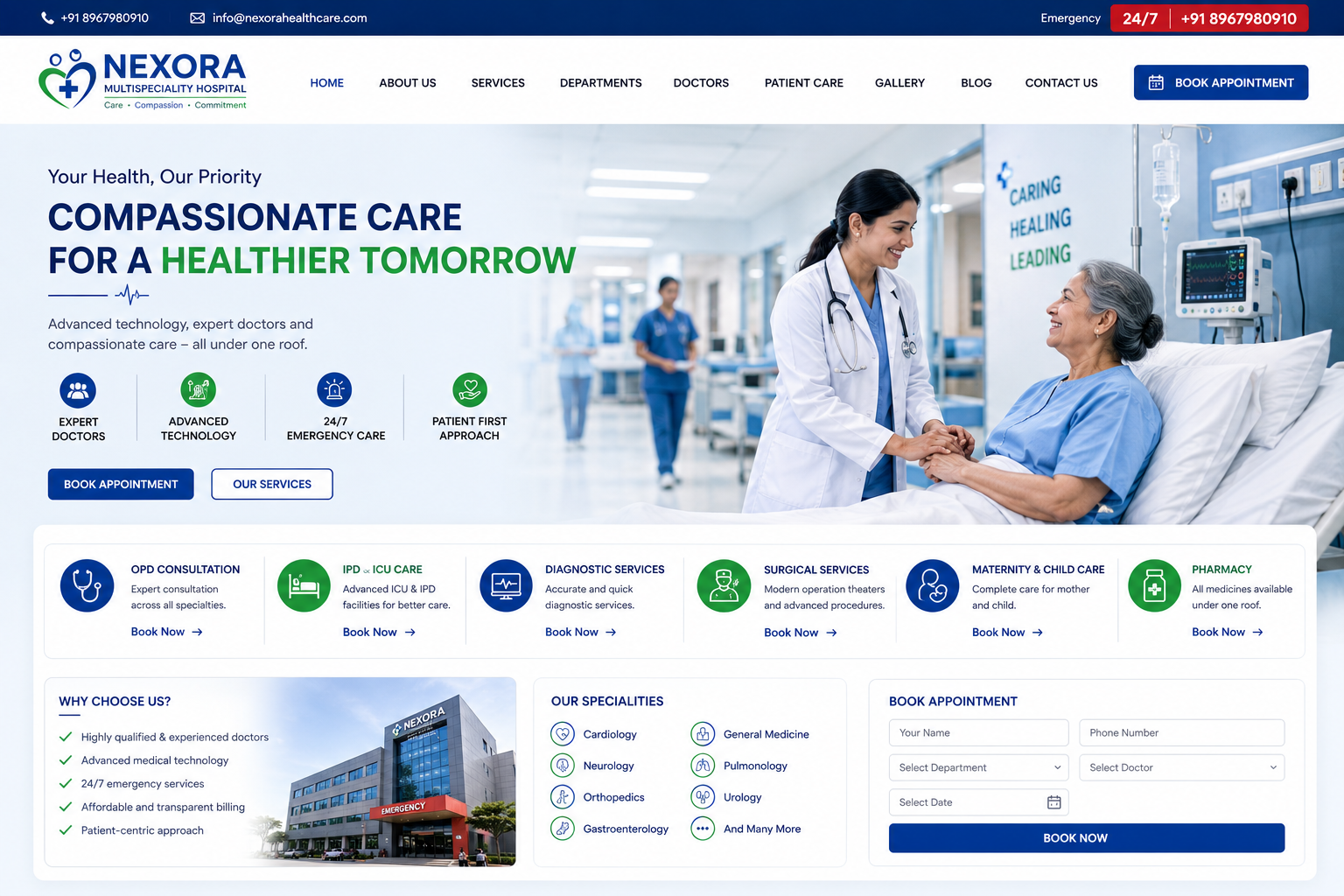
Hospital / Healthcare Website
Hospital & Healthcare Website Development
In today’s digital healthcare environment, patients increasingly search online for hospitals, clinics, doctors, departments, treatments, diagnostic services, health packages, appointment information, and emergency services before choosing a healthcare provider. A professional Hospital / Healthcare Website gives hospitals, clinics, diagnostic centers, nursing homes, medical centers, and healthcare organizations a trusted digital platform to connect with patients.
At Nexora IT Hub, we develop modern, responsive, secure, fast-loading, user-friendly, and SEO-friendly Hospital & Healthcare Websites designed around the specific needs of healthcare organizations.
A professional healthcare website can showcase doctors, departments, medical services, facilities, treatments, health packages, appointment booking, patient information, hospital news, emergency services, diagnostic facilities, testimonials, and contact information in one organized platform.
Whether you operate a Multi-Specialty Hospital, Private Hospital, Clinic, Nursing Home, Diagnostic Center, Dental Clinic, Eye Hospital, Physiotherapy Center, Medical Laboratory, Healthcare Organization, or Specialized Medical Center, we can create a customized website based on your requirements.
What Is a Hospital / Healthcare Website?
A Hospital or Healthcare Website is the official online presence of a healthcare organization. It allows patients and visitors to access important information about medical services, doctors, departments, facilities, appointments, and healthcare programs.
A professional healthcare website can include:
- Hospital Information
- About Us
- Doctors & Specialists
- Medical Departments
- Healthcare Services
- Treatments
- Diagnostic Services
- Health Packages
- Appointment Booking
- Emergency Services
- Patient Care
- Pharmacy Information
- Laboratory Services
- Insurance Information
- Health Articles
- News & Events
- Photo Gallery
- Contact Information
- Location & Map
Advanced healthcare platforms can also include patient portals, online reports, prescription management, telemedicine, online payments, doctor dashboards, appointment management, and hospital management system integration.
Why Does a Hospital Need a Professional Website?
A healthcare website is more than an online brochure. It can become an important communication and patient-information platform.
Build Patient Trust
A professional website allows hospitals to present their doctors, departments, facilities, services, technology, and healthcare expertise clearly.
Increase Appointment Enquiries
Online appointment forms and doctor profiles can make it easier for patients to contact the hospital.
Provide Information 24/7
Patients can access healthcare information, department details, doctor schedules, contact information, and appointment options at any time.
Improve Patient Communication
Important hospital announcements, health information, service updates, and contact options can be organized in one place.
Increase Online Visibility
SEO-friendly healthcare pages can help your organization become more discoverable when people search for relevant healthcare services.
Key Features of Hospital / Healthcare Website
1. Professional Healthcare Website Design
Healthcare websites require a clean, trustworthy, accessible, and professional design.
The website can include:
- Hospital logo
- Brand colors
- Professional typography
- Doctor photographs
- Hospital photographs
- Medical service sections
- Emergency contact
- Appointment buttons
- Department cards
- Health packages
- Patient information
- Contact details
The design can be customized according to the healthcare organization's branding.
2. Fully Responsive Website
Patients may access the website from smartphones, tablets, laptops, and desktop computers.
Our responsive healthcare websites are designed to adapt to different screen sizes, making it easier for patients to find important information from any device.
Mobile-friendly design is especially important for appointment enquiries and emergency contact information.
3. Professional Homepage
The homepage provides an overview of the hospital and its most important services.
It can include:
- Hospital introduction
- Emergency contact
- Appointment button
- Doctor search
- Departments
- Medical services
- Health packages
- Facilities
- Patient information
- Latest news
- Health articles
- Testimonials
- Contact information
Important actions such as Book Appointment, Find a Doctor, and Emergency Contact can be prominently displayed.
4. About Hospital Section
The About section can explain the hospital's background and healthcare philosophy.
It may include:
- Hospital history
- Mission
- Vision
- Healthcare philosophy
- Facilities
- Infrastructure
- Technology
- Accreditations
- Awards
- Achievements
- Patient-care approach
This section helps visitors understand the organization before choosing its services.
5. Doctor & Specialist Directory
A professional doctor directory allows patients to discover specialists available at the hospital.
Doctor profiles can include:
- Doctor name
- Qualification
- Designation
- Department
- Medical specialization
- Experience
- Consultation schedule
- Profile photograph
- Consultation information
- Appointment option
Patients can find the appropriate doctor based on specialty or department.
6. Doctor Search
For hospitals with many specialists, a doctor search system can make navigation easier.
Patients can search by:
- Doctor name
- Department
- Specialty
- Location
- Availability
An advanced system can connect doctor profiles directly to appointment scheduling.
7. Medical Departments
Create dedicated pages for individual departments.
Examples include:
- Cardiology
- Neurology
- Orthopedics
- Pediatrics
- Gynecology
- Dermatology
- Gastroenterology
- Oncology
- General Medicine
- General Surgery
- ENT
- Ophthalmology
- Urology
- Pulmonology
- Nephrology
Each department page can provide information about specialists, treatments, facilities, and contact details.
8. Healthcare Services
Showcase the hospital's key services in an organized structure.
Services may include:
- Emergency Care
- ICU
- Surgery
- Diagnostic Services
- Laboratory Services
- Pharmacy
- Ambulance
- Health Checkups
- Physiotherapy
- Rehabilitation
- Preventive Healthcare
Each service can have its own detailed page.
9. Online Appointment Booking
Online appointment booking can make it easier for patients to request consultations.
The appointment form may include:
- Patient name
- Phone number
- Doctor
- Department
- Preferred date
- Preferred time
- Appointment type
- Additional information
The system can send the appointment request to the appropriate hospital administration or scheduling system.
10. Appointment Management
An advanced appointment system can allow authorized staff to manage:
- New appointments
- Confirmed appointments
- Pending requests
- Cancelled appointments
- Doctor schedules
- Consultation slots
- Patient information
Automated notifications can also be integrated where appropriate.
11. Emergency Services
Emergency information should be easy to find.
A dedicated emergency section can display:
- Emergency phone number
- Emergency department
- 24/7 availability information
- Ambulance contact
- Emergency location
- Important instructions
A prominent emergency button can be included on mobile devices.
12. Ambulance Services
If the hospital provides ambulance services, the website can include:
- Ambulance availability
- Emergency contact
- Ambulance services
- Contact information
- Service area
- Request information
A direct call option can make emergency contact easier on mobile devices.
13. Health Packages
Hospitals can showcase preventive health checkup packages.
Examples include:
- Basic Health Checkup
- Full Body Checkup
- Executive Health Package
- Women's Health Package
- Senior Citizen Package
- Diabetes Checkup
- Heart Health Package
- Child Health Package
Each package can include relevant information, included tests, and enquiry options.
14. Diagnostic Services
A healthcare website can showcase available diagnostic facilities.
Services may include:
- Blood Tests
- Pathology
- X-Ray
- CT Scan
- MRI
- Ultrasound
- ECG
- Health Screening
- Laboratory Services
Dedicated pages can explain each diagnostic service.
15. Online Lab Report System
Healthcare organizations can optionally provide online access to diagnostic reports.
Patients may use:
- Patient ID
- Report ID
- Registration number
- Secure login
Reports should be protected with appropriate access controls because medical information is sensitive.
16. Patient Portal
An advanced healthcare website can provide a secure patient portal.
Possible features include:
- Patient profile
- Appointment history
- Medical reports
- Prescriptions
- Doctor information
- Billing information
- Health records
- Notifications
The exact functionality depends on the hospital's requirements and integrations.
17. Telemedicine / Online Consultation
Healthcare organizations can optionally provide online consultation services.
Possible features include:
- Doctor availability
- Appointment booking
- Online consultation
- Video consultation integration
- Patient information
- Consultation history
Any telemedicine implementation should follow applicable healthcare regulations and privacy requirements.
18. Pharmacy Information
Hospitals with pharmacy services can provide information about:
- Pharmacy location
- Opening hours
- Available services
- Contact information
- Prescription-related procedures
Online medicine ordering should only be implemented where legally and operationally appropriate.
19. Insurance & TPA Information
A dedicated insurance page can help patients understand available insurance and third-party administrator services.
It can include:
- Accepted insurance providers
- TPA information
- Cashless procedures
- Required documents
- Insurance contact information
- Claims guidance
20. Patient Care Section
A dedicated patient-care section can explain the hospital's approach to patient experience.
It can highlight:
- Patient support
- Nursing services
- Care facilities
- Attendant information
- Visitor guidelines
- Patient safety
- Support services
21. Hospital Facilities
Showcase healthcare infrastructure and facilities.
Examples include:
- ICU
- Operation Theatre
- Emergency Department
- Diagnostic Center
- Laboratory
- Pharmacy
- Private Rooms
- General Wards
- Waiting Areas
- Medical Equipment
- Ambulance Services
Professional photographs can make this section more informative.
22. Health & Medical Blog
A healthcare blog can publish useful, medically reviewed educational information.
Possible topics include:
- Preventive healthcare
- Healthy lifestyle
- Nutrition
- General health awareness
- Seasonal health information
- Medical department information
- Hospital updates
- Health screening information
Healthcare content should be created and reviewed responsibly by qualified professionals where medical advice is involved.
23. Health Awareness Content
Hospitals can use their websites to publish public health awareness information.
Examples include:
- Heart health awareness
- Diabetes awareness
- Women's health
- Child health
- Senior health
- Nutrition
- Preventive screening
- Healthy lifestyle
Useful educational content can also support long-term SEO.
24. News & Events
Keep visitors informed about hospital activities.
News and events can include:
- Health camps
- Medical seminars
- Awareness programs
- New department launches
- Hospital achievements
- Doctor conferences
- Community healthcare programs
25. Photo Gallery
A professional hospital gallery can showcase:
- Hospital building
- Reception
- Departments
- Operation theatre
- Laboratories
- Diagnostic facilities
- Patient rooms
- Medical equipment
- Health camps
- Events
Images can help visitors understand the hospital environment.
26. Video Gallery
Video content can include:
- Hospital introduction
- Facility tours
- Doctor interviews
- Health awareness programs
- Patient education
- Medical seminars
- Hospital events
Video content can increase engagement when used appropriately.
27. Testimonials
Patient testimonials can help demonstrate patient experiences.
Testimonials should only be published with appropriate permission and should follow applicable privacy and healthcare advertising requirements.
28. Contact & Location
The contact page can include:
- Hospital address
- Phone number
- Emergency number
- Department contacts
- Office hours
- Map
- Appointment form
- Social media links
Important contact information should be easy to find.
29. Google Maps Integration
Map integration helps patients locate the hospital.
The location section can show:
- Hospital location
- Nearby roads
- Directions
- Parking information
- Nearby landmarks
30. WhatsApp & Call Integration
A healthcare website can include quick-contact options for general enquiries.
Possible actions include:
- Call Hospital
- WhatsApp Enquiry
- Book Appointment
- Contact Department
Emergency contact information should remain clearly separated from general enquiry options.
31. Social Media Integration
Connect official healthcare social media profiles to the website.
Possible platforms include:
- YouTube
This can help hospitals share health awareness content and institutional updates.
32. SEO-Friendly Healthcare Website
Healthcare SEO requires useful, accurate, and trustworthy content.
Technical SEO foundations can include:
- SEO-friendly URLs
- Meta titles
- Meta descriptions
- Proper headings
- Image alt text
- Internal linking
- XML sitemap
- Mobile optimization
- Structured data where appropriate
- Search-friendly content
- Fast-loading pages
Search ranking depends on many factors, and no website can guarantee a particular position.
33. Local SEO for Hospitals
Patients commonly search for healthcare services based on location.
Relevant searches may include:
- Hospital near me
- Best hospital in [location]
- Multispecialty hospital in [location]
- Cardiologist near me
- Diagnostic center in [location]
- Emergency hospital near me
- Orthopedic doctor in [location]
Accurate business information and consistent local listings can support local search visibility.
34. Doctor SEO
Individual doctor pages can target searches related to a doctor's:
- Specialty
- Qualification
- Department
- Services
- Consultation
- Experience
Each profile should contain accurate information and should not make unsupported medical claims.
35. Department SEO
Dedicated department pages can target relevant healthcare searches.
For example:
Cardiology Department
Orthopedics Department
Neurology Department
Pediatrics Department
Each page can explain the department's services, doctors, facilities, and appointment options.
36. Healthcare Website Security
Healthcare websites can handle highly sensitive personal and medical information. Security should therefore be treated as a core requirement.
Security-conscious implementation may include:
- HTTPS/SSL
- Secure authentication
- Role-based access
- Input validation
- Secure password handling
- Database security
- Access logging
- Regular backups
- Software updates
- Controlled administrative permissions
Sensitive patient information should only be available to authorized users.
37. Easy-to-Manage Admin Panel
An administrative dashboard can allow authorized hospital staff to manage website content.
Depending on the implementation, administrators may manage:
- Doctors
- Departments
- Services
- Appointments
- Health packages
- Notices
- News
- Events
- Gallery
- Blog
- Pages
- Contact enquiries
This helps keep the website updated without requiring technical changes for every content update.
38. Performance Optimization
A healthcare website should be easy and fast to navigate.
Performance-focused development may include:
- Image compression
- Optimized code
- Efficient CSS and JavaScript
- Caching
- Responsive layouts
- Optimized page structure
Actual performance depends on hosting, images, third-party services, traffic, and implementation.
Benefits of a Professional Hospital / Healthcare Website
1. Strong Online Presence
Build a professional digital identity for your healthcare organization.
2. More Appointment Enquiries
Make it easier for patients to discover doctors and request appointments.
3. Better Patient Communication
Provide important information through a centralized online platform.
4. 24/7 Accessibility
Patients can access hospital information at any time.
5. Showcase Doctors
Help patients discover specialists, qualifications, departments, and consultation information.
6. Promote Healthcare Services
Present medical departments, treatments, diagnostics, and facilities clearly.
7. Increase Local Visibility
Create search-friendly pages for healthcare services and locations.
8. Improve Patient Experience
Make appointments, contact information, doctor discovery, and service information easier to access.
9. Build Trust
A professional and informative website can strengthen the hospital's digital credibility.
10. Support Digital Healthcare Services
Integrate appointments, patient portals, reports, telemedicine, payments, and other services as required.
Hospital / Healthcare Website Development Process
Step 1: Requirement Analysis
We understand your healthcare organization, services, departments, doctors, target audience, branding, and technical requirements.
Step 2: Website Planning
We organize the website structure, navigation, pages, content, and functionality.
Step 3: UI/UX Design
We create a clean and professional healthcare interface focused on usability and accessibility.
Step 4: Development
The approved design is converted into a responsive and functional website.
Step 5: Content Integration
Hospital information, doctor profiles, departments, services, facilities, images, and other content are integrated.
Step 6: Feature Integration
Appointment systems, portals, forms, reports, payments, and other required modules can be integrated.
Step 7: SEO Setup
Technical and on-page SEO foundations are configured.
Step 8: Testing
The website is tested across mobile, tablet, desktop, and major browsers.
Forms, appointment workflows, navigation, links, and interactive functions are checked.
Step 9: Security Review
Administrative access and sensitive functionality are reviewed for appropriate security controls.
Step 10: Launch
After approval, the website is deployed to the hospital's domain and hosting environment.
Step 11: Maintenance & Support
Ongoing technical support, security updates, content changes, performance improvements, and new features can be provided.
SEO Strategy for Hospital & Healthcare Websites
Healthcare SEO should focus on useful, accurate, trustworthy, and patient-focused information.
Service-Based SEO
Create detailed pages for individual medical services.
Department-Based SEO
Create dedicated pages for each department.
Doctor-Based SEO
Create accurate professional profiles for doctors and specialists.
Location-Based SEO
Optimize relevant pages for the hospital's service area.
Health Information SEO
Publish useful educational content that answers common patient questions.
Local Search Optimization
Maintain accurate hospital name, contact details, location, and other business information across relevant platforms.
Internal Linking
Connect doctors, departments, services, treatments, appointment pages, and health articles logically.
Why Choose Nexora IT Hub for Hospital Website Development?
At Nexora IT Hub, we develop professional digital solutions designed around the needs of modern healthcare organizations.
Professional Healthcare Design
Create a clean, modern, trustworthy, and user-friendly online presence.
Responsive Development
Ensure a convenient experience across smartphones, tablets, laptops, and desktops.
Customized Features
Choose the healthcare modules that match your organization's requirements.
SEO-Friendly Structure
Create a strong technical foundation for ongoing search engine optimization.
Secure Development
Use security-conscious practices for administrative systems and sensitive functionality.
Scalable Technology
Start with a professional website and expand into portals, appointment systems, reports, and other digital services when needed.
Easy Content Management
Manage doctors, departments, services, news, blogs, galleries, and other website content through an admin panel where required.
Ongoing Technical Support
Receive support for maintenance, updates, improvements, and future development.
Build Your Hospital Website with Nexora IT Hub
A modern Hospital / Healthcare Website can become a powerful digital platform for connecting healthcare providers with patients.
From doctor profiles and medical departments to appointment booking, healthcare services, diagnostic facilities, health packages, patient care, emergency information, health education, and contact services, everything can be organized in one professional online platform.
At Nexora IT Hub, we develop professional, responsive, secure, fast-loading, user-friendly, and SEO-friendly Hospital & Healthcare Websites customized to the needs of hospitals, clinics, diagnostic centers, nursing homes, and healthcare organizations.
Whether you are launching a new healthcare website or upgrading an existing platform, our goal is to create a digital experience that makes healthcare information easier to access while presenting your organization professionally.
Your Healthcare. Your Digital Presence. Your Patients' Convenience.
Professional Design • Responsive • SEO-Friendly • Secure • Fast • Scalable • Easy to Manage
Build your Hospital / Healthcare Website with Nexora IT Hub and take your healthcare organization online.