

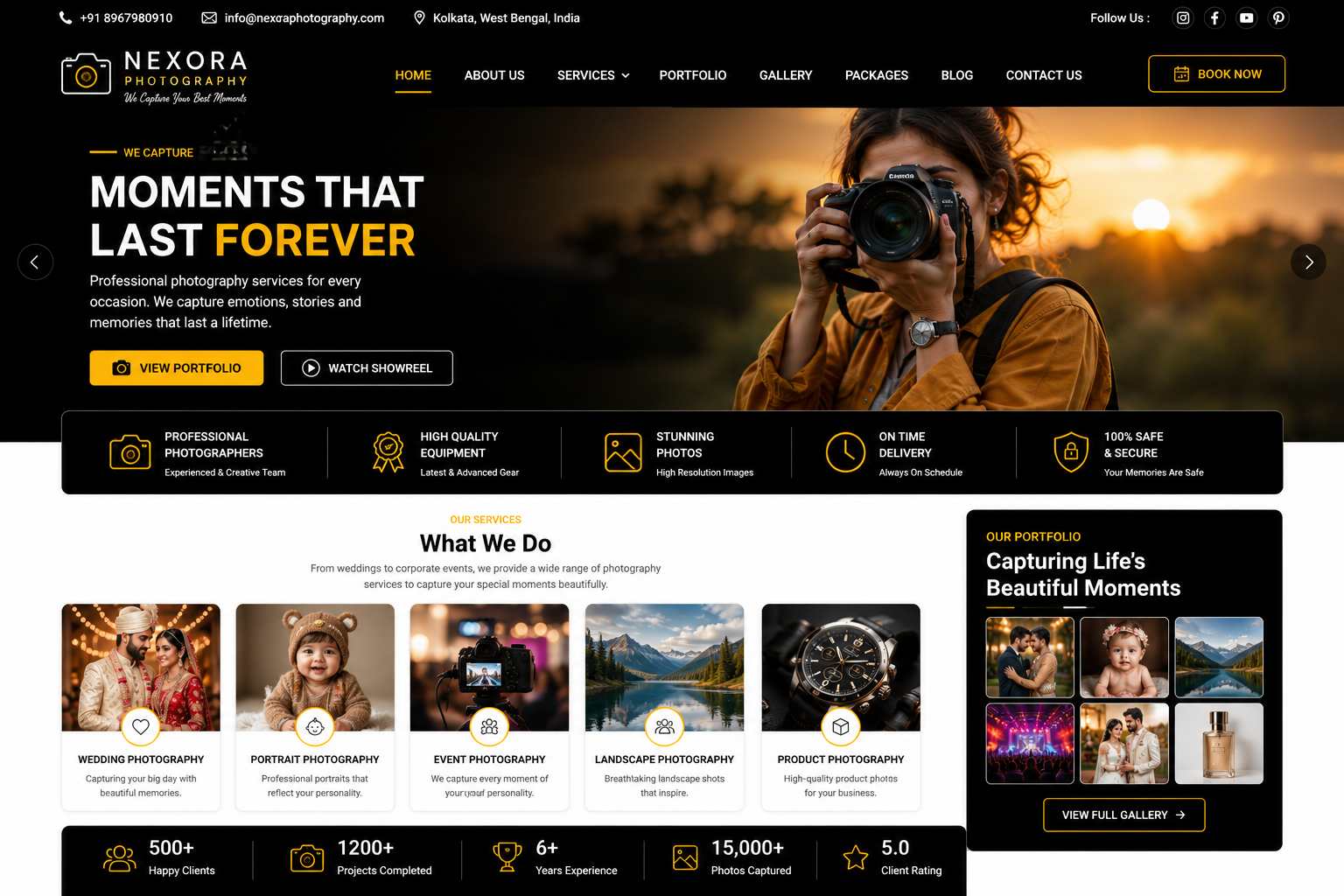
Photography Website
Photography Website Development
A professional Photography Website is the perfect digital platform for photographers, photography studios, wedding photographers, photo agencies, videographers, freelancers, and creative professionals to showcase their work, attract new clients, promote photography services, and build a strong online brand.
At Nexora IT Hub, we develop modern, responsive, fast-loading, secure, visually appealing, and SEO-friendly Photography Websites designed to highlight your creativity and photography portfolio.
A professional photography website can showcase Photo Galleries, Portfolio, Photography Services, Wedding Photography, Pre-Wedding Photography, Event Photography, Fashion Photography, Product Photography, Corporate Photography, Photo Albums, Videos, Client Testimonials, Packages, Pricing, Booking Enquiries, Contact Information, Blogs, Social Media, and an easy-to-manage Admin Panel.
Whether you are a Professional Photographer, Wedding Photographer, Photography Studio, Freelance Photographer, Fashion Photographer, Product Photographer, Travel Photographer, Event Photographer, Commercial Photographer, or Photo Agency, we can build a customized website according to your brand and business requirements.
What Is a Photography Website?
A Photography Website is a professional online portfolio that allows photographers and photography businesses to showcase their creative work and services.
A photography website can include:
- Home
- About Photographer
- Portfolio
- Photo Gallery
- Services
- Packages
- Pricing
- Wedding Portfolio
- Event Portfolio
- Pre-Wedding Portfolio
- Product Photography
- Fashion Photography
- Client Reviews
- Testimonials
- Videos
- Blog
- Booking Enquiry
- Contact
- Social Media
The website can also include advanced features such as online booking, quotation requests, client galleries, private albums, payment integration, appointment scheduling, downloadable galleries, and customer dashboards.
Why Does a Photographer Need a Professional Website?
Social media can showcase photographs, but a dedicated website provides a professional home for your complete photography brand.
Showcase Your Photography Portfolio
Display your best photographs in organized and visually attractive galleries.
Build Professional Credibility
A professional website can help potential clients understand your experience, services, portfolio, and brand.
Attract New Clients
SEO-friendly photography pages can help people discover your services through search engines.
Generate Booking Enquiries
Visitors can easily request a quotation, check packages, or contact you for their photography requirements.
Promote Your Services
Showcase different photography services with dedicated pages.
Control Your Brand
A website gives you greater control over your portfolio, content, branding, and customer experience.
Key Features of a Professional Photography Website
1. Premium & Visual Website Design
Photography websites should prioritize high-quality visuals while maintaining fast and easy navigation.
The design can include:
- Full-Screen Hero Image
- Featured Portfolio
- Masonry Gallery
- Photography Categories
- Services
- Packages
- Testimonials
- About Photographer
- Featured Projects
- Instagram Feed
- Blog
- Contact
- Booking CTA
The complete visual style can be customized according to your photography brand.
2. Fully Responsive Design
Potential clients may view your portfolio from smartphones, tablets, laptops, or desktops.
A responsive website ensures your photography portfolio looks professional across different screen sizes.
Visitors can easily:
- Browse Photos
- Watch Videos
- View Services
- Check Packages
- Submit Enquiries
- Request Quotes
- Book Photography Services
3. Professional Homepage
The homepage should immediately communicate your photography style and services.
It can include:
- Hero Photography
- Photographer Introduction
- Featured Portfolio
- Photography Services
- Recent Projects
- About Section
- Client Testimonials
- Packages
- Booking CTA
- Instagram/Social Media
- Blog
- Contact
A strong visual homepage can create a memorable first impression.
4. Photography Portfolio
A professional portfolio is one of the most important sections of a photography website.
Portfolio categories can include:
- Wedding Photography
- Pre-Wedding Photography
- Event Photography
- Fashion Photography
- Product Photography
- Food Photography
- Corporate Photography
- Portrait Photography
- Travel Photography
- Lifestyle Photography
- Commercial Photography
Each category can have its own gallery or dedicated page.
5. Photo Gallery
Create beautiful galleries to display your photography work.
Gallery features can include:
- Grid Layout
- Masonry Layout
- Full-Screen View
- Lightbox
- Image Categories
- Image Captions
- Project Albums
- Gallery Filters
The layout can be customized according to the photographer's visual style.
6. Wedding Photography Portfolio
Wedding photographers can create dedicated galleries for wedding projects.
A wedding portfolio can include:
- Wedding Ceremony
- Reception
- Couple Portraits
- Family Moments
- Candid Photography
- Traditional Photography
- Wedding Details
- Venue Photography
Dedicated wedding portfolio pages can also help attract wedding-related search traffic.
7. Pre-Wedding Photography Portfolio
Showcase pre-wedding photography projects through dedicated albums.
The page can include:
- Couple Photography
- Outdoor Sessions
- Studio Sessions
- Destination Shoots
- Creative Concepts
- Location Details
- Photo Stories
8. Event Photography Portfolio
Showcase previous event photography work.
Examples include:
- Corporate Events
- Birthday Parties
- Conferences
- Cultural Programs
- Award Ceremonies
- School Events
- College Events
- Private Events
9. Product Photography Portfolio
For commercial photographers, a dedicated product photography section can showcase professional product images.
Services can include:
- E-commerce Product Photography
- Fashion Product Photography
- Jewelry Photography
- Food Photography
- Cosmetic Photography
- Advertising Photography
10. Fashion Photography Portfolio
Fashion photographers can showcase:
- Editorial Photography
- Model Portfolios
- Fashion Campaigns
- Studio Photography
- Outdoor Shoots
- Brand Photography
A dedicated portfolio can help attract fashion brands and creative agencies.
11. Photography Services
Create individual pages for each service.
Examples:
Wedding Photography
Capture important wedding moments through professional photography.
Pre-Wedding Photography
Creative couple photography designed around your preferred concept and location.
Event Photography
Professional coverage for corporate, cultural, private, and social events.
Product Photography
High-quality product images for brands and e-commerce businesses.
Fashion Photography
Creative photography for models, designers, brands, and fashion campaigns.
Corporate Photography
Professional photographs for businesses, offices, conferences, and corporate events.
12. Photography Packages
Display your photography packages clearly.
Each package can include:
- Package Name
- Coverage Duration
- Number of Photographers
- Photography Services
- Album
- Edited Photos
- Video Services
- Delivery Information
- Starting Price
Packages can be updated from the admin panel.
13. Pricing Section
Provide transparent starting prices where appropriate.
For example:
- Basic Package
- Standard Package
- Premium Package
- Custom Package
If pricing depends on the project, you can use a Request a Quote button instead.
14. Online Booking Enquiry
Potential clients can submit booking enquiries directly through the website.
The form can include:
- Name
- Phone
- Event Type
- Event Date
- Event Location
- Required Services
- Budget Range
- Message
Enquiries can be managed through the admin panel.
15. Quote Request System
Allow customers to request customized quotations.
The system can collect project requirements and provide the photographer with the information needed to prepare a quote.
This is particularly useful for:
- Weddings
- Corporate Events
- Commercial Projects
- Product Photography
- Fashion Campaigns
16. Availability Calendar
An optional availability calendar can help manage photography bookings.
The calendar can show:
- Available Dates
- Booked Dates
- Pending Enquiries
- Event Dates
This can reduce scheduling conflicts.
17. Appointment Booking
For photography consultations, users can book available appointment slots.
Appointments can be used for:
- Wedding Consultation
- Photoshoot Planning
- Product Photography Discussion
- Project Consultation
- Studio Visit
18. Client Gallery
A professional photographer can provide private galleries for clients.
Clients may access:
- Wedding Photos
- Event Photos
- Portrait Sessions
- Project Albums
Private gallery access can be protected with appropriate authentication or password controls.
19. Private Photo Albums
Create password-protected galleries for selected clients.
This can be useful when photographs should not be publicly displayed.
Access controls should be configured securely.
20. Client Photo Download
An advanced client gallery can allow authorized clients to download selected photographs.
Download functionality can be configured according to:
- Gallery
- Client
- Photo Selection
- Access Permission
21. Digital Photo Delivery
Photographers can use the website to provide completed photo galleries to clients.
The system can help organize:
- Client Name
- Project
- Gallery
- Delivery Status
- Download Access
22. Video Portfolio
Photographers who also provide videography services can showcase videos.
Examples include:
- Wedding Films
- Pre-Wedding Videos
- Event Highlights
- Corporate Videos
- Promotional Videos
- Cinematic Films
23. Client Testimonials
Display genuine client feedback.
Testimonials can include:
- Client Name
- Project Type
- Review
- Rating
- Photo where permitted
Authentic testimonials can help build trust with prospective clients.
24. Featured Projects
Highlight selected photography projects on the homepage.
Each project can include:
- Project Name
- Project Type
- Location
- Date
- Description
- Photos
- Video
- Client Information where permitted
25. About Photographer
Create a professional About page to introduce the photographer.
It can include:
- Photographer Name
- Experience
- Photography Style
- Specialization
- Awards
- Achievements
- Professional Story
- Equipment Information where relevant
- Working Locations
26. Team Section
Photography studios with multiple professionals can showcase their team.
Profiles may include:
- Photographer
- Videographer
- Editor
- Creative Director
- Studio Manager
27. Instagram Integration
Connect your official Instagram presence to showcase recent photography work.
This can help visitors discover your social media portfolio and follow your brand.
28. Social Media Integration
Connect other official social platforms such as:
- YouTube
Social media integration can make it easier for visitors to explore your online presence.
29. Photography Blog
A photography blog can help attract organic search traffic and showcase expertise.
Content ideas include:
- Wedding Photography Tips
- Pre-Wedding Photoshoot Ideas
- Photography Locations
- Camera Guides
- Photography Trends
- Event Photography Tips
- Photography Preparation Guides
- Behind-the-Scenes Stories
Useful original content can support long-term SEO growth.
30. Location-Based Photography Pages
Photographers serving multiple locations can create genuinely useful location pages.
Examples:
- Wedding Photographer in Kolkata
- Wedding Photographer in Delhi
- Photographer in Mumbai
- Event Photographer in Bangalore
Location pages should provide unique and useful information rather than simply repeating keywords.
31. Photography SEO
A professional photography website can be optimized using SEO fundamentals such as:
- SEO-Friendly URLs
- Unique Page Titles
- Meta Descriptions
- Proper Heading Structure
- Image Alt Text
- Internal Linking
- XML Sitemap
- Mobile Optimization
- Structured Data where appropriate
- Optimized Images
- Fast Loading
Image SEO is particularly important for photography websites.
32. Image Optimization
Photography websites often contain large image files, so optimization is essential.
Techniques can include:
- Image Compression
- Responsive Images
- Modern Image Formats
- Lazy Loading
- Proper Image Dimensions
- Descriptive Alt Text
Optimized images can help improve page performance without unnecessarily sacrificing visual quality.
33. Fast Loading Performance
A visually impressive photography website should also load efficiently.
Performance optimization can include:
- Image Compression
- Browser Caching
- Lazy Loading
- Code Optimization
- CDN Integration where appropriate
- Efficient Hosting
- Reduced Unnecessary Scripts
Faster websites can provide a better user experience.
34. Contact & Enquiry Management
The website can collect and organize customer enquiries.
Enquiries can be categorized by:
- Wedding
- Pre-Wedding
- Event
- Product
- Corporate
- Fashion
- Other Services
The admin panel can help manage follow-ups.
35. WhatsApp Integration
A WhatsApp button can provide a quick communication channel.
Visitors can ask about:
- Availability
- Packages
- Pricing
- Photography Services
- Event Dates
- Booking
36. Google Maps Integration
If you operate from a studio or office, your website can include a map.
The contact page can show:
- Studio Location
- Address
- Directions
- Phone
- Working Hours
37. Newsletter Subscription
Allow visitors to subscribe to photography updates.
Newsletters can include:
- New Portfolio Projects
- Special Packages
- Photography Tips
- Studio Updates
- Seasonal Offers
Email marketing should follow applicable consent requirements.
38. Admin Dashboard
A powerful admin panel can allow photographers to manage:
- Portfolio
- Galleries
- Albums
- Services
- Packages
- Pricing
- Testimonials
- Projects
- Videos
- Blogs
- Enquiries
- Bookings
- Clients
- Website Content
This makes the website easy to manage without requiring technical knowledge for routine updates.
39. Secure Website Development
Photography websites may contain private client galleries and personal information.
Security-conscious development can include:
- HTTPS/SSL
- Secure Login
- Password-Protected Galleries
- Access Control
- Secure File Handling
- Database Protection
- Regular Backups
- Software Updates
40. Scalable Photography Platform
Your website can start as a simple portfolio and grow into a complete photography business platform.
Future features can include:
- Online Booking
- Client Dashboard
- Private Galleries
- Digital Downloads
- Online Payments
- Appointment Scheduling
- CRM Integration
- Package Management
- Advanced Analytics
Benefits of a Professional Photography Website
1. Showcase Your Best Work
Present your photography portfolio professionally in organized galleries.
2. Build Brand Credibility
A professional website can establish your photography business as a serious and trustworthy brand.
3. Generate More Enquiries
Visitors can easily contact you, request quotes, and enquire about availability.
4. Attract Local Clients
Location-based SEO can help potential customers find your photography services.
5. Promote Multiple Services
Showcase wedding, event, commercial, product, fashion, and other photography services.
6. Improve Client Experience
Private galleries, online booking, digital delivery, and enquiry management can make working with clients easier.
7. Increase Online Visibility
SEO-friendly pages and useful photography content can create opportunities for organic search traffic.
8. Showcase Testimonials & Projects
Real projects and client feedback can help potential customers understand your work quality.
9. Control Your Portfolio
Unlike relying entirely on social media, your website gives you a dedicated platform for your photography brand.
10. Grow Your Photography Business
A scalable website can support additional services, locations, clients, bookings, and digital features as your business grows.
Photography Website Development Process
1. Requirement Analysis
We understand your photography style, services, portfolio, target clients, locations, booking requirements, and business goals.
2. Website Planning
We plan the portfolio structure, galleries, services, packages, booking flow, client sections, and content architecture.
3. UI/UX Design
We create a premium visual experience that puts your photography work at the center.
4. Website Development
The approved design is developed into a responsive and functional website.
5. Portfolio & Gallery Integration
Photography projects, albums, services, videos, testimonials, and other content are integrated.
6. Booking & Enquiry Integration
Booking forms, availability, quote requests, appointments, and other required features are implemented.
7. SEO Setup
Technical and on-page SEO foundations are configured.
8. Image & Performance Optimization
Images and website resources are optimized to balance visual quality with loading performance.
9. Testing
The website is tested across smartphones, tablets, laptops, and desktop devices.
Gallery, forms, booking, navigation, downloads, and other features are reviewed.
10. Launch
After final approval, the website is deployed to your selected domain and hosting environment.
11. Maintenance & Support
Ongoing technical support, security updates, content changes, performance optimization, and future development can be provided.
SEO Strategy for Photography Websites
A successful photography SEO strategy should focus on services, locations, photography types, portfolio projects, and useful educational content.
Service-Based SEO
Create dedicated pages for:
- Wedding Photography
- Pre-Wedding Photography
- Event Photography
- Product Photography
- Fashion Photography
- Corporate Photography
Location-Based SEO
Target locations where you genuinely provide photography services.
Portfolio SEO
Create individual project pages with descriptive titles, relevant information, optimized images, and internal links.
Image SEO
Use:
- Descriptive File Names
- Relevant Alt Text
- Optimized Images
- Responsive Image Sizes
- Modern Formats
Photography Blog SEO
Publish useful content around:
- Photography Tips
- Wedding Planning
- Photoshoot Ideas
- Locations
- Photography Guides
Technical SEO
Maintain:
- Mobile-Friendly Design
- Fast Loading
- Clean URLs
- XML Sitemap
- Internal Linking
- HTTPS
- Proper Indexing
- Structured Data where appropriate
SEO can create a strong foundation for search visibility, but rankings depend on competition, content quality, website authority, technical implementation, and other factors.
Why Choose Nexora IT Hub for Photography Website Development?
At Nexora IT Hub, we develop professional digital solutions for photographers, studios, creative professionals, and photography agencies.
Premium Visual Design
Create a website that puts your photography portfolio at the center of the experience.
Responsive Development
Provide a professional experience across mobile, tablet, laptop, and desktop devices.
Portfolio & Gallery Features
Organize your photography work into beautiful galleries, projects, albums, and categories.
Booking & Enquiry Features
Capture photography enquiries, quote requests, appointments, and booking requirements.
Client Gallery
Provide private and secure galleries for clients where required.
SEO-Friendly Architecture
Build a strong foundation for photography service, location, portfolio, and image SEO.
Performance Optimization
Optimize large image assets and website resources for a better browsing experience.
Secure Development
Use security-conscious practices for client information, private galleries, and administrative access.
Easy Content Management
Manage portfolio images, galleries, services, packages, testimonials, blogs, and enquiries through an admin panel.
Ongoing Support
Get technical support for maintenance, updates, improvements, and future development.
Build Your Photography Website with Nexora IT Hub
A professional Photography Website can turn your creative work into a powerful digital portfolio and client acquisition platform.
From beautiful photography galleries and portfolio projects to service pages, packages, testimonials, booking enquiries, private client albums, digital photo delivery, videos, blogs, social media integration, and SEO-friendly image optimization, everything can be brought together into one professional website.
At Nexora IT Hub, we develop modern, responsive, secure, fast-loading, visually appealing, user-friendly, and SEO-friendly Photography Websites customized according to your photography style and business requirements.
Whether you are a wedding photographer, photography studio, freelance photographer, fashion photographer, product photographer, event photographer, travel photographer, or commercial photography agency, we can create a scalable digital platform designed to help you showcase your work, attract new clients, generate enquiries, build your brand, and grow your photography business online.
Capture Moments. Showcase Your Story. Grow Your Photography Brand.
Premium Design • Responsive • SEO-Friendly • Secure • Fast • Image Optimized • Scalable • Easy to Manage