

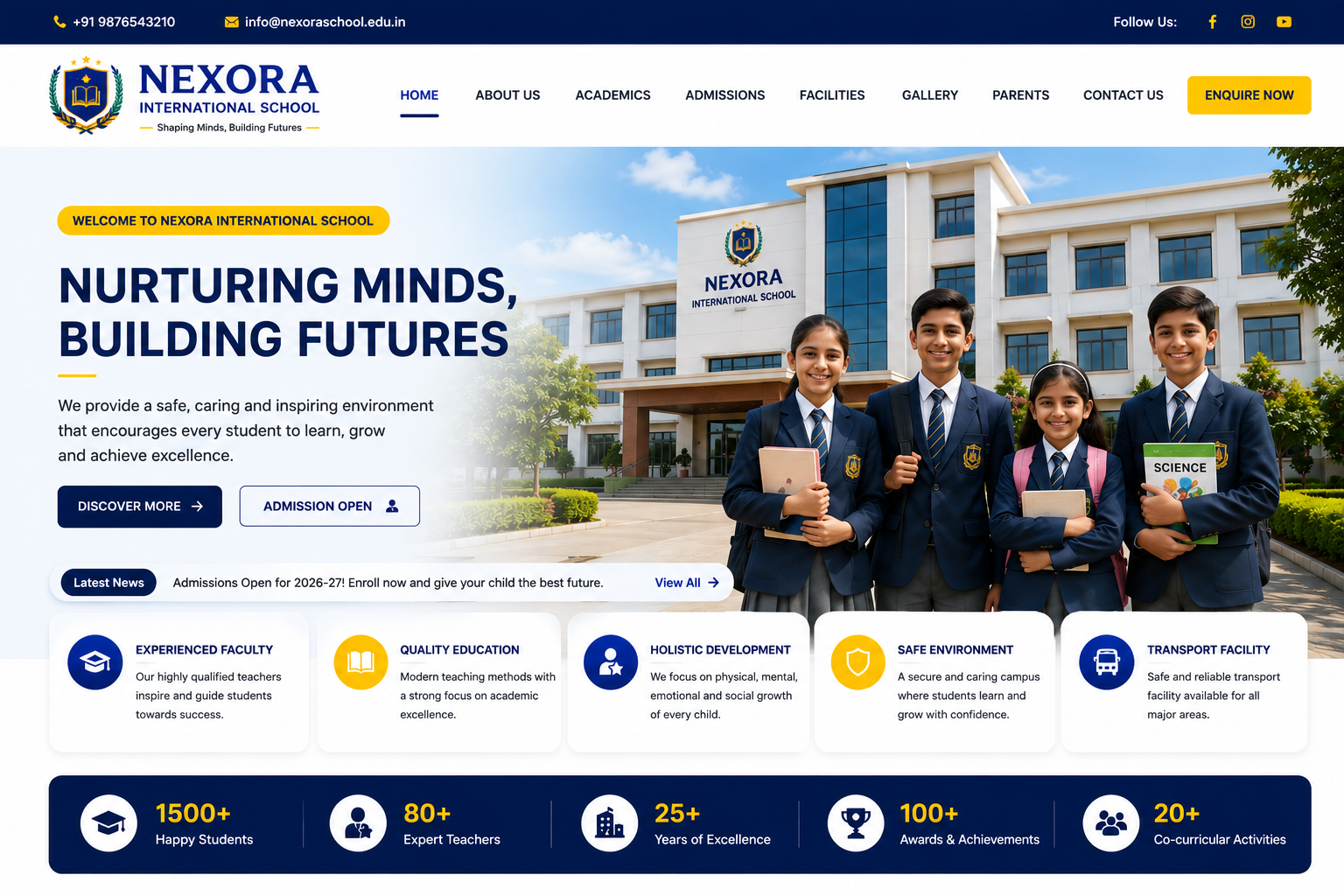
School Website
Professional School Website Development
In today’s digital education environment, a professional website has become an essential communication and information platform for schools, colleges, educational institutions, and academies. A well-designed School Website helps institutions showcase their academic programs, faculty, facilities, admissions information, notices, events, achievements, and student activities while keeping parents and students connected with the institution.
At Nexora IT Hub, we develop modern, responsive, secure, fast-loading, user-friendly, and SEO-friendly School Websites designed to create a strong digital identity for educational institutions.
A professional school website can serve as a central online platform for students, parents, teachers, administrators, and visitors. From admission inquiries and online forms to notices, results, academic information, event updates, galleries, and contact details, everything can be organized in a structured and easy-to-use interface.
Whether you need a website for a Primary School, Secondary School, Higher Secondary School, CBSE School, ICSE School, English Medium School, Government School, Private School, International School, Boarding School, or Educational Institution, we can create a customized website according to your requirements.
What Is a School Website?
A School Website is an official online platform that provides information about an educational institution and its academic activities.
A professional school website can provide information about:
- School introduction
- Principal's message
- Academic programs
- Classes and subjects
- Faculty members
- Admissions
- Fees information
- Notices
- Events
- Examination schedules
- Results
- School facilities
- Student activities
- Photo galleries
- News and announcements
- Contact information
- Location and directions
It can also include interactive features such as online admission forms, student portals, parent portals, teacher panels, result management, and downloadable documents.
Why Does a School Need a Professional Website?
Parents and students frequently search online for information before choosing an educational institution. A professional school website gives your institution a reliable place to present accurate and updated information.
Build a Strong Digital Identity
Your school website becomes the official digital identity of your institution.
Provide Information 24/7
Parents and students can access important information whenever they need it.
Increase Admission Inquiries
A well-designed admission section can help prospective parents understand courses, eligibility, facilities, fees, and the admission process.
Improve Parent Communication
Notices, announcements, events, schedules, and updates can be published online.
Showcase School Achievements
Display academic achievements, sports accomplishments, cultural activities, awards, and student success stories.
Build Parent Trust
Professional information, faculty details, facilities, photos, achievements, and transparent communication can help establish credibility.
Key Features of Our School Website
1. Professional School Website Design
We create modern and professional layouts suitable for educational institutions.
The design can include:
- School logo
- School colors
- Professional typography
- Attractive banners
- Academic sections
- Admission call-to-actions
- Photo galleries
- News and announcements
- Contact information
The design can be customized according to the school's branding and requirements.
2. Fully Responsive Website
Parents, students, and teachers may access the website from different devices.
Our responsive school websites can be optimized for:
- Smartphones
- Tablets
- Laptops
- Desktop computers
The website layout adapts to different screen sizes to provide a convenient browsing experience.
3. Attractive Homepage
The homepage creates the first impression of your school.
It can include:
- School name and logo
- Hero banner
- Admission announcement
- Principal's message
- About school
- Academic programs
- School facilities
- Latest notices
- Events
- Achievements
- Gallery
- Testimonials
- Contact information
Clear navigation helps visitors quickly find important information.
4. About School Section
The About section can explain the history, vision, mission, and educational philosophy of the institution.
It may include:
- School history
- Vision
- Mission
- Objectives
- Educational philosophy
- School achievements
- Infrastructure
- Core values
This section helps parents understand the institution before making an admission decision.
5. Principal's Message
A dedicated Principal's Message section can provide a personal introduction from the school leadership.
It may include:
- Principal's photograph
- Welcome message
- Educational philosophy
- School objectives
- Message to students and parents
This creates a more personal connection between the institution and its visitors.
6. Academic Information
The academic section can provide detailed information about the school's educational programs.
It may include:
- Classes
- Subjects
- Curriculum
- Academic session
- Teaching methodology
- Academic calendar
- Examination system
- Learning programs
This helps parents understand the academic structure of the school.
7. Admission Section
A dedicated admission page can provide all essential admission-related information.
It can include:
- Admission procedure
- Eligibility criteria
- Required documents
- Important dates
- Available classes
- Fee information
- Admission guidelines
- Online inquiry
- Application form
A prominent Apply Now or Admission Enquiry button can help generate inquiries.
8. Online Admission Form
Schools can collect admission inquiries through an online form.
The form may collect:
- Student name
- Parent/guardian name
- Contact number
- Date of birth
- Class applying for
- Previous school
- Address
- Additional information
Submitted inquiries can be managed through the admin panel depending on the implementation.
9. Faculty & Staff Section
Introduce teachers and staff members professionally.
Each profile can include:
- Name
- Designation
- Department
- Qualification
- Experience
- Photograph
- Subject specialization
This gives parents greater visibility into the school's teaching team.
10. Notice Board
A digital notice board allows administrators to publish important announcements.
Notices may include:
- Holiday announcements
- Examination notices
- Admission updates
- Parent meetings
- School events
- Important instructions
- Academic updates
The latest notices can be displayed prominently on the homepage.
11. News & Events
Keep students and parents informed about school activities.
News and event content can include:
- Annual functions
- Sports days
- Cultural programs
- Educational trips
- Competitions
- Seminars
- Workshops
- Celebrations
- Academic achievements
Event pages can include dates, descriptions, images, and other relevant information.
12. Photo Gallery
A professional gallery allows schools to showcase their campus and activities.
Gallery categories may include:
- Campus
- Classrooms
- Laboratory
- Library
- Sports
- Cultural events
- Annual function
- School trips
- Competitions
- Celebrations
High-quality images can help visitors understand the school's environment.
13. Video Gallery
Schools can also showcase videos such as:
- School introduction
- Annual function
- Sports events
- Cultural programs
- Educational activities
- Campus tours
- Student achievements
Videos can provide a more engaging presentation of the institution.
14. School Facilities Section
Highlight the facilities available to students.
Examples include:
- Smart classrooms
- Computer laboratory
- Science laboratory
- Library
- Playground
- Transportation
- Auditorium
- Activity rooms
- Cafeteria
- Security facilities
Each facility can have a dedicated description and image.
15. Student Achievements
Showcase student accomplishments to build credibility and motivate students.
Achievements may include:
- Academic results
- Sports achievements
- Olympiad participation
- Cultural competitions
- Art competitions
- Debate competitions
- Science exhibitions
- Awards and recognitions
16. Examination Information
A school website can provide examination-related information.
This may include:
- Examination schedules
- Assessment information
- Important instructions
- Examination notices
- Results
- Academic calendars
A separate result system can also be developed if required.
17. Online Result System
An online result module can allow authorized users or students to access examination results.
Depending on requirements, students may enter:
- Student ID
- Roll number
- Registration number
- Date of birth
The system can display relevant result information.
18. Student Portal
For schools requiring advanced functionality, a student portal can provide personalized access.
Possible features include:
- Student profile
- Attendance
- Results
- Homework
- Notices
- Timetable
- Study materials
- Examination information
Access can be controlled using secure login credentials.
19. Parent Portal
A parent portal can provide parents with relevant information about their child's academic activities.
Possible features include:
- Attendance
- Results
- Notices
- Homework
- School updates
- Fee information
- Communication
The exact features can be customized according to the school's requirements.
20. Teacher Portal
A teacher portal can provide authorized teachers with access to relevant academic functions.
Possible features include:
- Student records
- Attendance
- Marks entry
- Homework
- Notices
- Academic information
- Class schedules
Role-based permissions can be used to control access.
21. Online Fee Payment
Schools can optionally integrate online fee payment functionality.
Depending on the payment provider and school requirements, parents may be able to pay:
- Tuition fees
- Admission fees
- Examination fees
- Transport fees
- Other applicable charges
Payment receipts and transaction information can also be managed depending on the system.
22. School Management Integration
A school website can be connected to a broader school management system.
Possible modules include:
- Student management
- Teacher management
- Attendance
- Fees
- Examination
- Results
- Timetable
- Homework
- Notices
- Reports
This can transform the website from a simple information portal into a comprehensive digital education platform.
23. Timetable Section
Publish class or examination timetables online.
The system can organize:
- Class timetable
- Subject
- Teacher
- Room
- Period
- Examination schedule
Students and parents can access the latest schedules from their devices.
24. Academic Calendar
An online academic calendar can display important dates such as:
- School opening
- Examinations
- Holidays
- Parent meetings
- Events
- Competitions
- Annual functions
This helps students and parents plan ahead.
25. Downloadable Documents
Schools can provide important documents for download.
Examples include:
- Admission forms
- Prospectus
- Academic calendar
- Examination schedule
- Circulars
- Notices
- Rules and regulations
- Fee structure
- Application forms
26. Contact & Location
A professional contact page can include:
- School address
- Phone number
- Office hours
- Contact form
- Google Maps integration
- Social media links
This makes it easier for parents and visitors to contact the school.
27. WhatsApp Integration
A WhatsApp contact option can allow prospective parents to quickly contact the school for general inquiries.
It can be used for:
- Admission inquiries
- General questions
- Contact requests
- Support communication
28. Social Media Integration
Connect the school website with official social media accounts.
Possible platforms include:
- YouTube
This allows visitors to discover more school activities and updates.
29. SEO-Friendly School Website
Search engine optimization can help parents discover your school when searching online.
SEO foundations may include:
- SEO-friendly URLs
- Page titles
- Meta descriptions
- Heading structure
- Image alt text
- Internal linking
- XML sitemap
- Mobile-friendly structure
- Structured data where appropriate
- Search-friendly content
A website alone does not guarantee rankings, but a technically sound structure creates a stronger foundation for ongoing SEO.
30. Local SEO for Schools
Schools usually serve a specific geographic area, making local SEO especially valuable.
Local SEO can focus on relevant searches such as:
- School near me
- Best school in [location]
- English medium school in [location]
- CBSE school in [location]
- ICSE school in [location]
- Primary school in [location]
Accurate school name, address, contact information, and local business information should be maintained consistently across relevant online platforms.
31. School Blog
A school blog can publish useful educational and institutional content.
Possible topics include:
- School activities
- Educational tips
- Parenting tips
- Student achievements
- Academic guidance
- School events
- Teacher articles
- Career guidance
- Educational resources
A consistent content strategy can help build the school's online visibility.
32. Search-Friendly Content
Each important page should provide useful, original information.
Examples include:
About School
Admissions
Academics
Facilities
Faculty
Events
Results
Contact
Clear page structure helps both visitors and search engines understand the website.
33. Website Security
Security is important when a website handles student, parent, teacher, or administrative information.
Security-conscious development may include:
- HTTPS/SSL
- Secure login
- Role-based access
- Form validation
- Secure password handling
- Database security practices
- Regular backups
- Software updates
- Access control
Sensitive information should only be accessible to authorized users.
34. Easy-to-Manage Admin Panel
An administrative dashboard can allow authorized school staff to manage website content.
Administrators may be able to update:
- Notices
- News
- Events
- Gallery
- Faculty
- Admissions
- Pages
- Documents
- Results
- Announcements
This allows the school to keep information current without requiring changes to the website code for every update.
35. Fast & Performance-Focused Website
Parents and students expect websites to load quickly.
Performance-conscious development can include:
- Image optimization
- Efficient code
- Optimized assets
- Responsive layouts
- Caching where appropriate
- Reduced unnecessary scripts
Actual website speed depends on hosting, content, third-party integrations, and implementation.
Benefits of a Professional School Website
1. Strong Online Presence
Establish an official and professional digital identity for your institution.
2. Better Parent Communication
Publish notices, events, academic information, and announcements in one central location.
3. More Admission Inquiries
Make it easier for prospective parents to learn about the school and submit inquiries.
4. Showcase School Achievements
Display student achievements, awards, events, and extracurricular activities.
5. Improve Transparency
Provide clear information about academics, facilities, admission procedures, and school activities.
6. 24/7 Accessibility
Important school information remains available online throughout the day.
7. Better Student Engagement
Students can access academic information, notices, results, schedules, and other resources.
8. Professional Brand Image
A modern website can create a stronger impression among parents and students.
9. Reduce Repetitive Enquiries
Frequently requested information can be published online for easy access.
10. Support Digital Marketing
The website can become the central destination for traffic from Google, social media, advertisements, and other digital channels.
School Website for Different Educational Institutions
Primary School Website
Showcase classes, teachers, activities, facilities, admission information, and school events.
Secondary School Website
Provide academic information, examinations, results, notices, faculty details, and student achievements.
Higher Secondary School Website
Highlight subjects, academic programs, admission requirements, examinations, and career-focused information.
CBSE School Website
Present curriculum information, facilities, admissions, faculty, notices, events, and academic activities.
ICSE School Website
Provide academic programs, school information, examinations, facilities, and admission details.
English Medium School Website
Create a professional online platform for admissions, academics, events, facilities, and parent communication.
International School Website
Present global academic programs, facilities, student activities, admissions, and institutional information.
Boarding School Website
Include accommodation, campus facilities, academic programs, activities, admissions, and student life information.
School Website Development Process
Step 1: Requirement Analysis
We understand the school's objectives, audience, academic structure, content, branding, and required functionality.
Step 2: Website Planning
We organize the website structure, navigation, pages, modules, and content hierarchy.
Step 3: UI/UX Design
A professional school-focused interface is created according to the institution's branding.
Step 4: Development
The approved design is converted into a functional responsive website.
Step 5: Content Integration
School information, faculty details, images, facilities, notices, events, and other content are added.
Step 6: Feature Integration
Required modules such as admission forms, results, portals, galleries, notices, and online payments are integrated.
Step 7: SEO Setup
Technical and on-page SEO fundamentals are configured.
Step 8: Testing
The website is tested across:
- Mobile devices
- Tablets
- Desktop computers
- Major browsers
- Forms
- Navigation
- Links
- Interactive features
Step 9: Security & Performance Review
The website is reviewed for security-conscious configuration and performance.
Step 10: Launch
After approval, the website is deployed to the school's domain and hosting.
Step 11: Maintenance
Ongoing support can include content updates, technical maintenance, security updates, SEO improvements, and new features.
School Website SEO Strategy
A strong school SEO strategy should focus on the information parents are actually searching for.
Location-Based Keywords
Target relevant searches around the school's service area.
Admission Keywords
Create useful admission pages targeting searches related to:
- School admission
- Admission process
- Admission form
- Admission dates
- School fees
- Eligibility
Academic Keywords
Create content around:
- Curriculum
- Classes
- Subjects
- Academic programs
- Examination information
Facility Keywords
Create useful pages for:
- School campus
- Library
- Laboratory
- Playground
- Transportation
- Smart classrooms
Event Content
Publish event pages and school activity updates to create fresh, useful content.
Local Search Optimization
Maintain consistent school information across relevant local platforms and directories.
Why Choose Nexora IT Hub for School Website Development?
At Nexora IT Hub, we focus on creating professional educational websites that combine modern design, usability, performance, security-conscious development, and SEO-friendly structure.
Professional Design
Create a modern and trustworthy digital identity for your school.
Responsive Development
Provide a smooth browsing experience across mobile, tablet, and desktop devices.
Customized Features
Choose the features and modules that match your institution's requirements.
SEO-Friendly Structure
Build a strong technical foundation for ongoing search engine optimization.
Easy Content Management
Manage notices, events, galleries, faculty, admissions, and other content through an admin system where required.
Scalable Solution
Start with a basic school website and expand it with portals and management modules as your requirements grow.
Security-Focused Development
Protect administrative access and sensitive information using appropriate security practices.
Ongoing Support
Get technical assistance and future development support according to your requirements.
Build a Strong Digital Identity for Your School
A modern School Website is more than an online brochure. It can become a complete communication platform connecting the school with students, parents, teachers, and the wider community.
From school information and admissions to notices, events, galleries, academic details, results, parent communication, and online services, a professionally developed website can bring important information together in one convenient platform.
At Nexora IT Hub, we develop professional, responsive, secure, fast-loading, user-friendly, and SEO-friendly School Websites designed around the specific needs of educational institutions.
Whether you are launching a new school website or upgrading an existing website, we can help create a digital platform that strengthens your school's online presence and improves communication with parents and students.
Your School. Your Identity. Your Digital Presence.
Professional Design • Responsive • SEO-Friendly • Secure • Fast • Easy to Manage • Scalable
Build Your School Website with Nexora IT Hub and take your institution's digital presence to the next level.