

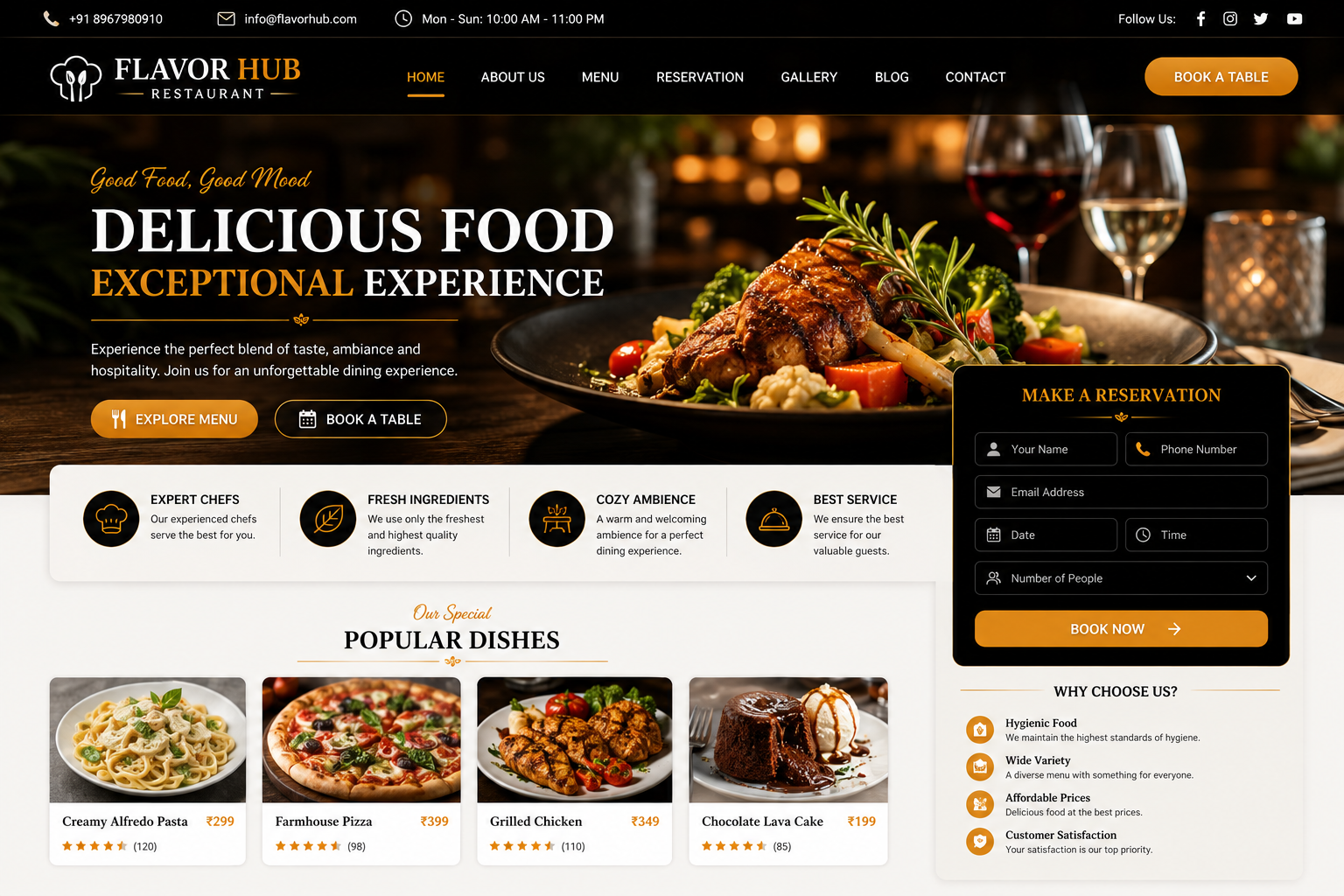
Restaurant Website
Restaurant Website Development
In today’s digital-first food and hospitality industry, customers often search online before choosing a restaurant, café, bakery, food court, cloud kitchen, or dining destination. A professional Restaurant Website gives your business a strong digital presence where customers can explore your menu, discover special offers, view food images, check opening hours, find your location, make table reservations, and contact your restaurant.
At Nexora IT Hub, we develop modern, responsive, fast-loading, secure, user-friendly, and SEO-friendly Restaurant Websites customized for restaurants, cafés, bakeries, cloud kitchens, fast-food businesses, fine-dining restaurants, food outlets, catering companies, and hospitality brands.
A professional restaurant website can showcase digital menus, food categories, restaurant information, table reservations, online ordering, delivery information, special offers, food galleries, customer reviews, location maps, events, contact information, and social media in one organized platform.
Whether you operate a Fine Dining Restaurant, Café, Fast Food Restaurant, Bakery, Cloud Kitchen, Family Restaurant, Multi-Cuisine Restaurant, Food Court, Takeaway Outlet, Catering Business, or Food Brand, we can create a customized website designed around your business goals.
What Is a Restaurant Website?
A Restaurant Website is the official online platform of a restaurant or food business. It allows customers to discover your brand, explore your menu, view food items, learn about your services, and contact your business.
A professional restaurant website can include:
- Restaurant Information
- Digital Menu
- Food Categories
- Food Item Details
- Food Images
- Table Reservation
- Online Ordering
- Delivery Information
- Special Offers
- Combo Packages
- Restaurant Gallery
- Customer Reviews
- Location & Map
- Opening Hours
- Events
- Contact Information
- Social Media Links
Advanced restaurant websites can also include online food ordering, payment integration, table management, reservation management, customer accounts, loyalty programs, coupon systems, delivery integration, and admin dashboards.
Why Does a Restaurant Need a Professional Website?
A restaurant website is more than an online menu. It can become an important digital marketing and customer-conversion platform.
Build a Strong Restaurant Brand
Present your restaurant, food, ambiance, services, and unique identity professionally.
Showcase Your Menu 24/7
Customers can view your menu, food items, prices, ingredients, and categories whenever they want.
Increase Table Reservations
Online reservation forms make it easier for customers to request tables.
Generate Direct Orders
If online ordering is enabled, customers can order directly through your website.
Improve Local Visibility
SEO-friendly pages can help customers discover your restaurant when searching for food or restaurants in your area.
Promote Special Offers
Highlight discounts, combo meals, seasonal menus, events, and special dining experiences.
Key Features of a Professional Restaurant Website
1. Modern Restaurant Website Design
Your website should visually represent the restaurant's brand and food experience.
The design can include:
- Restaurant logo
- Brand colors
- Professional typography
- Food photography
- Hero banner
- Digital menu
- Reservation button
- Online ordering
- Special offers
- Customer reviews
- Location
- Contact information
The design can be customized according to your restaurant's style.
2. Fully Responsive Design
Customers use smartphones, tablets, laptops, and desktops to search for restaurants.
A responsive website automatically adapts to different screen sizes.
Mobile visitors can easily:
- View the menu
- Check prices
- See food images
- Reserve a table
- Place an order
- Call the restaurant
- Open directions
- Contact the restaurant
A mobile-friendly experience is especially important for local restaurant searches.
3. Professional Homepage
The homepage creates the first impression of your restaurant.
It can include:
- Restaurant introduction
- Hero food image
- Menu button
- Book a Table button
- Order Online button
- Featured dishes
- Popular categories
- Special offers
- About restaurant
- Customer reviews
- Gallery
- Location
- Opening hours
- Contact information
Clear calls-to-action can help visitors quickly take the action they need.
4. Digital Food Menu
A professional digital menu is one of the most important features of a restaurant website.
Menu categories can include:
- Starters
- Main Course
- Rice
- Noodles
- Pizza
- Burger
- Pasta
- Indian Cuisine
- Chinese Cuisine
- Continental
- Desserts
- Beverages
- Mocktails
- Combos
Each food item can include:
- Food Name
- Image
- Description
- Price
- Ingredients
- Vegetarian / Non-Vegetarian Information
- Spicy Level where applicable
- Special Tag
5. Menu Category Management
A restaurant admin panel can allow authorized staff to manage menu categories.
Administrators can:
- Add categories
- Edit categories
- Delete categories
- Reorder categories
- Add food items
- Update prices
- Upload food images
- Mark items as available or unavailable
This makes it easier to keep the online menu updated.
6. Detailed Food Item Pages
Each important food item can have its own page.
The page can include:
Food Name
Example:
Special Chicken Biryani
Description
A detailed description of the dish.
Ingredients
Relevant ingredient information.
Price
Current menu price.
Food Image
High-quality photograph.
Dietary Information
Where appropriate, indicate vegetarian, vegan, allergen, or other relevant information accurately.
Order Button
Allow customers to add the item to an online order where ordering is enabled.
7. Food Image Gallery
Food photography plays a major role in restaurant marketing.
A gallery can showcase:
- Main Dishes
- Starters
- Desserts
- Beverages
- Restaurant Interior
- Restaurant Exterior
- Chef
- Special Events
- Customer Experiences
High-quality images can make the website more attractive and encourage customers to explore the menu.
8. Online Food Ordering
An advanced restaurant website can provide online food ordering.
Customers can:
- Browse the menu
- Select food items
- Add items to cart
- Choose quantity
- Review the order
- Enter delivery details
- Select payment method
- Place the order
The exact workflow can be customized according to the restaurant's operations.
9. Shopping Cart
For online ordering websites, customers can add multiple food items to a cart.
The cart can display:
- Food Item
- Quantity
- Price
- Subtotal
- Taxes where applicable
- Delivery Charge where applicable
- Discount
- Final Total
Customers can review their order before checkout.
10. Online Payment Integration
Restaurants can optionally integrate online payment gateways.
Customers may be able to pay using supported methods such as:
- UPI
- Debit Card
- Credit Card
- Net Banking
- Wallets
Available payment methods depend on the selected payment gateway.
Payment processing should use appropriate security practices.
11. Table Reservation System
A table booking system can allow customers to request or reserve tables online.
The reservation form can include:
- Customer Name
- Phone Number
- Date
- Time
- Number of Guests
- Seating Preference
- Special Request
The restaurant team can manage reservation requests from the administrative dashboard.
12. Reservation Management
An admin panel can help restaurant staff manage:
- New reservations
- Confirmed reservations
- Pending requests
- Cancelled reservations
- Completed reservations
- Table availability
This can make restaurant reservation management more organized.
13. Table Management
An advanced restaurant website can include table management functionality.
Staff can manage:
- Table Number
- Table Capacity
- Available Tables
- Reserved Tables
- Occupied Tables
- Table Status
This can be customized according to the restaurant's seating arrangement.
14. Takeaway & Pickup
Restaurants offering takeaway services can provide a dedicated ordering option.
Customers can:
- Select food
- Choose pickup
- Select preferred pickup time
- Place order
- Receive confirmation
This provides an alternative to dine-in and delivery orders.
15. Food Delivery Information
If the restaurant offers delivery, the website can provide information about:
- Delivery Areas
- Delivery Charges
- Minimum Order
- Estimated Delivery Time
- Delivery Schedule
- Ordering Process
The exact information should be updated regularly.
16. Special Offers & Discounts
Promote offers through dedicated sections.
Examples include:
- Weekend Offers
- Lunch Offers
- Dinner Offers
- Festival Offers
- Combo Deals
- Family Meals
- Couple Packages
- Birthday Offers
- Seasonal Promotions
Offer pages can also be optimized for relevant search queries.
17. Combo Meals & Packages
Create attractive packages for customers.
Examples include:
- Family Combo
- Couple Combo
- Lunch Combo
- Dinner Combo
- Party Package
- Office Meal Package
- Birthday Package
Each package can include food items, pricing, terms, and ordering options.
18. Restaurant About Us
The About section can tell your restaurant's story.
It may include:
- Restaurant History
- Chef Information
- Cuisine
- Philosophy
- Specialties
- Dining Experience
- Restaurant Mission
- Awards
- Achievements
A strong story can help differentiate your restaurant from competitors.
19. Chef Profile
A restaurant can showcase its chef or culinary team.
The profile may include:
- Chef Name
- Photograph
- Experience
- Specialization
- Culinary Background
- Signature Dishes
- Achievements
This can add personality and credibility to the restaurant brand.
20. Restaurant Facilities
Showcase the facilities available to customers.
Examples include:
- Air Conditioning
- Wi-Fi
- Parking
- Family Seating
- Private Dining
- Outdoor Seating
- Live Music
- Children's Area
- Accessible Facilities
- Event Space
Only list facilities actually available at the restaurant.
21. Customer Reviews & Testimonials
Customer reviews can help potential visitors understand the dining experience.
Testimonials can include:
- Customer Name
- Rating
- Review
- Date
Reviews should be genuine and published with appropriate permission where required.
22. Restaurant Events
Restaurants can promote upcoming events.
Examples include:
- Live Music
- Food Festivals
- Special Dinner
- Birthday Events
- Private Parties
- Corporate Events
- Cultural Programs
- Festival Celebrations
Each event can have its own page with details and enquiry options.
23. Catering Services
Restaurants offering catering can create a dedicated catering page.
It can showcase:
- Wedding Catering
- Corporate Catering
- Birthday Catering
- Party Catering
- Event Catering
- Menu Options
- Package Information
- Enquiry Form
24. Private Dining & Party Booking
If the restaurant provides private dining or event space, customers can enquire online.
The page can include:
- Venue Images
- Seating Capacity
- Food Packages
- Decoration Options
- Event Types
- Booking Enquiry
25. Restaurant Location & Map
Location is extremely important for local restaurant discovery.
The website can show:
- Restaurant Address
- Google Map
- Nearby Landmarks
- Parking Information
- Directions
- Opening Hours
A clear map can help customers find the restaurant easily.
26. Opening Hours
Display restaurant operating hours clearly.
Information can include:
- Monday–Sunday Hours
- Breakfast Hours
- Lunch Hours
- Dinner Hours
- Takeaway Hours
- Delivery Hours
- Holiday Schedule
Keeping this information updated helps prevent customer confusion.
27. WhatsApp Integration
A WhatsApp button can allow customers to contact the restaurant quickly.
Customers can ask about:
- Menu
- Table availability
- Private dining
- Catering
- Events
- Food orders
- Special requests
28. Call Now Feature
Mobile users can directly call the restaurant through a Call Now button.
This can be displayed on:
- Homepage
- Contact Page
- Menu Page
- Reservation Page
- Catering Page
29. Social Media Integration
Connect your restaurant's official social media channels.
Possible platforms include:
- YouTube
Restaurants can use social media to promote:
- Food images
- Reels
- New dishes
- Special offers
- Events
- Customer experiences
30. Restaurant Blog
A restaurant blog can support organic traffic and brand awareness.
Content ideas include:
- Food Guides
- Local Food Culture
- Restaurant Stories
- Chef Interviews
- New Menu Announcements
- Recipe Inspiration
- Dining Guides
- Event Information
- Food Trends
Useful content can attract visitors searching for food-related information.
31. Local SEO for Restaurants
Local SEO is particularly important for restaurants.
Potential searches include:
- Restaurant near me
- Best restaurant in [Location]
- Restaurant in [Location]
- Chinese restaurant in [Location]
- Indian restaurant in [Location]
- Family restaurant in [Location]
- Café near me
- Best biryani restaurant in [Location]
A properly optimized local presence can help your restaurant become more discoverable.
32. Menu SEO
Individual menu pages and food categories can be optimized for relevant search queries.
For example:
Best Biryani Restaurant in [Location]
or
Pizza Restaurant in [Location]
The content should remain natural, useful, and accurate rather than relying on excessive keyword repetition.
33. Food Item SEO
Important dishes can have dedicated pages containing:
- Dish Name
- Description
- Ingredients
- Price
- Food Image
- Availability
- Ordering Information
This creates additional useful content for search engines and customers.
34. Mobile-Friendly Restaurant Website
A large number of customers search for restaurants from smartphones.
The mobile experience should make it easy to:
- View the menu
- Check prices
- Call the restaurant
- Reserve a table
- Place an order
- Open directions
- Contact through WhatsApp
35. Secure Restaurant Website
If the website collects customer details or processes online payments, security is important.
Security-conscious implementation may include:
- HTTPS/SSL
- Secure login
- Input validation
- Secure password management
- Payment gateway security
- Database protection
- Access controls
- Regular backups
- Software updates
36. Restaurant Admin Dashboard
An admin dashboard can allow authorized staff to manage:
- Menu
- Food Items
- Categories
- Prices
- Availability
- Orders
- Reservations
- Tables
- Offers
- Coupons
- Gallery
- Events
- Blog
- Enquiries
This helps restaurant staff keep website information updated.
37. Order Management
For restaurants accepting online orders, staff can manage:
- New Orders
- Confirmed Orders
- Preparing
- Ready
- Out for Delivery
- Completed
- Cancelled
The workflow can be customized according to the restaurant's operations.
38. Coupon & Promo Code System
An online ordering website can optionally support promotional codes.
Examples:
- WELCOME10
- WEEKEND20
- FESTIVE15
- FIRSTORDER
Discount rules can be configured according to the restaurant's promotional strategy.
39. Performance Optimization
Restaurant websites often contain large food photographs, videos, and menus.
Performance optimization can include:
- Image compression
- Responsive images
- Lazy loading
- Browser caching
- Optimized CSS
- Optimized JavaScript
- Efficient page structure
Actual website speed depends on hosting, media files, traffic, and implementation.
40. SEO-Friendly Restaurant Website
An SEO-friendly restaurant website can include:
- Search-friendly URLs
- Unique page titles
- Meta descriptions
- Proper heading structure
- Image alt text
- Internal linking
- XML sitemap
- Mobile optimization
- Structured data where appropriate
- Local business information
- Useful food and restaurant content
SEO can strengthen the website's search visibility foundation, although rankings cannot be guaranteed.
Benefits of a Professional Restaurant Website
1. Increase Customer Enquiries
Give customers convenient ways to contact your restaurant.
2. Increase Table Reservations
Allow customers to request tables online.
3. Promote Your Menu
Showcase dishes, categories, prices, images, and specialties.
4. Generate Direct Orders
Online ordering can create an additional direct sales channel.
5. Build Brand Awareness
Present your restaurant professionally across digital channels.
6. Improve Local Visibility
SEO and local optimization can help customers discover your restaurant.
7. Promote Special Offers
Highlight discounts, combo meals, events, and seasonal promotions.
8. Improve Customer Experience
Provide menu, location, hours, booking, and contact information in one place.
9. Showcase Your Food
High-quality food photography and videos can increase engagement.
10. Grow Your Restaurant Business
A scalable website allows you to add new menu items, locations, services, offers, and online ordering features as your business grows.
Restaurant Website Development Process
1. Requirement Analysis
We understand your restaurant, cuisine, menu, services, locations, target customers, and business requirements.
2. Website Planning
We create the website structure, navigation, menu categories, reservation flow, and content architecture.
3. UI/UX Design
We create an attractive restaurant-focused interface designed around food discovery and customer conversion.
4. Development
The approved design is developed into a responsive and functional website.
5. Menu & Content Integration
Food items, prices, images, descriptions, restaurant information, offers, and other content are added.
6. Feature Integration
Online ordering, table reservations, payment gateways, maps, WhatsApp, and other required features are integrated.
7. SEO Setup
Technical and on-page SEO foundations are configured.
8. Testing
The website is tested across smartphones, tablets, laptops, desktops, and major browsers.
Menu navigation, forms, ordering, reservations, payments, links, and other functionality are checked.
9. Security & Performance Review
The website is reviewed for appropriate security and performance practices.
10. Launch
After final approval, the website is deployed to your restaurant's domain and hosting environment.
11. Maintenance & Support
Ongoing technical support, menu updates, security maintenance, performance improvements, and additional development can be provided.
SEO Strategy for Restaurant Websites
A restaurant SEO strategy should focus on location, cuisine, menu items, dining intent, and useful local content.
Location-Based SEO
Create useful pages for the locations your restaurant serves.
Cuisine-Based SEO
Target relevant cuisine searches such as:
- Indian Restaurant
- Chinese Restaurant
- Bengali Restaurant
- Italian Restaurant
- Fast Food Restaurant
- Multi-Cuisine Restaurant
Dish-Based SEO
Create useful content around popular signature dishes.
Restaurant Service SEO
Create pages for:
- Table Reservation
- Online Food Ordering
- Catering
- Private Dining
- Event Booking
- Takeaway
Local SEO
Maintain accurate restaurant information across relevant online profiles and platforms.
Food Blog SEO
Publish useful content about food, dining, local attractions, events, and your restaurant's specialties.
Why Choose Nexora IT Hub for Restaurant Website Development?
At Nexora IT Hub, we create professional digital solutions designed around modern restaurant businesses.
Professional Restaurant Design
Create an attractive online experience that reflects your restaurant's brand and food.
Responsive Development
Provide a smooth experience across smartphones, tablets, laptops, and desktops.
Custom Features
Build menus, ordering, reservations, offers, galleries, events, and other features according to your requirements.
SEO-Friendly Structure
Create a strong technical and content foundation for long-term search optimization.
Secure Development
Use security-conscious practices for customer information, accounts, forms, and payments.
Scalable Platform
Start with a professional restaurant website and add online ordering, reservation management, loyalty systems, and other features as your business grows.
Easy Content Management
Manage menus, food items, prices, offers, gallery, blog posts, reservations, and orders through an admin panel where required.
Ongoing Support
Receive technical support for maintenance, updates, improvements, and future development.
Build Your Restaurant Website with Nexora IT Hub
A professional Restaurant Website can transform the way customers discover your restaurant, explore your menu, make reservations, and place orders.
From digital menus and food galleries to online ordering, table reservations, special offers, catering, event bookings, customer reviews, location maps, and restaurant management, everything can be brought together into one powerful digital platform.
At Nexora IT Hub, we develop professional, responsive, secure, fast-loading, user-friendly, and SEO-friendly Restaurant Websites customized for restaurants, cafés, bakeries, cloud kitchens, food outlets, catering businesses, and hospitality brands.
Whether you are launching a new restaurant or upgrading an existing website, we can create a scalable digital solution designed to help you showcase your food, attract more customers, generate enquiries, increase direct orders, and build a stronger online presence.
Showcase Your Food. Attract More Customers. Grow Your Restaurant Business.
Professional Design • Responsive • SEO-Friendly • Secure • Fast • Scalable • Easy to Manage
Build your Restaurant Website with Nexora IT Hub and take your food business online.